

The All-in-One Tool — for Thinking and Learning New! - https://nitter.gq/t.co/1UWSpnLhj2 https://nitter.gq/t.co/jYPwesu1XX
Joined June 2019
- Tweets2K
- Following9
- Followers11.3K
- Likes1.4K
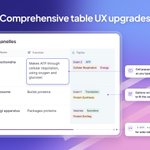




Tables got dozens of fixes and upgrades! Multi-select options wrap neatly in Comfortable cells, cell popups grow as you type, images stay in their column, and Shift+scroll moves sideways through wide tables.

You can now lock an embedded document's contents in place, so nothing moves while you work around it. Unlock it anytime from its padlock.

Ctrl+F now searches typed text on your canvases. Matches are highlighted, with markers on the minimap, so you can quickly find that one note before the exam.

New canvas shortcuts to help you build big diagrams faster:
Option/Alt-drag to duplicate
Shift+1 to zoom to fit
Shift+2 to zoom to your selection
Plus auto-scroll at the canvas edge, and a minimap on iPad.

Arrows on your canvas are now smarter. They highlight what they'll attach to, connect more precisely, and are easier to edit, so concept maps come together faster.

Items on your infinite canvases and handwritten documents now snap to nearby edges, centers, and even gaps, with guides as you drag or resize. Tidy diagrams, without the fiddling.

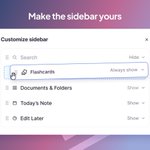
You can now choose which sections appear in your left sidebar. Right-click any option to show or hide it, or click “Customize Sidebar” to reorder.
Keep what you study with every day one click away.

You can now set the zoom level of the whole app on desktop, Android, and iOS. Make everything bigger to ease your eyes, or smaller to fit more on screen.

We've redesigned the Lecture Recorder and significantly upgraded recording on mobile.
Plus tons of little upgrades: easier mic controls, better transcripts, faster loading, and much more.

You can now capture key points and photos while recording a lecture. Snap the whiteboard or flag an important moment, and find it again at the right spot in your recording.

Lecture transcription is now 10x cheaper, and even higher quality than before.
Record 100+ hours of audio per month on the Pro + AI plan. No more choosing which lectures are worth recording.

Lecture Recorder V2 links your slides to your recording.
For each slide, instantly play back what was said in lecture. Reading the transcript? See the matching slide right beside it.
Linking is automatic; just upload your slides.

List cards now have a cleaner layout in the new queue, so it's easy to see which line you're recalling next.

We've made the grade buttons clearer: Forgot, Hard, Good, and Easy, with simple labels and consistent icons. Less reading, faster grading.

Make practice feel like yours! You can now pick a custom background for your flashcards queue, from calm Lagoon to bright Clementine.


In the latest update, the new Focused display mode shows your cards with larger text and a nicer layout. Even table cards are easy to read at a glance.
Prefer the classic look? The Editor-like display mode is still available.

New in RemNote: the Beautiful Queue!
We've redesigned flashcard practice on desktop and mobile to make finishing your cards faster and more pleasant.
To try it, click “...” in the top-right of the queue, then “Enable the beautiful queue.”


