

I help sites rank on Google and get cited by ChatGPT. Rank Season: the workflows that rank, sent every Monday. What moved, what works, what pays. Free ↓
Joined August 2026
- Tweets8.4K
- Following3.8K
- Followers2.2K
- Likes4.5K


Pinned Tweet
most SEO news is noise. a few things actually move rankings and revenue each week
Rank Season sends just those every Monday: what moved in Google and AI search, the AI workflows that rank, and the plays that turn clicks into money
free. first issue drops soon, get on the list: rankseason.com

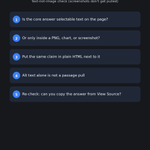
every page ChatGPT cited was one its own search had pulled first. that's the finding I'd build an AI visibility plan around.
two University of Toronto researchers (Mahe Chen, Nick Koudas, arXiv, Oct 2026) studied 158,099 AI answers to commercial questions, with 468,037 citations.
what they found:
- what ChatGPT's own search retrieved explained 32% of the citation differences between pages of a site. page properties explained 2.8%
- it rewrites the question into new sub-queries on every answer, and those rarely match Google's or Bing's results
- within one site, pages whose title and paragraphs match the questions people ask got cited more. FAQ blocks, schema, summary boxes and page speed only looked like they worked when comparing different sites
their public study, not my data.
the question match check:
1. write down 5 questions a buyer asks before choosing you
2. find the page that should answer each one
3. read its title and first paragraph. if they don't answer the question in plain words, rewrite those before you add another FAQ block
my take: schema isn't useless, it just isn't what moved citations in this paper.
which of your pages answers its question in the title?
2
1
86
moving a hit site to a new domain for a fresh start? John Mueller: "A site move doesn't improve the site's overall quality." fix the pages first. what's pushing you to move?
26
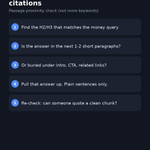
link count is the weakest number in most link reports, at least for showing up in AI Overviews.
Ahrefs studied 75K brands (May 2025) and checked what tracks with how often AI Overviews mention a brand:
- brand web mentions: 0.664
- brand anchors (your name in the link text): 0.527
- referring domains: 0.295
- number of backlinks: 0.218
that's their public study, not my data. it's correlation too, and big brands have more of everything.
my take: if your link report leads with count, it's grading the weakest signal on that list. the anchor is the cheap part to fix.
the brand anchor check:
1. Search Console > Links > Top linking text
2. count how many of the top 20 contain your brand name
3. on your next 5 placements, ask for your brand name plus the topic in the anchor, not "click here"
it's a sample, not every link, but it's free and it's Google's own list.
how many of your top 20 anchors say your brand?
7
5
283
$28 million in ransomware payments, and the way in was SEO.
the FBI's Nov 16 FLASH on Gootloader: as of October 2026 it found over 1,000 infected WordPress sites and 216 domains run by the Gootloader admin, linked to over $28 million in ransomware payments.
two details site owners miss:
- it went after low-competition phrases, like a jurisdiction-specific contract clause, so a lure page could rank without beating anyone big
- it filtered visitors by country, referrer, cookie or IP. so whoever checks the site may never see the bad pages
the hacked page check, today:
1. Search Console > Security issues. if Google found something, it shows there
2. search site:yourdomain with words you never publish about, like contract, agreement or template
3. per the FBI, the admin scanned WordPress sites for xmlrpc.php. if nothing you run needs XML-RPC, turn it off
ever found pages on your site you didn't publish?
2
4
191
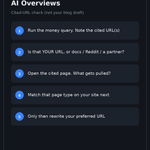
AI Overview citations just got easier to see on Google. for now.
Brodie Clark spotted it on Nov 17: AI Overviews now show three citation cards by default, with no fade on the lower ones, so the third source is fully visible without opening the overview. last month he reported the cards gone from desktop completely. Barry Schwartz at Search Engine Roundtable also saw a "Show all" button being tested.
no Google announcement that I can find, and these cards have flipped back and forth for months. treat it as a test you can measure, not a win.
the citation date check:
1. add a Search Console annotation on Nov 17
2. list 10 queries where you've seen an AI Overview cite you
3. compare their CTR for the 14 days before and after, same weekdays, Web search type (Google counts AI Overview traffic there)
4. CTR up with flat position: the visible card is a likely reason, not a proven one. CTR back down later: check the layout again before you blame content
do you know which of your queries show you as a citation?
if you want layout changes like this checked before you act on them, Rank Season is a free SEO newsletter that lands every monday. it isn't live yet, and early subscribers get into a link trading community. link in bio
5
4
263
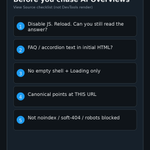
most SEOs check canonicals by crawling for the rel=canonical tag. that shows what you asked for, not what Google picked.
Search Console shows both. inspect a URL and the indexed result lists:
- User-declared canonical: yours
- Google-selected canonical: the one Google chose
Page indexing even has a status for the gap: "Duplicate, Google chose different canonical than user". per Google's help, Google indexed the URL it considers canonical instead of that page.
the canonical gap check:
1. open Page indexing and click that status
2. inspect 3 URLs from it
3. open the page, your declared canonical and Google's pick side by side. if Google's pick is the page you want to rank, update your canonical. if not, make that page clearly different or merge them
one catch from the same help page: the live test can't predict Google's canonical choice. read the indexed result.
how many URLs sit in that status on your site?
1
1
167
your ChatGPT citations can drop with no Google update, no robots.txt change and no content change. the trigger can be a model launch.
Anna Crowe in Search Engine Land (Nov 16), using Muck Rack's Generative Pulse data: from the day OpenAI rolled out GPT-5.6 in ChatGPT (July 9), citations to AP, TIME, TechCrunch, the LA Times and The Atlantic fell 50% to 90% within a week. her Semrush check of their Google top 3 keywords for June 15 to July 15 showed no matching drop (AP was up 17%). Gemini's citations of them barely moved.
Muck Rack's own report adds: several major publishers fell to near zero in ChatGPT citations even though most still allowed OpenAI's search crawler.
caveats: Generative Pulse queries models through APIs, not the ChatGPT app. the dates line up with launches, that doesn't prove the launch caused it. and the author works at Muck Rack.
the launch date check:
1. track AI citations per model, by day, not one blended score
2. mark every ChatGPT model launch on that chart
3. ChatGPT line breaks, Gemini flat, Search Console flat: look at OpenAI before you rewrite pages
4. grep server logs for OAI-SearchBot and ChatGPT-User. still fetched but not cited means a selection change, not a crawl problem
my take: if most of your AI visibility comes from press mentions, one launch can cut it. pages with your own data are the hedge.
do you track citations per model or one blended number?
1
1
67
site down and your "back soon" page returns a 200? John Mueller: Google can index that text and dedupe it with other sites showing the same page. what does yours send, 200 or 503?
1
2
169
a page drops out of Google and most SEOs go straight to rankings or the Page indexing report. Search Console can also show you if someone asked Google to remove it.
the Removals tool has three tabs, and two of them log things other people did:
- Outdated content: requests from people who don't own your site, filed through Google's Refresh Outdated Content tool. each row shows the URL, the type (outdated page or outdated snippet removal), the date and the status
- SafeSearch filtering: URLs users reported as adult content. "Filtered" means the URL won't show for people with SafeSearch on
- Temporary removals: requests filed from your own property. each one lasts about six months and covers http, https, www and non-www
the removals check, 5 minutes:
1. open Removals and read all three tabs, not just the first one
2. a "Temporarily removed" row nobody remembers: find out who filed it. a prefix request can hide a whole folder
3. an approved outdated page removal on a URL that should be live: check its status code now. Google denies those when the page still exists, so it looked gone when Google checked
4. a "Filtered" row on a normal page: that page is hidden for SafeSearch users. the same help page explains how to ask for a review
limits: the history only goes back 6 months.
my take: with the core update still rolling, rule this out before you blame the update for one missing page.
when did you last open the Removals tab?
want Google's AI agent to shop or book on your site? robots.txt won't decide that. your firewall will.
Google published a new guide today (Nov 17), "Allow Google-Agent traffic". Google-Agent is what agents on Google infrastructure use to browse and take actions when a user asks. it's listed as a user-triggered fetcher, and Google says those generally ignore robots.txt.
how Google says to verify and allow it:
1. User-Agent header contains Google-Agent
2. IP is in user-triggered-agents.json
3. if the request is signed, verify the Web Bot Auth signature (agent.bot.goog)
4. verified requests skip bot challenges
the part most sites will miss is the troubleshooting list. allowing the homepage isn't enough. the rule has to cover on-site search, filters, detail pages, add-to-cart, booking, and the XHR, GraphQL or api.* calls behind them.
two checks worth running this week:
- does your allow rule run before ASN blocks, managed bot rules and "block AI agents" toggles?
- do per-IP rate limits throttle it? Google says many users share the same egress pool.
my take: for shops and travel sites this is a conversion path question, not an SEO setting. walk search to checkout with the rule on before assuming it works.
source: Google's crawling docs, changelog Nov 17.
do you let AI agents through, or block them by default?
3
1
92
you can stop maintaining a brand regex for your Search Console reports.
on Nov 16 Google brought three Performance report filters to the Search Analytics API:
- brandedClassification: split rows into BRANDED and NON_BRANDED
- type webMultimodal: performance from Google Lens, Circle to Search and image uploads in Search
- filterLists: several countries or devices in one request, so one call for LATAM instead of one per country
the catches, per the API docs:
- branded data starts Feb 21, 2026
- only top-level properties with enough query and impression volume. other properties get no rows, not zeros
- the branded filter can't be combined with a query filter in the same request
the brand split check for your dashboard:
1. pull NON_BRANDED clicks as their own line
2. keep your old regex line next to it for a few weeks and compare
3. if a property returns no branded rows, keep the regex there
my read: non-branded is the line that shows SEO work. branded mostly follows demand from everything else you do. that's my take, not Google's.
limits: this is Google's classification, not your term list, so check it against your own brand terms before you switch.
are you splitting branded and non-branded yet?
Rank Season is a free monday SEO newsletter that explains Google changes like this one. first issue is coming soon, and subscribers get exclusive access to a link trading community. link in bio
2
88
Google's Indexing API is not a faster way to get blog posts indexed.
per Google's quickstart, it can only be used for pages with JobPosting, or BroadcastEvent embedded in a VideoObject. so job listings and livestream pages, nothing else.
the same doc says every submission goes through spam detection, and using multiple accounts or other tricks to get past the quota can get your access revoked.
default quota, per the quota page Google updated in October:
- 200 publish requests per day per project, URL_UPDATED and URL_DELETED combined
- 180 getMetadata requests per minute
- 380 requests per minute across all endpoints
- free to use, daily quota resets at midnight Pacific
the Indexing API check:
1. list what your plugin or script sends through it
2. anything that isn't a job listing or livestream page: stop sending it
3. normal pages: keep your sitemap current and link new pages from pages Google already crawls
4. job sites: send URL_DELETED when a listing comes down, not only URL_UPDATED
source: Google Search Central Indexing API docs.
limits: this is what the docs say. it doesn't show what Google does with requests outside those page types.
anyone still pushing blog posts through it?
your core update drop probably isn't ready to read yet.
the November 2026 core update started Nov 10, and Google's Search Status Dashboard still shows no end date. the last five core updates listed there took between 11 days 21 hours and 18 days 2 hours to finish.
Google's core updates doc sets the order:
- confirm on the dashboard that the rollout finished
- wait at least a full week after it completes
- then compare that week with a week before the rollout started
the core update read:
1. save the week before Nov 10 (Nov 3 to 9) as your baseline
2. when the dashboard shows an end date, add 7 days before you judge anything
3. compare top pages and queries, not just the sitewide line
4. small moves, like position 2 to 4: Google says no drastic action, and avoid changing pages that already do well
5. large drops, like 4 to 29: a deeper look at the site as a whole
6. check Web, Images, Video and News separately
my take: hold off on rewrites while it's still rolling. positions can keep moving until it ends.
limits: past durations don't predict this one. it's a timeline, not a forecast.
which week are you using as your baseline?
4
4
229
g mid rollout, comparing the sections that fell against the ones that held usually shows the pattern, since scaled sections tend to drop as a group.
2
2
73
underscores in your URLs? Google still recommends hyphens.
Google's URL structure doc, updated in October, says to use hyphens (-) instead of underscores (_) to separate words. its reason: underscores often mean "keep these together", like format_date in code, while hyphens clearly mark a word boundary.
two more lines in the same doc that audits often skip:
- URLs are case sensitive. Google treats /APPLE and /apple as different URLs with their own content
- trim parameters that don't change the content
the URL check, before your next launch or migration:
1. new URLs: words split with hyphens, one consistent case
2. if your server returns the same page for upper and lower case, convert to one case, as Google suggests
3. strip parameters that don't change what's on the page
what I'd skip: renaming live underscore URLs just for this. the doc doesn't tell you to, and every rename needs a redirect. that's my call, not Google's.
limits: this is a recommendation in Google's docs, not a ranking test.
hyphens or underscores on your sites right now?
if you want Google doc changes like this explained, Rank Season is the free monday SEO newsletter. first issue drops soon, and the list gets exclusive access to a link trading community. link in bio
3
128
AI content licensing is starting to price each use separately: training, RAG, grounding, AI-generated overviews.
the Internet Licensing Collective launched Nov 12 with Yahoo Scout as its first commercial licensee. it's a nonprofit (formerly RSL Collective), and its launch release says more than 3000 media brands, content owners and publishing platforms are in.
how it works, per that release:
- one blanket license for AI companies, who license only the uses they need
- publishers join free and choose which uses and which AI companies they approve
- non-exclusive, so existing direct deals stay
- payouts weighted by how the content is used, the value of the AI product, and how often it's relied on, not catalog size
my read: "block AI or allow it" is turning into a per-use decision. Google's shared AI training control for robots.txt, announced Oct 30, covers training only.
the use split check:
1. list the uses: training, answers that pull your pages, AI-generated overviews
2. decide yes or no for each one, not one blanket rule
3. make sure your robots.txt says the same thing
limits: one licensee so far and no payout figures published. too early to call it worth joining.
would you allow AI answers but block training?
3
2
105
thinking about opting your site out of AI Overviews? read your data first, and maybe not this week.
Google's Search generative AI control is live for every site (Search Console > Settings > Search generative AI). exclude, and your links and content stop showing in AI Overviews, AI Mode and generative AI features in Discover. Google says it isn't a ranking signal for the rest of Search.
the opt-out math check:
1. check the setting on every property. child properties inherit from the parent, so one change at the domain level can flip all of them
2. open the Generative AI performance report and pull clicks and impressions for your top pages
3. leave out Nov 9 to 11 (Google flagged a logging error that undercounted impressions) and wait for the November core update to finish
4. know what it doesn't do: it doesn't stop AI training. that's Google-Extended
5. if you flip it, annotate the date. Google says exclusion takes 1 to 2 days, some content longer
what would make you opt out?
7
5
209
your PageSpeed score isn't what Search Console grades you on.
the Core Web Vitals report uses real Chrome user data (CrUX), not a lab test. per Google's docs:
- it reads the 75th percentile of page loads over the last 28 days
- it grades groups of similar pages, not single URLs
- a group's status is its worst metric. poor CLS with good INP is still poor
- good means LCP 2.5s or less, INP 200ms or less, CLS 0.1 or less
and Lighthouse can't measure INP at all. no real user, no real clicks. web.dev says to use Total Blocking Time there instead.
the field data check:
1. open the Core Web Vitals report, mobile first
2. note which metric fails and which URL group it hits
3. open an example URL in PageSpeed Insights and read the real user section, not the lab score
4. fix the template behind the group, not one page
5. group missing from the report? it may not have enough Chrome data yet. that isn't a pass
keep the ranking part honest too. Google says good Core Web Vitals don't guarantee top rankings, and chasing a perfect score just for SEO "may not be the best use of your time."
source: Google Search Central and web.dev docs.
which metric fails on your mobile report?

your sitemap index can be valid XML and still list sitemaps Google won't accept.
Google's rule: every sitemap an index lists must sit in the same folder as the index, or deeper.
index at example.com/blog/sitemap_ind…:
- example.com/blog/posts.xml works
- example.com/products.xml doesn't
the sitemap index check:
1. open the index and note its folder
2. compare every <loc> to that folder. anything higher up, or on another host, is a miss
3. move the index to the root, or set up cross-site submission if the sitemaps live on another host
4. while you're in there: each sitemap max 50,000 URLs or 50MB uncompressed, each index max 50,000 sitemaps
source: Google Search Central sitemap docs.
limits: this checks one rule from Google's docs. it doesn't tell you why pages aren't indexed.
where does your sitemap index live?
1
2
80
bought an expired domain for its backlinks? Google's spam policy cares what you do with it, not how old it is.
Google's spam policies define expired domain abuse: buying an expired domain and repurposing it mainly to manipulate rankings with content that gives users little to no value.
Google's own examples:
- affiliate content on a former government agency site
- commercial medical products on a former nonprofit medical charity site
- casino content on a former elementary school site
every example is a topic swap. that's my reading of the list, not a rule Google published.
the expired domain check, before you buy:
1. look up what the domain hosted before, in the Wayback Machine
2. compare it to what you plan to publish. same audience, or a swap like the ones above?
3. ask if anyone would find the site except through Google. Google says these domains usually aren't meant to be found any other way
4. if the old reputation is the main reason you're buying, skip it
Google also says it's fine to use an old domain for a new, original site built for people first.
limits: Google gives no test or threshold. this check reads its examples, it doesn't predict rankings.
ever bought a domain mainly for its old links?
if you'd rather earn links than borrow an old domain's past, Rank Season is the free monday SEO newsletter. first issue drops soon, and the list gets exclusive access to a link trading community. link in bio
4
5
216