

Local AI hardware fit checks. 8 GB card, 24 GB 3090, or a 64 GB Mac: we tell you which models actually fit. Follow for daily "Does it fit?"
Joined October 2026
- Tweets197
- Following72
- Followers0
- Likes1


Pinned Tweet
Wondering if a model will run on your GPU, Mac, or mini PC before you download 50 GB?
FitMyModel matches local AI models to real hardware: which sizes and quants fit your VRAM or unified memory, and what to expect.
Start here: fitmymodel.com

Mac unified memory vs Ollama sizes: 16 GB runs qwen3:14b (9.3 GB), 32 GB runs qwen3:32b (20 GB), 64 GB runs llama3.3:70b (43 GB), 128 GB runs gpt-oss:120b (65 GB). qwen3:235b (142 GB) needs more. macOS needs its share too.

Reply with your GPU (or Mac + RAM) and I'll tell you the biggest local model that fits.
Real download sizes from the Ollama library, no guessing. Go.
What 24 GB of VRAM actually runs, Q4 vs Q8. Ollama library downloads, weights only:
Qwen3.8 27B: 18 GB vs 30 GB
Gemma 4 31B: 20 GB vs 34 GB
Gemma 4 26B MoE: 18 GB vs 28 GB
Mistral Small 3.2 24B: 15 GB vs 26 GB
Phi-4 14B: 9.1 GB vs 16 GB
So on 24 GB the real choice is a bigger model at Q4 or a 14B at Q8.
If you want Q8 on the 27-31B models, that's 30-34 GB of weights before context, which is past a 32 GB card for Gemma 4 31B and tight for Qwen3.8 27B. Think 48 GB or a 64 GB Mac.
Full 24 GB list, including the MoE picks:
fitmymodel.com/vram/24gb/
What are you running on 24 GB, and at which quant?

An RTX 3090's 24 GB fully holds qwen3:32b (20 GB), qwen3:30b (19 GB) and gemma3:27b (17 GB), plus room for context. llama3.3:70b at 43 GB doesn't. Still the best used card for local AI?

Le Chonk at home, by Unsloth's GGUF sizes on Hugging Face:
1-bit (IQ1_S): 233 GB
2-bit (Q2_K_XL): 378 GB
4-bit (Q4_K_XL): 605 GB
8-bit: 1,115 GB
Even the 1-bit only just fits a 256 GB Mac Studio, before context.


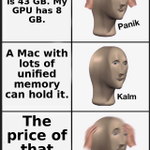
Choose the model your GPU can actually hold. llama3.3:70b is 43 GB; llama3.1:8b is 4.9 GB and runs fine on 8 GB 😌

What fits on your GPU right now, using Ollama's default downloads (weights only, leave 2-4 GB for context):
8 GB: qwen3.5:4b 3.3 GB, qwen3.5:9b 6.6 GB (tight)
12-16 GB: gemma4:12b 7.7 GB
24 GB: qwen3.8:27b 18 GB, gemma4:31b 19 GB
Which tier are you on?
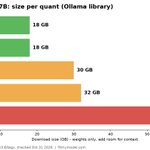
Qwen3.8 ships in one size on Ollama: 27B. The quant you pick decides your hardware. Sizes from the Ollama library:
Q4_K_M 18 GB
NVFP4 18 GB
Q8_0 30 GB
MXFP8 32 GB
BF16 56 GB
Weights only, so leave room for context.

Q8 at 30 GB or MXFP8 at 32 GB: a 32 GB card like the 5090 is tight once you add context. A 48 GB GPU or a 64 GB unified-memory Mac or Strix Halo box is the comfortable pick.
BF16 at 56 GB needs 64 GB+, and 96-128 GB is better.
Full breakdown of 16, 24 and 32 GB setups for Qwen3.8 27B:
fitmymodel.com/articles/what…
Which quant are you running it at?

Qwen3.8 27B on Ollama: 18 GB at Q4_K_M, 30 GB at Q8, 56 GB at bf16. Q4 fits a 24 GB card with room for context, Q8 is tight even on a 32 GB 5090, and bf16 is Mac Studio or multi-GPU territory. What quant are you running?
Quick VRAM cheat sheet, default Ollama downloads: qwen3:8b 5.2 GB, qwen3:14b 9.3 GB, gpt-oss:20b 14 GB, Qwen3.8 27B 18 GB, qwen3:32b 20 GB. Leave a few GB free for context on top. What are you running on yours?
When a model fits your GPU memory, it runs. When it doesn't, speed barely matters.
Why VRAM matters more than GPU speed for local AI:
fitmymodel.com/articles/why-…
