

highschool | creative ai https://xitter.cf/t.co/rEaqu46FoA
Munich
Joined March 2025
- Tweets19.1K
- Following834
- Followers31.8K
- Likes55K






TasteSkill is now in Perplexity Computer!

Computer now has more taste in building websites, thanks to @LexnLin’s open-source skill, now integrated inside. We’re giving 5000 credits per user to tinker around.
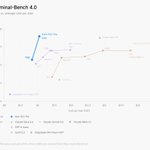
Holy shit. Kimi K3.1 Pro (max) is like 3x cheaper than Opus 5.5 and even slightly better than Opus 5.5 on Terminal Bench 4.0???


Introducing Kimi K3.1 Pro: our most capable 3T-class open-weight model.
🔹 1M-token context, 2.8T total / 104B active params (MoE), Multimodal.
🔹 Full-project coding: games in Unreal, Unity & Godot.
🔹 Excels at parametric 3D modeling in Blender & CAD.
🔹 More reliable at finance work: Accurate modeling with hallucination down by 65%.
🔹 Matching the strongest proprietary models across coding, agentic and knowledge benchmarks.
Kimi K3.1 Pro and K3.1 Pro Highspeed (2–3× faster) are now live on Kimi.ai, Kimi Work, Kimi Code, and the Kimi API.
Open weights by Nov 4, 2026.
🔗 API: platform.kimi.ai
🔗 Tech blog: kimi.ai/blog/kimi-k3-1-pro

This thing took 80h and a LOT of tokens.
I hope future models will be way faster and way more efficient + plus ofc stronger, so that we can build even more impressive demos in probably 5h for cheaper.
It's gonna be a lot of fun

earshot v0.4 is out!
added:
- 51 new sounds, all made with code (252 now)
- cut hits, knocks, drips, shutters, chimes, UI pops and reverse swells and more
- a new launch kit: so the sounds will be right on the cut and above the music
+ a website where you can play every single sound
>> leonxlnx.github.io/earshot-s…
all the sfx in this video are made with earshot :)
repo >> github.com/Leonxlnx/earshot
release notes >> github.com/Leonxlnx/earshot/…

I asked Opus 5.5 to build some very realistic ocean/water.
no assets were used :)
here is the repo, feel free to use! github.com/Leonxlnx/open-wat…
Used Codex for the first time in a while now again
Why does it take time to "start my chat" and why is taking longer than usual to start my chat??


v2.2 is already in work!
(also I'm not cherrypicking any results, if there's something not that nice looking, please send me a dm! In the next version many things will improve :))
music: Enemy by Alex-Productions (onsound dot eu), royalty free via free-stock-music dot com, CC BY 3.0
The launch video was made with opus 5.5 btw!
github.com/Leonxlnx/taste-sk…

also new in v2.1:
- landing pages for software products now are going to show real, working parts of the app, and not any fake mockups
- there's a new frame check that looks for: no clear title on the first screen, uneven margins, random alignment, empty gaps
- new motion recipes and more layouts
- There is now this one skill for everything, redesigns included. the old styles moved to taste-skill-classics, the image skills to imagegen-skills

here is the prompt + reference images
github.com/Leonxlnx/procedur…
Recreate the environment in these 10 reference images in 3D, using only code. No assets, no textures. It's a big environment: a lake with mountains and forest around it.
The task has two parts:
1. Build the 3D environment.
2. Make a cinematic one minute video that showcases the world, and render it.
The environment:
- Make it look 99.9% like the reference images. Don't stop early because you think it's good enough. Iterate until you reach 99.9% similarity. It might take days, I know. There's a lot to do.
- Colors: 100% clean, the best colors. Compare your colors with the colors in the images. Most of the time the colors come out wrong and a bit too grey, and coloring is one of the most important things. Light and shadows have to match too.
- Water: get the water right. The colors, the physics, everything should look perfect.
- Trees: they can't look fake. Give them much better textures and make the forest denser.
- Mountains: better textures and a better vibe.
- Rocks and terrain: good rock textures and a lot more detail in the small stones and the terrain.
- Distance: render everything. Don't render the trees only half of the distance. Trees far away need detail too, also in the half-wide shots.
- In the end it should look like a real place to the human eye.
The video:
- Cinematic, like a drone-filmed movie. That's only a comparison: no drone UI, no drone noises, just a clean video.
- Start with a really good scene and show the best stuff first. Then slowly show more and more: for example, you're behind a rock and can only see a bit, then the camera flies up and you see a really nice view.
- Every six or seven seconds, switch to a different place. Sometimes fast, sometimes slow.
- Sound: calm nature sounds and epic background music. The music has to be really good.
- Output: high resolution and ultra-wide, so you can see the trees on the other side as well. Clean and not buggy. Keep full quality, even if it takes longer.
How to work:
- I don't have a strong GPU, so keep that in mind. You can use my GPU, on CPU it would take a lot of time.
- Work in rounds and send me screenshots after each round, without pausing. If it still needs improvement to reach 99%, start the next round right away.
- Don't start the final video before everything is really good. Send me the screenshots first, wait for my approval, and only then render.
- Don't stop until it's really done and really good.
If you have questions, ask me now. Otherwise, build as long as you can and make it awesome. Go and cook.
