

Curriculum consultant for MGL, NCCE associate facilitator and Apple Teacher. Former assistant head with over 25 years experience in the primary classroom.
Manchester, England
Joined January 2016
- Tweets1K
- Following259
- Followers192
- Likes356




It was an absolute privilege to attend the U.K. #canvassadorsummit last week on behalf of MGL! I got so many inspiring ideas and got to network with educators from across the U.K. if you’re coming to the MGL conference in June, get excited! @MGLWorldNews @jadecanvaedu – at Birmingham, England


In computing Year 4 at @stmarys_CofE continued looking at smarter searching and online
safety. Today we watched CEOP’s Play Like Share Episode 1 and identified common
messaging tactics used by strangers to be aware of. Well done. @MglWorldNews
#ks2computing

Year 2
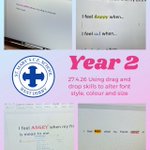
This week Year 2 at @stmarys_CofE have been investigating how to change font colours,
styles and sizes with dragging and highlighting. Great skills! @MglWorldNews
#ks1computing

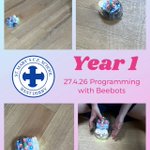
Y1 at @stmarys_CofE really enjoyed using the Beebots again today. We programmed
them to move to a partner using forwards, left, right and backwards and even had Beebot
races! Super work! @MglWorldNews #ks1computing

In computing this week Year 3 at @stmarys_CofE looked at the history of computers from
1930 until the present day. We learnt lots of interesting facts such as the first computers
were bigger than a room! @MglWorldNews #ks2computing

This week in computing, Year 5 at @stmarys_CofE learnt all about our digital footprints and
how to stay safer online. We looked at the information 2 teenagers shared online and
decided what was positive, negative or neutral. Great work! @MglWorldNews
#ks2computing

In computing @SMA_Year4 have continued their unit on Smarter searching and online
safety. we have looked at the reliability of websites and the different
tactics strangers may use when messaging us. @MglWorldNews #ks1computing
@MglWorldNews @StMargarets_ #ks2computing

In computing @SMA_Year4 have continued their unit on Smarter searching and online
safety. we have looked at the reliability of websites and
tactics strangers may use when messaging us. @MglWorldNews #ks1computing
@MglWorldNews @StMargarets_ #ks2computing

This week Year 2 at @stmarys_CofE have been developing their typing skills and how to
use the shift key for capital letters, exclamation marks and question marks. Great skills!
@MglWorldNews #ks1computing

Year 1 at @stmarys_CofE really enjoyed using the Beebots today. We programmed them to
move to a partner using forwards, left, right and backwards and even had Beebot races!
Super work! @MglWorldNews #ks1computing

In computing this week Year 3 at @stmarys_CofE looked at the history of computers from
1930 until the present day. We learnt lots of interesting facts such as the first computers
were bigger than a room! @MglWorldNews #ks2computing

This week in computing, Year 5 at @stmarys_CofE learnt all about our digital footprints and
how to stay safer online. We looked at the information 2 teenagers shared online and
decided what was positive, negative or neutral. Great work! @MglWorldNews
#ks2computing

Year 6
In computing Year 6 @stmarys_CofE started a new computing unit using @code.org. We
worked at our own pace through the sprite lab workshop, great work! @MglWorldNews
#ks2computing

In computing Year 4 at @stmarys_CofE started looking at smarter searching and online
safety. Today we looked at common search mistakes such as using images to try and find
information and not using the correct keywords. Well done. @MglWorldNews
#ks2computing

In computing this week @SMA_Year4 started a new topic all about smarter searching and
online safety. Today we evaluated websites on their usefulness for finding out Great work!
@MglWorldNews #ks1computing @MglWorldNews @StMargarets_ #ks2computing

This week Year 2 at @stmarys_CofE started a new computing unit on digital publishing.
Today we practised our typing skills using the Typing Club website. Great work!
@MglWorldNews #ks1computing

Year 1 at @stmarys_CofE started looking at Beebots in computing this week. Today we
learned about how Beebots move and programmed them to move forwards, backwards and
turn. Great work! @MglWorldNews #ks1computing

In computing this week Year 3 at @stmarys_CofE cbegan a new unit looking at computers
and how they work. Today we identified the key parts of a computer system. Well done!
@MglWorldNews #ks2computing

This week in computing, Year 5 at @stmarys_CofE started a new unit learning about the
internet and how networks are connected. This week we thought about all the ways we use
the internet at home and school. Well done! @MglWorldNews #ks2computing

In computing Year 6 @stmarys_CofE began creating a storyboard for their greenscreen
movies linked to their topics of The Mayans or Manchester. We worked in groups to decide
who would act and film each scene. @MglWorldNews #ks2computing
