Mercku Connectivity | WiFi & Smart Home (@MerckuWIFI) header
Mercku Connectivity | WiFi & Smart Home (@MerckuWIFI) profile picture

Empowering your home through future-proof, innovative technology. WiFi 6 | Mesh WiFi | Next-Gen Wireless Sensing | Flexible Cloud Network Management

Toronto, Ontario
Joined September 2010
Photo by Mercku Connectivity | WiFi & Smart Home (@MerckuWIFI)Photo by Mercku Connectivity | WiFi & Smart Home (@MerckuWIFI)Photo by Mercku Connectivity | WiFi & Smart Home (@MerckuWIFI)Photo by Mercku Connectivity | WiFi & Smart Home (@MerckuWIFI)Photo by Mercku Connectivity | WiFi & Smart Home (@MerckuWIFI)Photo by Mercku Connectivity | WiFi & Smart Home (@MerckuWIFI)Photo by Mercku Connectivity | WiFi & Smart Home (@MerckuWIFI)Photo by Mercku Connectivity | WiFi & Smart Home (@MerckuWIFI)Photo by Mercku Connectivity | WiFi & Smart Home (@MerckuWIFI)Photo by Mercku Connectivity | WiFi & Smart Home (@MerckuWIFI)
🪄 Introducing Mercku Pilot Palooza 2024 - an exclusive opportunity for ISPs to test and deploy Mercku's full suite of award-winning connectivity solutions, no strings attached. See our latest innovations, featured products and full details at buff.ly/3Rh2F96 #ISP #WISP
1
103
WiFi Tips #08: 160 MHz isn't a faster radio — it's a wider channel. More lanes, same cars. The M6s supports it on 5 GHz (2402 Mbps, 2976 Mbps total dual-band), with DFS opening the spectrum it needs. Your devices need to support it too. #WiFiTips #WiFi6
2
A multi-gigabit plan plugged into a 1 Gbps WAN port stops at 1 Gbps. The Mercku M6s has a 2.5Gbps WAN port and four gigabit LAN ports — plus AX3000-class dual-band WiFi with 160 MHz support. #WiFi6 #MultiGig
14
Break free from vendor lock-in with Mercku M6. Built on EasyMesh, it supports: • Multi-vendor interoperability • Standardized Controller/Agent architecture • TR-069 integration with existing ACS Open standards. More flexibility. #Mercku #EasyMesh #ISP
16
WiFi Tips #06: beamforming focuses the signal toward the device you're using, instead of broadcasting in every direction. On the M6 it works alongside Band Steering, AP Steering, and Client Steering — by default, not as a setting. #WiFiTips #WiFi6
11
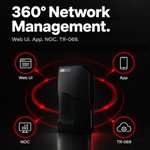
One device. Four ways to manage. The Mercku M6 supports Web UI, mobile app, Mercku NOC, and TR-069 — giving ISPs the flexibility to manage networks their way. #Mercku #ISP #Broadband
9
WiFi Tips #03: Smart Connect lets the router automatically steer devices between 2.4 GHz and 5 GHz on one network name — fewer manual switches, fewer dead spots. #WiFiTips #WiFi6 #Mercku
18
Sharing your main WiFi password with visitors means sharing access to everything on your network. The Mercku M6 has a built-in Guest Wi-Fi feature via the mobile app — separate access, same router. #GuestWiFi #WiFi6 #Mercku
18
Simplify CPE management with the Mercku M6. • TR-069: Integrate with your existing ACS • Mercku NOC: Monitor devices, visualize topology, and manage remotely • Web WAN: Access devices for faster troubleshooting #Mercku #ISP #Broadband #TR069 #NOC
20
WiFi Tips #05: a strong password isn't the whole story — WPA3 is the newest WiFi encryption standard, with stronger protection against password-guessing and safer connections on open networks. The Mercku M6 supports WPA/WPA2/WPA3 plus a Guest Wi-Fi network. #WPA3 #WiFiTips
40
At 8 PM, the TV, laptops, phones, and smart home devices are all sharing your WiFi at once. Wi‑Fi 6 was designed for congested homes. The M6's dual‑band Wi‑Fi 6 with Smart Connect helps steer devices to the best band automatically. #WiFi6 #MeshWiFi
31
Putting a Mesh node inside the dead zone is already too late. Place it in an open area between the main router and the weak floor, where it can still receive a reliable signal. Good Mesh performance starts with good placement. #WiFiTips #MeshWiFi #Mercku
3
A fast internet plan does not guarantee strong WiFi in every room. Your plan determines the speed entering your home. Walls, floors, distance and interference shape the coverage inside it. Before upgrading, identify whether the problem is bandwidth or coverage #WiFiTips #Mercku
4
WiFi Tips #02: 2.4 GHz generally offers better reach. 5 GHz typically offers higher speeds at shorter distances. The Mercku M6 supports both, plus Smart Connect and band steering to help compatible devices find a suitable connection. #WiFiTips #Mercku
2
When subscribers ask, “Why is my WiFi down?”, support teams need answers fast. Mercku NOC lets ISPs remotely check router status, view Mesh topology, verify firmware, and manage supported devices—reducing truck rolls and speeding up support at scale. #Mercku #ISP #NOC
2
WiFi Tips #01: Why is WiFi fast downstairs but weak upstairs? Internet speed and WiFi coverage are two different things. Walls, floors, and interference affect signal strength fast. Mesh nodes bring WiFi closer to where you actually use it. #WiFiTips #MeshWiFi #WiFi6
1
2
WiFi works fine next to the router. The real challenge is walking upstairs or closing the bedroom door. Mesh systems connect multiple nodes into a single network, so you stay connected without manually switching between different WiFi networks. #MeshWiFi #WiFi6
1
53
🚀 Speed. Stability. Strength. We put Mercku to the test 🧪📊 📶 Faster speeds ⏱️ Lower latency 🔗 More connected devices — all at once! Why settle for less when Mercku delivers more? 👇 See the results for yourself in the graph! #WiFiRouter #TechTest #Mercku
1
28
🏠💼 Work from home, stress-free! 📶 Mercku brings you ultra-stable & reliable Wi-Fi. 🚫 No more lags, ❌ no more drops — just smooth productivity. ✨ You deserve better. Upgrade now! #WiFiRouter #RemoteWork #Mercku #StableConnection #TechForWork
1
17
🏠 Dead zones? Not on our watch. MERCKU’s advanced mesh Wi-Fi ensures seamless, wall-to-wall coverage — even in tricky corners. 💡 Smart design. Powerful performance. 📶 #MERCKU #MeshWiFi #SmartHome #WiFiEverywhere
22
🎯 Small Router. Big Performance. Meet the Mercku M6s Nano – the world’s smallest Wi-Fi 6 router. 📡 Mesh-ready. Dead zones? Gone. ⚡ Blazing-fast 3Gbps Wi-Fi 6 🛠️ Plug & Play, no setup hassle 🔗 It’s not just tiny. It’s mighty. #WiFi6 #MeshNetwork #Mercku #TechMinimalism
27