
📒 Pure local text editor for #Orgmode users 📱 IOS & Android https://nitter.gq/t.co/L9sP3zbBpW 🧑🤝🧑 Support & Community https://nitter.gq/t.co/NDLOSH223F
Joined June 2022
- Tweets18
- Following44
- Followers53
- Likes8

Pinned Tweet
🚨 Black Friday Alert! 🚨
Score a massive 50% off 💰on lifetime access to #Metanote available worldwide 🌍from 📅Nov 24-27.
Don’t miss out on this exclusive deal. Upgrade now! ⏫
#BlackFriday #Metanote #IOSapp #timemanagement #notion #orgmode #logseq #obsidian

Metanote retweeted

Someone very dear to me needs a simple journaling #iOS app, so I'm experimenting with building one backed by #emacs #orgmode markup.
Want to try it out?
DM/email me at journellyATxenodium.com with an email address for a TestFlight invite.
Need feedback. Please retweet 🙏
📚To empower our users to fully leverage the robust features of #Metanote and #Orgmode, we’ve updated documents and tutorials❗️
🔍You can find them here metanote-dev.github.io/
❓Need help? Join DC and summon NPC!
#IOSapp #timemanagement #notion #orgmode #logseq #obsidian
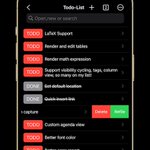
✅ View to-do items by day, week, month, or year
✅ Save custom agenda views for easy access
✅ Focus on the present with incomplete to-do items by default
✅ Access Capture and Agenda View from the More menu
🧑🤝🧑 discord.gg/xQ2gExpaVE
#productivity #timemanagement #obsidian
Metanote iOS version 0.6.0 released! Now supporting custom agenda views! You can customize your to-do lists based on CATEGORY, TAG, PROPERTY, TODO keywords, etc., and save them for easy access and review.
1. Customizable agenda views supported
3. Support for Properties, including custom Properties and Special Properties. Currently supported Special Properties include PRIORITY, LEVEL, TODO, ITEM, CATEGORY. Refer to the help documentation for details.
Metanote iOS 0.5.0 released!
1. In this version, we have introduced the option to make a one-time purchase for permanent access to all Metanote premium features!
2. Added support for iPad!
3. Utilize the indentation buttons on the keyboard toolbar to increase or decrease the indentation of your list items, allowing you to adjust the hierarchy of your columns effortlessly.
2. Indentation Shortcut: To indent a list item, press the "TAB" key on the keyboard toolbar. This helps you add a new line within the list, maintaining the proper indentation.
1. Inserting Lists: Tap the "Insert" panel on the keyboard toolbar. Choose "Ordered List" for numbered lists or "Unordered List" for bullet points. While editing, press "Enter" to create a new list item. Press "Enter" twice to exit the list.


