Self-custody Bitcoin and crypto wallet for iPhone and iPad. You hold the keys. https://xitter.cf/t.co/zPLde6s8gW

United States
Joined September 2026
A public GitHub repo is a start. But what connects that code to the wallet on your phone? We unpack open source, reproducible builds, App Store approval—and Oath’s own source-correspondence statement. Read the full guide ↓
3
3
1
14
1,369
Do you know who really controls your crypto? When a wallet says “self-custodial,” you should be able to look beyond the claim. Can you inspect its code? Can you follow how the app is built and released? With Oath, you can. Our source code and GitHub release workflow are public: shorturl.at/Iszn5 Your keys. Your control. We’re here to stay. Self-custody is our standard. v4.1.7 build 91, on the way to app store.
1
17
Oath 4.1.2 is live on the App Store ✨ Here’s what’s new: 🌱 Celo support View your CELO and token balances, follow your transaction history, and send or receive on Celo—all inside Oath. 🌳 Group tokens by chain Prefer a more organized view? Turn this on in Filters to see each network with its tokens underneath. Prefer your current list? Leave it off. 🏷️ Know which network you’re using Network badges sit beside token names, making it easier to distinguish the same token across different chains. 🔧 More accurate network fees We improved fee calculations for Bitcoin, Dogecoin, Litecoin, and Bitcoin Cash when a transaction combines inputs from different address types and scripts. Plus interface improvements and bug fixes throughout the app. Update Oath and let us know how it feels. apps.apple.com/us/app/oath-c…
1
1
4
79
Oath has reached 5 million downloads on the App Store. To everyone who has downloaded the app, shared feedback, or recommended Oath to someone: thank you. Your support has helped us reach this milestone, and your feedback continues to shape what we build next.
4
1
1
9
178
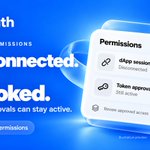
Finished using a dApp? Disconnecting doesn’t remove the token approvals you granted. Oath lets you review those approvals and revoke supported access from Settings → Permissions. It’s worth checking what still has permission to spend your tokens—even after you’ve moved on.
1
3
10
165
Oath 4.0.5 is live 💙 A quicker send flow. Transaction history that loads faster. Less waiting as you move around your wallet. Here’s what’s in this update: • Faster everyday use, from finding an asset to opening your receiving QR code. • Improved translations, with coverage across every supported app language. • Refined animations that respect your iPhone’s Reduce Motion setting. • Passphrase wallets: separate wallets from one recovery phrase, each with its own addresses and balances. • More consistent scanning for wallet addresses, recovery phrases and WalletConnect codes. Using a passphrase wallet? Back up both your recovery phrase and the exact passphrase. You need both to restore it. Update Oath on the App Store, give it a try, and tell us how it feels. apps.apple.com/us/app/oath-c…
12
2
247
7,030
9/10 Need to check your saved passphrase? Open that wallet's settings → View Recovery Phrase and authenticate. The screen also shows the passphrase, with Copy Passphrase preserving it exactly. Keep a secure copy somewhere you control. Never share it in chat or email.
1
26
10/10 Separate wallets, with a little extra responsibility: keep the recovery details safe and verify you can restore the right wallet before moving funds. We've put the setup and backup steps in one guide: help.oathwallet.org/articles…
28
7/10 To restore this wallet, you need BOTH your recovery phrase and the exact passphrase. The words alone won't restore it. A typo in the passphrase can open a different, empty wallet. There is no passphrase reset if you lose access and all your copies.
1
21
8/10 Back up the NEW wallet separately. An encrypted iCloud backup made for the passphrase wallet includes its passphrase. The original wallet's backup does not. Keep your backup password safe too, and make sure the new backup completes.
1
1
23
6/10 Give the new wallet a name and color so it's easy to recognize. Oath makes it active, and you can switch back to your original wallet whenever you like. Already added the same passphrase wallet? Oath offers Open Existing Wallet instead of creating a duplicate.
1
20
1/10 One wallet for everyday spending. Another for the funds you want to keep separate. With Add Passphrase, Oath lets you create separate wallets from the same recovery phrase. Here's how it works, how to set it up, and what to back up.
5
2
10
305
5/10 Enter your passphrase, then enter it again to confirm. Use the eye buttons privately to check both entries, then tap Create Passphrase Wallet. Capital letters and spaces matter. Choose something strong and keep an exact, secure copy.
1
1
21
4/10 To get started: Settings → Wallets → choose your wallet → Add Passphrase. Read the explanation, then tap Continue. Use a wallet created or restored with a recovery phrase. This option isn't available for private-key imports or watch-only wallets.
1
1
23
3/10 A strong passphrase can help protect a wallet if the recovery words alone are exposed. A short, predictable one is easier to guess. This is separate from your app passcode and iCloud backup password. It changes which wallet your recovery words open.
1
1
25
2/10 Same recovery phrase + a different passphrase = a different wallet, with its own addresses and balances. Your original wallet stays unchanged. Nothing moves automatically. Moving funds between wallets is a normal on-chain transfer, with network fees.
2
1
8
154
A big addition to Oath: WalletConnect is here 🔗 Connect to your favorite dApps with the wallet you already know. It’s available in the latest update. Give it a try—we’d love to hear which dApp you connect to first.
5
2
1
15
1,783
Been looking forward to sharing this one. 💙 We’ve spent a lot of time on the things you notice every time you open your wallet: • WalletConnect is here. Connect Oath to your favorite compatible dApps in a few taps. • A redesigned home screen with a cleaner asset list. • Refined Send, Receive and Import screens, with scanning right beside Paste. • More reliable balance and price refreshes when a data provider has problems. • Clearer transaction details. • and more! Looking forward to hearing what you think—and what still needs work. Get Oath here: apps.apple.com/us/app/oath-c…
9
1
1
21
2,165