

Ethical Hacker, Forensic Investigator, Malware Engineer. Security+, Network+, Pentest+, and CNVP. Founder of @hack_ademy One hack at a time!
I am Root
Joined June 2022
- Tweets6K
- Following215
- Followers29.3K
- Likes3.8K





Pinned Tweet
Few days ago I promised to drop a roadmap for beginners in ethical hacking so they don’t get confused and carried about by shinny object syndrome.
Tap in 👇
cybergeneration.tech/becomin…

We had a Windows machine where one process kept coming back after every reboot.
At first, it looked like normal Windows activity because the service name was:
WindowsTelemetry
That sounds believable enough.
Windows has plenty of telemetry components, so if you are checking quickly, you might not even stop there.
But I checked the full service configuration.
The executable path was:
C:\Users\kevin\AppData\Roaming\Microsoft\Telemetry\telemetry.exe
That did not make sense.
A service running as LocalSystem should not normally be launching an unsigned executable from a user’s AppData folder.
I checked the file signature.
NotSigned
Then I checked when the service was installed.
Event ID 7045 in the System log showed that WindowsTelemetry had been created the previous night around 11:08 PM.
The service was configured to start automatically and run as LocalSystem.
That meant the binary was not just persistent.
It was running with very high privileges.
I pulled the PID for the service and checked its network activity.
The process had an established HTTPS connection to an external IP address.
At that point, we isolated the machine.
The interesting part for me was how normal the service looked from the name alone.
WindowsTelemetry
Microsoft\Telemetry
telemetry.exe
Everything was named to make you move past it.
But once you looked at the path, signature and service account, the picture changed completely.
This is why when I am reviewing Windows services, I do not only look for strange names.
I check what they actually execute.
I check where the file lives.
I check who signed it.
And I check which account the service runs under.
A malicious service does not need a suspicious name.
Sometimes it just needs a name boring enough that nobody bothers to open the properties.

A developer checked the source code and confirmed that no API token had been hardcoded.
The configuration file was also protected, so everyone assumed the secret was safe.
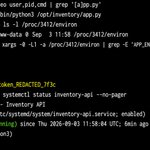
But the application received the token through an environment variable. Once the service started, that variable became part of the running process and could be inspected through Linux’s /proc filesystem.
In the image, PID 3412 belongs to the Inventory API running as www-data. Reading /proc/3412/environ reveals the application environment, database host, database username and a redacted lab token.
The /proc file is not readable by every ordinary user. Access depends on process ownership, root privileges and security controls such as hidepid and ptrace restrictions. Still, an administrator—or an attacker who gains sufficient privileges—may be able to recover secrets from a live process.
Environment variables are better than hardcoding credentials, but they are not automatically secret storage. Sensitive values should be protected with proper service permissions, short-lived credentials, restricted /proc access and a dedicated secrets-management system.
The secret may be absent from the source code and still be sitting inside the process.

The car had recently been repaired after an electrical fault.
A control module had been replaced, the warning lights were cleared, and the car was driving normally again.
But during a follow-up audit, one thing did not match.
The replacement ECU was reporting a different software version from the rest of the vehicle.
That does not automatically mean anything bad happened. Replacement modules are common, and sometimes a newer or older calibration is installed depending on what part was available.
Still, I wanted to understand exactly what had changed.
So I connected to the diagnostic network and started reading identification data from the modules.
The gateway, engine ECU, transmission controller and ABS module all returned their software and calibration information.
Most of them lined up with the vehicle’s service history.
The replacement module did not.
Its hardware number looked correct.
Its software version was older.
And the calibration identifier did not match the version I expected for that vehicle configuration.
That is where this becomes interesting from a cybersecurity point of view.
Modern ECUs are not just boxes of electronics.
They run firmware.
That firmware controls how the module behaves, how it communicates, what diagnostics it accepts, and sometimes what security protections are available.
So when a module is replaced, the question is not only:
“Does the part work?”
You also want to know:
“What software is actually running on it?”
A module can be physically compatible and still be running the wrong firmware, an outdated calibration, or software intended for a different vehicle configuration.
In this case, I did not try to flash anything.
I simply documented the identifiers, compared the versions, and checked whether the module had been programmed through an expected service path.
That is the safest place to start.
The finding did not prove the ECU had been tampered with.
It could have been a used replacement part, an incomplete programming job, or a module that was installed without the latest manufacturer update.
But it gave us something concrete to verify instead of assuming that “the car drives fine” means the repair is complete.
That is one thing people rarely think about with modern vehicles.
When you replace a control module, you are not only replacing hardware.
You are also introducing software into the car.
And that software deserves to be audited too.

The owner bought the car used and asked for a basic cybersecurity check.
Nothing was wrong with the car mechanically. No warning lights, no battery drain, no strange behaviour.
But while going through the infotainment and telematics settings, I noticed something that would bother me if it were my own car.
The previous owner’s profile was still present.
That alone is not unusual.
People trade in cars every day without properly resetting the infotainment system.
What made this one more interesting was that the telematics module was still making outbound connections shortly after the ignition came on.
So I started looking at the traffic from the vehicle’s connected-services side.
The car was reaching cloud endpoints normally used for things like remote services, vehicle status, app syncing, and account-based features.
Again, that does not mean anything malicious was happening.
The real question was simpler:
Whose account was the car still associated with?
I checked the local infotainment profiles, paired phones, and connected-service settings.
There it was.
The previous owner’s account had never been removed.
That means the physical car had changed hands, but part of its digital identity had not.
Depending on the manufacturer and which services are enabled, connected-car accounts can be tied to things like vehicle location, remote lock status, maintenance data, trip information, charging information, or app-based controls.
Not every platform exposes the same features, but the principle is the same.
Ownership of the car and ownership of the digital account should match.
I documented the existing profile, removed the stale pairing, factory-reset the infotainment data, and verified that the telematics account was properly transferred.
After the reset, the old profile was gone and the expected onboarding process appeared instead.
This is one of those things people rarely think about when buying or selling a car.
They clear the glovebox.
They remove the toll tag.
They take out the garage remote.
But they forget that the car may also contain account data, paired phones, contact history, navigation destinations, Wi-Fi profiles, and cloud-linked services.
A used car should not only be mechanically inspected.
It should be digitally cleaned too.
Because sometimes the previous owner leaves more behind than a receipt in the centre console.
The user said he had removed the Chrome extension twice.
It still came back.
At first, I thought Chrome Sync was probably restoring it, so we disabled sync and removed the extension again.
After the next restart, it was back.
That was when I stopped looking at Chrome itself and checked the Windows policies controlling the browser.
Inside the Registry, I found this path:
HKLM\SOFTWARE\Policies\Google\Chrome\ExtensionInstallForcelist
There was one extension ID configured there.
That changed the whole investigation.
Chrome was not randomly reinstalling the extension.
Windows policy was telling Chrome that the extension had to be installed.
I checked the extension files under the user’s Chrome profile and found one called:
Secure Search Helper
The name sounded harmless.
But its manifest showed permissions like:
tabs
webRequest
and access to:
Meaning it potentially had visibility into a lot of what the user was doing inside the browser.
I checked Sysmon next.
Event ID 13 showed that the Chrome policy registry value had been created the previous afternoon.
A few seconds earlier, Sysmon had also recorded reg.exe being launched from PowerShell.
So now we had a proper timeline.
PowerShell runs.
reg.exe modifies Chrome policy.
Chrome sees the forced-extension policy.
The extension installs automatically.
The user removes it.
Chrome checks the policy again and installs it back.
That explained why normal removal was not working.
We isolated the laptop, preserved the Registry entries, extension files and Sysmon logs, then removed the policy after collecting the evidence.
We also revoked the user’s active sessions because with a browser extension like this, I would not be comfortable assuming only browsing history was exposed.
The part I found interesting was that the user actually did the right thing.
He saw an extension he did not recognise and removed it.
The problem was sitting one level deeper.
As long as that Registry policy remained there, Chrome was simply going to bring the extension back.
So if you ever remove a suspicious Chrome extension and it keeps reinstalling itself, don't only check the browser.
Check the policies controlling the browser too.
Sometimes Chrome is not the one making the decision.

Defender kept saying the machine was clean.
But something about the laptop still did not look right.
There was a process making outbound connections in the background, and the user could not explain where it came from.
So I checked Microsoft Defender’s exclusions.
That was where I found:
C:\ProgramData\MediaCache
That folder had been excluded from Defender scanning.
Now that was a serious red flag.
I checked the Defender Operational log and found Event ID 5007 showing that the exclusion had been added the previous evening around 7:42 PM.
Then I checked the folder itself.
Less than a minute after the exclusion was created, a file called:
MediaSync.exe
appeared inside it.
The name looked normal enough, but the file was not digitally signed.
I checked the process list and confirmed the same executable was currently running in the background.
Then I checked its network activity.
It had an active HTTPS connection to an external IP address.
At that point, the timeline was becoming very clear.
First, the Defender exclusion was created.
Then the executable was dropped into that exact folder.
Then the process started running from a location Defender had been told not to scan.
So when somebody checked the machine and Defender said everything was fine, that did not necessarily mean the machine was fine.
Part of the machine had basically been removed from Defender’s normal visibility.
We isolated the laptop, collected the executable and Defender logs, preserved the exclusion configuration and started checking how that setting was added in the first place.
One thing this incident reminded me of is that security tools are only as useful as their configuration.
If malware can get its own folder excluded, you can scan the machine ten times and still feel confident for the wrong reason.
So when Defender says a suspicious machine is clean, I also like checking:
Get-MpPreference
Especially the exclusion paths.
Sometimes the most important finding is not what Defender detected.
It is what Defender was told not to look at.

The user said some of his finance emails were “just disappearing.”
At first, I thought maybe he was accidentally moving them or Outlook was syncing badly.
His laptop looked clean, Defender was quiet, and there was nothing obvious running on the endpoint.
So I stopped looking at the laptop and checked the mailbox itself.
That was where I found a rule called:
RSS Feed Cleanup
The name did not look serious at all.
But when I opened the rule properly, it was looking for emails with words like:
invoice
and
payment
Then it would mark those emails as read and move them straight into the RSS Subscriptions folder.
So the messages were actually being delivered.
The user just was not seeing them in his Inbox.
I checked mailbox-level forwarding next, thinking maybe somebody was also forwarding mail outside the company.
Nothing there.
Then I checked the Microsoft 365 audit logs.
The rule had been created around 9:16 PM the previous night and modified again less than a minute later.
That was definitely not something the user remembered doing.
Now we had a different type of incident.
The attacker was not trying to destroy the mailbox.
They were trying to quietly control what the user could see.
And if you think about finance-related emails, that can become very serious very quickly.
If somebody can hide legitimate invoices or payment conversations, they can create room for fake payment instructions later without the victim seeing the original thread properly.
We disabled the rule, revoked the user’s active sessions, reset the credentials and started reviewing the sign-in history and OAuth permissions.
We also checked whether any similar rules had been created in other mailboxes.
What stood out to me here was that the laptop was not the problem.
You can rebuild the laptop completely and still miss an incident like this if the persistence or manipulation is sitting in the cloud account.
Sometimes when a user says, “My emails are disappearing,” it is worth checking more than Outlook.
Check the mailbox rules too.
That small rule can tell you a lot.

Winston Ighodaro retweeted
One of our Ubuntu Docker hosts suddenly started running hot.
The applications were still working, nobody was complaining, and there was no obvious outage.
But CPU usage had jumped badly overnight.
So I checked the containers with:
docker stats
One container immediately stood out.
metrics-sync
It was using almost 300% CPU.
That means it was basically keeping close to three CPU cores busy by itself.
The name sounded normal enough because we do have monitoring services running in containers.
Still, there was no reason for a small metrics service to be consuming that much CPU.
So I went inside the container and checked the processes.
The actual metrics-sync application was barely doing anything.
The process eating all the CPU was:
/tmp/.sys-cache
Now that looked wrong.
It was running as root, the filename was hidden, and it had been dropped inside /tmp.
I checked the hash and then moved into the container’s network namespace to see what that process was talking to.
It had an established outbound connection over port 443 to an external IP address.
At that point, we treated the container as compromised and stopped looking at this like a normal performance issue.
The timestamps made things even more interesting.
The container had been created the previous night around 10:48 PM.
/tmp/.sys-cache appeared less than a minute later.
So whatever happened was tied very closely to that container deployment.
We isolated the Docker host from unnecessary network access and preserved the container filesystem, image information and logs before killing anything.
Further analysis of the binary showed behaviour consistent with a cryptocurrency miner.
That explained the ridiculous CPU usage.
But the bigger question was no longer, “Why is this server slow?”
It became:
“How did this binary get inside the container?”
Was the image bad before deployment?
Were registry credentials compromised?
Did something exploit the application after the container started?
Those are very different incidents, so we did not just delete the container and assume everything was fine.
That is one thing I have learned with containers.
People sometimes see them as disposable, so the instinct is:
“Just restart it.”
But if a container is compromised, restarting it can destroy some of the evidence you need to understand how it happened.
Sometimes that 300% CPU spike is not just a performance problem.
It is your first clue that somebody else is using your infrastructure for their own work.

One of our Ubuntu Docker hosts suddenly started running hot.
The applications were still working, nobody was complaining, and there was no obvious outage.
But CPU usage had jumped badly overnight.
So I checked the containers with:
docker stats
One container immediately stood out.
metrics-sync
It was using almost 300% CPU.
That means it was basically keeping close to three CPU cores busy by itself.
The name sounded normal enough because we do have monitoring services running in containers.
Still, there was no reason for a small metrics service to be consuming that much CPU.
So I went inside the container and checked the processes.
The actual metrics-sync application was barely doing anything.
The process eating all the CPU was:
/tmp/.sys-cache
Now that looked wrong.
It was running as root, the filename was hidden, and it had been dropped inside /tmp.
I checked the hash and then moved into the container’s network namespace to see what that process was talking to.
It had an established outbound connection over port 443 to an external IP address.
At that point, we treated the container as compromised and stopped looking at this like a normal performance issue.
The timestamps made things even more interesting.
The container had been created the previous night around 10:48 PM.
/tmp/.sys-cache appeared less than a minute later.
So whatever happened was tied very closely to that container deployment.
We isolated the Docker host from unnecessary network access and preserved the container filesystem, image information and logs before killing anything.
Further analysis of the binary showed behaviour consistent with a cryptocurrency miner.
That explained the ridiculous CPU usage.
But the bigger question was no longer, “Why is this server slow?”
It became:
“How did this binary get inside the container?”
Was the image bad before deployment?
Were registry credentials compromised?
Did something exploit the application after the container started?
Those are very different incidents, so we did not just delete the container and assume everything was fine.
That is one thing I have learned with containers.
People sometimes see them as disposable, so the instinct is:
“Just restart it.”
But if a container is compromised, restarting it can destroy some of the evidence you need to understand how it happened.
Sometimes that 300% CPU spike is not just a performance problem.
It is your first clue that somebody else is using your infrastructure for their own work.
The owner had already checked the tyre pressure more than once.
All four tyres were fine.
No obvious leak, no flat tyre, nothing that should have kept the warning light on.
But the TPMS alert kept coming back.
What made the situation more interesting was that one of the wheels had recently been replaced.
So instead of treating it like a simple pressure issue, I started looking at the sensor side of the car.
A lot of people do not realise that modern tyre-pressure sensors are small wireless devices sitting inside the wheels.
They do more than just measure air pressure.
Each sensor usually has its own identifier, and the vehicle expects to hear from the correct sensors assigned to it.
I used a passive receiver and watched the TPMS traffic around the car.
Three sensor IDs appeared consistently.
Then a fourth one showed up with a different identifier.
That was the clue.
The replacement wheel had a working sensor, but the car had not learned it as one of its own.
So from the driver’s point of view, all four tyres looked perfectly fine.
From the vehicle’s point of view, one of the expected sensors was missing.
That is why the warning stayed on.
Nothing was hacked.
Nothing malicious was happening.
It was simply a mismatch between the physical part that had been installed and the digital identity the car expected to see.
And that is one of the things I like about automotive cybersecurity auditing.
You start noticing that modern cars are full of small systems most people never think about.
A tyre is not just rubber and air anymore.
There can be a sensor inside it broadcasting data, carrying an identifier, and taking part in the vehicle’s wider electronic system.
So when I audit a car, I am not only thinking about the engine ECU or the CAN bus.
I am also thinking about the wireless systems around the car, the sensors attached to different components, and whether the physical hardware actually matches what the vehicle has stored digitally.
The owner thought he had a tyre-pressure problem.
What he really had was a sensor identity problem.

This is why I keep saying a “smart TV” should be treated like another computer sitting on your network, not just a screen.
The concerning part is bigger than the headline. Researchers working with Gamers Nexus and Level1Techs reported seeing LG sets perform network discovery, collect ACR viewing data, and, in their testing, capture microphone audio while the display was in standby. They also observed data being retained while offline and transmitted after connectivity returned.
LG disputes the microphone interpretation and says voice processing requires user activation, so I wouldn’t jump from the research straight to “LG intentionally records every conversation.” But the discrepancy between what the researchers measured and what the manufacturer says is exactly why independent testing matters.
And ACR itself is worth understanding. It can fingerprint what is playing on the television, including content coming through other inputs, to identify viewing habits. That may be useful for recommendations and advertising, but it also means the television can have considerably more visibility into your household activity than most people realize.
This is also why I prefer putting smart TVs and other IoT devices on their own VLAN/guest network with limited access to everything else. Privacy settings are good, but network segmentation gives you another boundary when you don’t completely trust what the device or a future firmware update might do.

Winston Ighodaro retweeted

boss keh!!
i'm a boy who's born BlackHat baptised to GreyHat, now who's a grown up baby who has little knowledge of irl hacking/cybersecurity, I'm still learning though I can do some things on my own without ai..
I just have knowledge on how to use ai/configure them to perform the major tasks, work within the given perimeter and get things done!
I follow these guys to learn on CT: @dontfadedave, @GodwinXbt @Officialwhyte22 and few other guys
see how this ollama model plays out🤧
This one was a bit deceptive because the executable itself was actually signed by Microsoft.
We had a workstation making an outbound connection that we could not immediately explain.
When I traced the connection back to the process, I found:
OneDriveStandaloneUpdater.exe
At first glance, that did not look too serious.
I checked the digital signature.
Valid Microsoft signature.
So if I had stopped there, I probably would have assumed it was just OneDrive doing something in the background.
But the location bothered me.
It was running from:
C:\Users\james\AppData\Local\Temp\ODUpdate\
That is not somewhere I would expect a OneDrive updater to just sit permanently and run from.
So I checked everything else inside that folder.
There were only two files:
OneDriveStandaloneUpdater.exe
and
version.dll
The EXE was properly signed.
version.dll was not.
Now it was starting to make sense.
I checked the Sysmon Image Load events.
Event ID 7 showed the signed OneDrive executable loading that exact version.dll from the same temporary directory.
That is when DLL side-loading became a serious possibility.
The idea is quite simple.
You take a legitimate, trusted executable that expects to load a DLL.
Then you place a malicious DLL with the expected name somewhere the application will search first.
The legitimate program starts.
Windows loads the attacker-controlled DLL into it.
Now when somebody checks the process, they may only see a properly signed Microsoft executable running.
That is what made this one interesting.
The process maintaining the outbound HTTPS connection was still:
OneDriveStandaloneUpdater.exe
The executable itself had not been modified.
The suspicious part was what it had loaded into its process.
We isolated the workstation and preserved both files along with the Sysmon logs before doing anything else.
We also started working backwards to find out how that folder ended up in the user’s Temp directory in the first place.
This case is one reason I do not treat a valid digital signature as the end of an investigation.
A signature can tell you that a particular executable is legitimately signed.
It does not automatically tell you that everything the executable loads at runtime is trustworthy.
Sometimes the EXE is completely legitimate.
The DLL beside it is the part you actually need to investigate.

Winston Ighodaro retweeted
A Defender alert pointed to PowerShell making an outbound connection seconds after a user logged on to WS-FIN-07. I treated the alert as a lead, not proof of compromise, and started by checking process creation around the recorded time.
Event ID 4688 showed powershell.exe running hidden with an encoded command, launched by taskeng.exe under the user CORP\\maria.santos. PowerShell Event ID 4104 decoded the script block enough to reveal an attempt to run C:\\ProgramData\\WinCache\\sync.ps1 and contact 198.51.100.27 over HTTPS.
The scheduled task named WinCacheUpdate connected the evidence. Its logon trigger, SYSTEM principal and action matched the same script path, while the task's Last Run Time aligned with the PowerShell and process-creation events. Get-FileHash also gave the script a stable SHA-256 value for containment and hunting.
The evidence confirms an active persistence mechanism that launched the local script and attempted the documented outbound connection. It does not identify the person who created the task or prove how the script first reached the host, so those points remain unconfirmed pending wider timeline and identity review.
The defensive lesson is to correlate telemetry before making attribution claims. A process event, script-block log, task definition, file hash and network record become far stronger when their times, paths and execution context agree, and the remaining gaps are stated clearly.
A Defender alert pointed to PowerShell making an outbound connection seconds after a user logged on to WS-FIN-07. I treated the alert as a lead, not proof of compromise, and started by checking process creation around the recorded time.
Event ID 4688 showed powershell.exe running hidden with an encoded command, launched by taskeng.exe under the user CORP\\maria.santos. PowerShell Event ID 4104 decoded the script block enough to reveal an attempt to run C:\\ProgramData\\WinCache\\sync.ps1 and contact 198.51.100.27 over HTTPS.
The scheduled task named WinCacheUpdate connected the evidence. Its logon trigger, SYSTEM principal and action matched the same script path, while the task's Last Run Time aligned with the PowerShell and process-creation events. Get-FileHash also gave the script a stable SHA-256 value for containment and hunting.
The evidence confirms an active persistence mechanism that launched the local script and attempted the documented outbound connection. It does not identify the person who created the task or prove how the script first reached the host, so those points remain unconfirmed pending wider timeline and identity review.
The defensive lesson is to correlate telemetry before making attribution claims. A process event, script-block log, task definition, file hash and network record become far stronger when their times, paths and execution context agree, and the remaining gaps are stated clearly.
One of the Finance users said she opened a payment schedule from the shared drive and nothing happened.
She assumed the PDF was broken and moved on.
A few hours later, we noticed PowerShell starting in the background on her workstation.
That was what made us go back and check the file she had opened.
The file was named:
Q3_Payment_Schedule.pdf.lnk
From a quick glance in File Explorer, it looked like a normal PDF.
But it was actually a Windows shortcut.
I checked the shortcut target with PowerShell.
It was not pointing to Adobe Reader or any PDF application.
It was pointing to:
powershell.exe
The shortcut arguments told PowerShell to run a script from:
C:\ProgramData\Microsoft\Cache\update.ps1
with the window hidden.
Now we had something real to investigate.
I checked Sysmon on the workstation.
The process creation event showed:
explorer.exe
starting PowerShell around the exact time the user opened the file.
That made sense because she had double-clicked the shortcut from File Explorer.
I checked the file server logs as well.
Event ID 5145 showed her account accessing that same .lnk file on the Finance share a few seconds before PowerShell started.
So the timeline was quite clean.
She opens the “PDF” from the shared drive.
Windows follows the shortcut.
PowerShell starts silently.
The script runs from ProgramData.
We isolated the workstation and preserved the shortcut, PowerShell script, Sysmon events and file-server logs.
We also removed the malicious shortcut from the shared folder after collecting it and checked whether any other users had opened it.
That last part was important.
Once something malicious lands on a shared drive, you are no longer investigating only one computer.
You need to know who else touched the file.
What I liked about this case was how simple the trick was.
The attacker did not need some strange executable called payload.exe.
They just made a shortcut look like a document people expected to see.
If you are investigating suspicious files on Windows, sometimes it is worth checking the real extension instead of trusting the icon or filename you see in Explorer.
A file can look like a PDF and still be something completely different.

Winston Ighodaro retweeted
The application itself was patched and fully updated. The exposure came from a backup archive that someone copied into the production web directory and forgot to remove.
During an authorized assessment, I confirmed the application’s normal response headers and performed limited content discovery against the approved target. A directory named /backup/ returned HTTP 200 and allowed directory listing instead of denying access.
The listing exposed a recent deployment archive that could be downloaded without authentication. Examining the ZIP file showed application source code, a SQLite user database and a production .env file packaged together.
I inspected the environment file locally and redacted every secret from the terminal output. Even without displaying credential values, the evidence confirmed that database credentials, a session secret and an SMTP API key had been exposed through a public web path.
This was not a sophisticated exploit. It was a deployment and configuration failure with serious consequences. Backups should live outside the document root, directory listing should be disabled, secrets should never be included in distributable archives, and exposed credentials must be rotated immediately.
The application itself was patched and fully updated. The exposure came from a backup archive that someone copied into the production web directory and forgot to remove.
During an authorized assessment, I confirmed the application’s normal response headers and performed limited content discovery against the approved target. A directory named /backup/ returned HTTP 200 and allowed directory listing instead of denying access.
The listing exposed a recent deployment archive that could be downloaded without authentication. Examining the ZIP file showed application source code, a SQLite user database and a production .env file packaged together.
I inspected the environment file locally and redacted every secret from the terminal output. Even without displaying credential values, the evidence confirmed that database credentials, a session secret and an SMTP API key had been exposed through a public web path.
This was not a sophisticated exploit. It was a deployment and configuration failure with serious consequences. Backups should live outside the document root, directory listing should be disabled, secrets should never be included in distributable archives, and exposed credentials must be rotated immediately.
The seller said there were no warning lights on the car.
And when I first looked at the dashboard, he was right.
No check-engine light. No ABS light. No obvious warning message. The car started normally, idled fine, and nothing immediately looked wrong.
But I do not like judging a used car only by what the dashboard is showing at that moment.
So I connected to the diagnostic port and started checking the OBD-II data.
The first thing that stood out was the readiness status.
Several monitors were still showing Not Ready.
That usually happens after the diagnostic memory has been cleared or after the battery has been disconnected. The vehicle needs to go through certain driving conditions before those monitors complete again.
So I checked how much distance the car had travelled since the last reset.
It was very low.
At that point, I became more interested.
A clean dashboard by itself is one thing.
A clean dashboard, multiple incomplete readiness monitors, and very little distance since the diagnostic memory was cleared is something I would want to understand before buying the car.
That still does not prove anybody was trying to hide a fault.
Maybe the battery had just been changed.
Maybe some repair work was done.
Maybe the codes were cleared as part of normal diagnostics.
There are plenty of innocent explanations.
But then I checked the pending faults.
One code had already started coming back.
It had not matured enough to turn the check-engine light on yet, so the driver would not necessarily see anything on the dashboard.
That is exactly why I check more than just stored codes.
The dashboard tells you what the vehicle is showing you right now.
The diagnostic data can sometimes tell you what happened shortly before you arrived.
And when I am looking at a used vehicle, that difference matters.
Modern ECUs keep quite a bit of state. Depending on the vehicle, you may be able to see things like readiness status, pending faults, permanent faults, reset counters, distance since codes were cleared, and other diagnostic information that helps you build a better picture of what has been happening.
So if a seller tells me, “There are no warning lights,” I do not automatically disagree.
I just verify what the car itself has to say.
Because sometimes the warning light is gone.
The reason it came on in the first place is not.

One thing I’d add about Tails: the files you share need their own privacy checks. Protecting your connection does not remove information inside an attachment. This terminal walkthrough shows how a vendor-security report can identify its author and internal contacts before anyone looks beyond the document itself.
The first inspection returns Sarah Okafor in the PDF’s author field, an internal procurement reference, and creation and modification timestamps. These properties can be edited, so they are clues rather than proof of authorship. Still, they reveal information that someone preparing the report for external sharing might have overlooked.
Extracting the page text exposes more: Sarah’s job title, Daniel Morgan as the review owner, and a contact email address. The short Python helper then creates a separate PDF with its document information dictionary removed. Its scope matters: removing that dictionary does not redact the pages or clean every possible location where a PDF can store metadata.
The follow-up inspection no longer returns the selected metadata fields, but the cleaned copy still contains both names and the email address. The SHA-256 hashes identify the original and rewritten files; different hashes confirm different bytes, not anonymity. Calling a file “cleaned” does not make it ready to publish.
Before sharing a sensitive document, inspect its properties and read the actual pages. Remove unnecessary metadata, properly redact identifying content, check the finished copy, and make sure that is the version you attach. Tails can support a privacy workflow, but it cannot decide which details in your document you intended to keep private.

what is Tails?
It's an operating system that runs from a USB drive and leaves absolutely no trace on the machine you use it on.
you plug it in. it boots. you work. you unplug it. the machine has zero record of what you did.
it's not installed on your computer. it doesn't touch your hard drive. it runs entirely in RAM. when you shut down, the RAM clears.
Everything in Tails routes through Tor automatically. every connection, your IP address never reaches any website you visit. the exit node sees your traffic. nobody sees you.
it also comes with a suite of pre-installed tools:
— Tor Browser
— Thunderbird with OpenPGP for encrypted email
— KeePassXC for passwords
— OnionShare for file sharing over Tor
— Metadata Cleaner to strip identifying data from documents before sharing
the persistent storage feature lets you save specific files across sessions if you want. encrypted. on the same USB. optional.
who uses it:
journalists communicating with sources. whistleblowers. activists in high-risk environments. anyone who needs a clean, untraceable session on a machine they don't control.
the Guardian used Tails to work with the Snowden documents.
What it isn't:
Tails doesn't protect you if the hardware is compromised at the firmware level. it doesn't protect you from what you do after removing the drive. and it doesn't protect your identity if you log into personal accounts while using it.