
GitHub Star ⭐️ | Microsoft MVP | AI Transformation @ AT&T | Humans + agents. AI-native engineering. Rethinking how organizations build.
Joined April 2009
- Tweets3.6K
- Following235
- Followers2.8K
- Likes3K




Getting agents to build state machines so they can work as a state machine just got verified by @mattpocockuk
But if u r not Matt and have zero clue how to do that you should leverage @GitHubCopilot Dynamic Workflows
Bonus points if you use HydraFusion
xitter.cf/orenme/status/21059027…

The biggest flaw in how we measure AI ROI?
Assuming every token creates value and every minute saved translates into business impact.
Neither is true by default.
More PRs, faster delivery, growing AI spend.
Where’s the corresponding growth in revenue?


HydraFusion is evolving, and there a shiny new v2 that brings a pretty interesting change to the @GitHubCopilot experience.
The biggest change isn't just the new Max Mode, although - yes, there is a new Max mode. But it's also how HydraFusion is becoming part of Auto.
Instead of having HydraFusion as a separate option in the model picker, which was uber annoying IMHO, HydraFusion and HydraFusion Max now have their own tier in Auto's "Optimize for" UI.
You can choose between the regular HydraFusion and the new Max variant, depending on how much you want to push for quality.
A quick reminder of what makes HydraFusion interesting in the first place:
It's not a model. It's a multi-model orchestrator that chooses how to approach a task.
- Single: One model handles the task.
- Cascade: Start with a more efficient model and escalate when needed.
- Critique: One model solves the task, another reviews it, and the first gets a chance to revise.
With v2, this approach is becoming a more integrated part of Auto, with an explicit higher-tier option through Max Mode.
My take: we're moving away from choosing which model writes our code to choosing how much effort we want the system to invest in solving the problem.
Not every task needs the same level of reasoning, and I like the direction of making that trade-off an explicit part of the experience.
Still a research preview, but definitely worth exploring in VS Code Insiders.
And look out for your tokens if you throw a too complex task on it - it will solve it, but boy you are gonna spend 😄
VS @code is experimenting with something simple that could make sessions significantly cheaper to run:
changing the order of the system prompt.
Let me explain - A system prompt contains both stable instructions and information that changes between sessions.
If that changing information appears too early, it can prevent the model provider from reusing a large portion of the cached prompt.
The new experimental setting in @code , chat.copilot.stabilityOrderedPrompt.enabled, addresses this by grouping the system prompt into global, repository, and session-specific blocks.
Stable content comes first. Session-specific information moves to the end.
The results from two test sessions with Claude Opus 5.5 were interesting:
- Cache reads increased from 14.5K to 23K tokens.
- Uncached tokens dropped from 10.7K to 2.3K.
- Reported credits dropped from 5.9 to 1.6.
That's roughly 73% fewer credits for the measured model call!!!!
The change is experimental, and it also changes the order in which the model sees instructions, so cost isn't the only thing to validate. The required runtime support is another dependency.
The bigger point is that context engineering isn't just about what you put into the context window. It's also about how you structure it - and it is really great to see the team putting the effort to reduce our overall cost of usage
One caveat that we need to bare in mind: these are results from a specific test, not a guarantee of the same savings across models, workloads, or sessions.

This is a big step by @github for @GitHubCopilot cloud code review.
The harsh truth is that tokens are tokenomics. They’re metered, budgeted, and tracked across organizations.
People are literally afraid to use code review because they don’t want to burn through their own token budget, even when the pricing is fair and the results are good.
Now, organizations using @GitHubCopilot can enforce global rules for cloud code review and have it billed at the org level. That takes the cost burden off the individual developer and makes code review a team-level capability.
But that doesn’t mean you should review every PR and every push. That can be wasteful too.
My preferred trade-off:
- Automatically review when a PR is opened.
- For subsequent reviews, trigger Copilot manually in the PR comments.
This gives you a useful baseline while keeping control over how often you spend tokens on another review.
One more thing: reviewing code in isolation only gets you so far.
In enterprise applications spanning multiple repos, the real question isn’t just whether the code looks good. It’s whether the implementation matches the original intent.
What I do is keep the specs, the intent, in a central repo, and use a CODE-REVIEW.md skill that instructs Copilot code review to use GitHub MCP to fetch the relevant specs and validate the implementation against them.
That turns code review from “spot issues in this diff” into something closer to “does this implementation actually deliver what we designed?”
Don’t sleep on @GitHubCopilot code review, especially with this new billing option.
It’s becoming a standalone capability from a billing perspective, while remaining deeply integrated with the GitHub platform and Copilot’s customization and memory capabilities.
Yes, you heard that right. Copilot can learn your preferences and remember them.
The interesting part isn’t just getting AI to review more code. It’s making code review an organizational capability, with the right cost controls and the right context.
I’ll sum it up:
1. Cost ownership enables policy, not just usage.
2. Review cadence should follow the development lifecycle.
3. The biggest opportunity is reviewing against intent. A review that understands requirements, architecture decisions, and cross-repo dependencies can catch problems that a diff-only review won't.

New billing and license controls let orgs choose how Copilot code review usage is billed and who can request reviews.
• Orgs can bill Copilot reviews to the org instead of individual member quotas
github.blog/changelog/2026-1…

Agent Bakeoff is coming to @GitHubCopilot .
Instead of running the same task manually with different models, you can now run multiple agent attempts and compare the results side by side.
You can run 2-10 attempts, use different models, or even run the same model multiple times.
Each attempt gets its own isolated worktree, while the workspace, harness, execution mode, permissions and other task configuration stay consistent.
Then you can add a Judge to evaluate the attempts and a Synthesizer to combine the results.
So:
Task → multiple agent runs → Judge → Synthesis
There is also telemetry around the comparison, including the comparison ID and the role of each participant.
What I find more interesting is how this fits with some of the other things landing in Copilot right now that I recently wrote about.
HydraFusion is exploring how Copilot can dynamically choose a workflow and coordinate multiple models within a turn.
Dynamic Workflows go in almost the opposite direction: you define the process - the steps, conditions, handoffs, parallelism and checkpoints - and agents execute the parts that need reasoning.
And Agent Bakeoff gives you a way to experiment with the execution itself and compare the outcomes.
So I don't see these as three competing features at all.
I see them as different pieces of the same direction:
Define the process.
Choose or discover how to execute it.
Run multiple approaches.
Evaluate the results.
That's a much more interesting direction than simply adding another model to the picker. I think this is where @GitHubCopilot really shines vs other harnesses especially lately with all of these features.
[Quite a long video, the start is where the initial config is being set, then mostly seeing the 4 agents I chose going at it while some opened the browser and some just worked, and eventually towards the end the judge and the synthesis - which honestly failed for me 😅 )
These dystopian premonitions are very strange to me
First all of the examples given are very biased
Devs also code alone today, pair programming is a myth, but planning, brainstorming and charting on a board - these are things we do together and also doctors do and I want to believe also mechanics
The actual work at the end is done alone maybe and that’s what is being replaced
So maybe actually AI will make us work a lot more together in the interesting things
I personally really don’t want to work alone
So no, I don’t think dev teams are going away, just going somewhere new and exciting

Theory: Development teams are going away. We will increasingly work alone instead of on teams.
Here’s why: Historically, writing software was slow, expensive, and required highly specialized knowledge about languages, libraries, and syntax.
So, we grouped developers into teams to achieve sufficient velocity, and support specialization.
Now, one dev can orchestrate multiple agents in loops to achieve an entire team’s output. No team required.
Of course, lone professionals aren’t a new idea. Many industries often work alone.
Doctors join a practice, but often see patents alone.
Attorneys join a firm, but often try cases alone.
Mechanics join a shop, but often service vehicles alone.
Developers will soon be the same. We’ll join a company, but often build and manage entire apps alone.
We’ll still interact with each other, but we will be more like doctors - we’ll advise and assist each other, but we won’t work together daily on the same code.
Our new job is to create and manage “software factories” - agents that generate the software for us.
You don’t need a team of devs to do that.
So, software development isn’t dead. But the idea of multiple developers working on the same code is soon going away.
This is a great example how chat is not the (only) best interface for an agent
When you can customize the agents experience you lower barrier for also non technical staff and also it is easy to share
I’ve been using this with @GitHubCopilot for a while now with the canvass feature in Copilot Desktop app which recently been also ported back to @code agents window
xitter.cf/orenme/status/21056392…

Dynamic Workflows in @GitHubCopilot were just introduced.
We've been talking a lot about multi-agent orchestration, subagents, parallel execution and handing off tasks between agents.
But there's a difference between asking an agent to figure out how to complete a task and defining the actual process it should follow.
That's what Dynamic Workflows bring to Copilot.
A dynamic workflow is essentially a program that orchestrates agents, deterministic operations, tools and APIs into a structured process.
You define the steps, the dependencies, where agents are needed, what they should return, and how the results flow into the next stage.
The agents handle the reasoning. The code handles the orchestration.
What makes this interesting?
- Deterministic orchestration: Define which steps run, in what order, and what happens next, instead of leaving the entire process to the agent.
- Parallel execution: Break down a task into independent workstreams, run multiple agents in parallel, and combine their structured results.
- Validation and verification: Have agents review each other's findings, enforce output formats, and add deterministic checks between stages.
- Human-in-the-loop: Pause at specific checkpoints, review the results, provide input and resume the workflow.
- Observability and control: Track workflow phases, agent activity, AI credit consumption and execution time. Set limits on concurrency, total agents, runtime and approximate AI credits.
- Resumability: Pause long-running tasks or resume workflows that stopped at a limit, reusing saved results from completed steps.
And these aren't just theoretical capabilities. Workflows can run commands, call external services, use tools, and combine all of these with agent reasoning.
A practical example:
Imagine a workflow for investigating a production incident.
1. Collect logs, telemetry and relevant deployment information using deterministic operations.
2. Spawn multiple agents to independently investigate different services.
3. Require each agent to return structured findings.
4. Cross-check the findings and ask agents to challenge each other's conclusions.
5. Combine the verified results into a timeline and root-cause analysis.
6. Pause for an engineer to review the findings before proceeding with remediation.
The process is defined once and can be reused, while the agents still have room to reason about the specific incident.
How to get started
Dynamic Workflows are available in the GitHub Copilot app, Copilot CLI and Copilot SDK, currently in public preview.
In the Copilot app, no additional setup is required. In Copilot CLI, enable experimental features with --experimental or /experimental on.
You don't even have to write the workflow yourself.
Just ask Copilot something like:
Create a dynamic workflow named review-changed that lists changed files, asks an agent to review them, and summarizes the findings.
Copilot authors the workflow inside an extension. By default, it's scoped to your current session, but you can move it into a personal or project extension and share it with your team.
You can then run it by name, monitor it through /workflows in the CLI or the Workflows panel in the app, and revise its definition as you learn from actual runs.
You can also run existing workflows directly from the CLI, making them usable in scripts and CI/CD pipelines.
How it differs from Claude Code's Dynamic Workflows?
Anthropic has also introduced Dynamic Workflows in Claude Code, with a similar idea of generating a task-specific orchestration harness rather than relying on a fixed, generic sequence.
The interesting difference is in the implementation and integration. Claude Code's approach focuses on dynamically composing agents through workflow scripts, while Copilot's implementation defines workflows in extensions, with explicit steps, integrations and lifecycle controls across its app, CLI and SDK.
Both are exploring the same broader direction: moving beyond simple agent delegation toward more structured, reusable and observable agentic processes.
My take
We've been putting a lot of effort in optimizing individual agents, their prompts, skills, tools and context.
But as we start running more complex tasks, the orchestration layer becomes just as important as the agents themselves.
I see Dynamic Workflows as another step toward treating agents as components inside software-defined processes, rather than expecting a single agent to figure out everything from start to finish.
The next challenge is making these workflows reusable, testable, versioned, measurable and governed across teams.
More links in the comments:

Computer use 🤝 @GitHubCopilot Desktop App

Computer use has arrived in GitHub Copilot!
Automate expenses, book travel, or speed up E2E testing.
Available in preview today:
github.blog/changelog/2026-1…
Seems like @code is starting to tell you: your agent primitives need to move.
There is now a new migration banner in the Chat panel, and it is part of a much bigger change happening under the hood: the move from the old Local harness to the new Agent Host architecture built around AHP.
This is not just about moving where an agent runs.
The old model was very VS Code-centric: prompts, custom agents, instructions and skills could live in VS Code-specific locations and the agent runtime lived inside the extension host.
The new Agent Host separates the agent runtime from the editor. Sessions can keep running when the window closes, be shared across VS Code windows, run remotely, and support different harnesses such as Copilot, CLI and Copilot Desktop App through a common session layer.
And that means some of our primitives need to move too.
Prompt files are being deprecated for Agent Host and migrated to Skills. User-level agents and instructions that lived in VS Code profile storage need to move to harness-supported locations. Even the old location settings are being deprecated.
The new migration experience can detect these things and guide you through moving or converting them, while keeping the originals unless you explicitly remove them.
The new banner is basically the first visible sign that this migration is becoming a real product workflow. Basically telling us - it's time to move on!!!!
If you have accumulated a lot of prompts, custom agents, instructions and skills over the last year, now is probably a good time to understand where they actually live and which harness owns them.
To summarize the shift - it isn't just:
VS Code Chat → Agent Host
It is:
VS Code-specific primitives → harness-native primitives.
And I think this is going to become increasingly important as agents stop being features inside an IDE and become runtimes that multiple clients can connect to.
Go run your migrations now 🏃♀️
More updates for the upcoming release
Agent customization marketplace options with extended tracking and controls:
xitter.cf/orenme/status/21055231…
Remote agent delegation tools:
xitter.cf/orenme/status/21053835…
Spawning child sessions in Copilot desktop app
xitter.cf/orenme/status/21054092…
And canvasses in @code just like we have in the desktop app
xitter.cf/orenme/status/21056392…

Use this!!!!
This is hands on the superpower of @GitHubCopilot app that I think no other harness has yet to lock down
Gather context across repos or distribute work in parallel across repos - so many awesome use cases
VS @code is bringing Copilot Canvases into the Agent experience.
The concept is similar to Canvases in the GitHub Copilot app: a shared interactive surface where both the human and the agent can work on the same artifact. Think dashboards, Kanban boards, plans, triage boards, etc.
But there is an interesting difference under the hood.
VS Code isn't waiting for Canvases to become part of the canonical Agent Host Protocol. It is shipping a VS Code-specific transport first, which lets them experiment with the primitive without committing the whole AHP ecosystem to the API yet.
And you can actually create one yourself.
Start an agent session and run:
/create-canvas
Then describe what you want, for example:
`Create an agentic Kanban canvas where I can create, assign and move cards, and where you can also update the board.`
The agent builds the canvas and opens it in the Sessions UI. You can then keep iterating on the UI, state and capabilities from the agent.
For a team canvas, it can live under .github/extensions. Personal canvases can live under ~/.copilot/extensions.

You need to be turning Agent Customizations into a package ecosystem. And that's what happeining in @code now with a new Marketplace UI poping under the customization modal.
But - the interesting part isn't the new Marketplace UI.
It's the fact that skills, plugins and MCP servers are starting to get the same primitives extensions have had for years:
- source and registry identity
-versioned installs
-provenance
-install records
-repair
-uninstall
-separation between what's installed and what's simply sitting on disk
That last one is particularly important.
A skill called foo sitting in .github/skills is no longer necessarily the same thing as [email protected] installed from a marketplace.
VS Code keeps a machine-local record of what was actually installed, where it came from and which version it was.
This is the beginning of the shift from:
"agent customization = some Markdown files in my repo"
to:
"agent customization = a managed package."
And the architecture already goes beyond a single public store.
Discover can aggregate GitHub's public feed, MCP galleries, configured plugin registries and eventually authenticated Copilot Connectors.
This is very close to what I think the agent ecosystem needs:
an npm-like distribution layer for agent primitives.
Skills, MCPs, instructions, hooks and agents shouldn't just be copied around as files forever.
They need identity, versioning, provenance, governance and eventually dependency management and telemetry.
The marketplace UI is just the visible part.
The more interesting change is underneath it. I really hope they start using APM (agent package manager) as the underlying system
Use this!!!!
This is hands on the superpower of @GitHubCopilot app that I think no other harness has yet to lock down
Gather context across repos or distribute work in parallel across repos - so many awesome use cases


We are going to start letting the agent decide where the work should run.
A new experimental feature in @code adds built-in tools for remote agent delegation.
Instead of me picking a remote machine, the agent can now:
- discover connected hosts, their OS, CPU, memory, models and current load
- choose a host based on the task requirements
- create a remote session
- check its status and results
- send follow-up work
- report the result back to the originating chat
So you can say something like:
“Start a remote session on a Linux host with at least 16GB RAM and 8 CPUs, check the installed Node and Python versions and report back.”
And the agent handles the placement.
This is a small feature, but I think it points at a much bigger shift and a new way to run local orchestrator while still allowing dangerous operations to be run isolated on remote machines.
We usually think about agents as workers.
But once agents can discover other agents, choose execution environments and delegate work, they start becoming schedulers and orchestrators too.
The IDE becomes less about where I am running the agent, and more about coordinating a pool of execution environments.
And this is exactly the direction I expect agentic development environments to move toward.
Your machine is just one of the available workers.


POV: you’re just trying to check in at the airport but the signage looks like an AI conference agenda.
Hermes + TUI

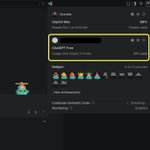
The Codex/ChatGPT account linking in @code is taking much more front and center place
You can now link your ChatGPT account and view it and the weekly reset limits right in the user menu next to your @GitHubCopilot account
And you can also see your achievements badges 🏅

There’s a new HydraFusion experience in @code Insiders, and it gives you a pretty interesting look under the hood.
The selected workflow is now exposed as clickable pills, showing its different stages. Clicking one opens a new panel experience where you can actually follow the flow.
In my case it picked the Critique Workflow, so I got to see the Critique pass at the end.
The workflow chose Luna 5.6, made a plan, edited the code, created Playwright tests, ran them, and delivered a final verdict.
Luna 5.6 → plan → edit code → create Playwright tests → run them → Critique pass → final verdict.
All of this was on a small test app I have.
The UI is nice, but what’s more interesting to me is now finally being able to actually see the workflow operating as a system rather than just watching an agent produce a final answer as it was up until now(in the CLI)
Now I want to see how this behaves on a real application I have, with real context and the rest of the modes.
Very impressive.