
The email service you've always wanted ⚡️ Get started for free with email hosting for your domain
Joined December 2013
- Tweets128
- Following15
- Followers565
- Likes0







We've decided to remove open notifications as one of our upgraded features.
Stay tuned for a blog post outlining the decision.
1

How to use:
Host: smtp.pingly.com
Port: 587
Auth: your pingly user/pass
Note: TLS and Authentication required for clients
Pingly retweeted

New email features launching today for @Pinglyapp after a month sprint to restructure the back-end and clear out technical debt.
Felt good pushing that commit 😅
User management has been updated ⚡️
- Easily change a username/email
- Delete users with email retention
- Updated UI
✉️ Need email on your domain? Get setup with Pingly.com in minutes

Pingly retweeted
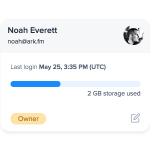
🤓 Refactoring @Pinglyapp's user management UI:
Before—Users listed in table fashion. Limited info displayed on one line, have to scan left-to-right based on browser's width.
After—Card layout encapsulates each user into a fixed layout.
Thoughts?


Check out the interview with @shuttlestackHQ and how they use Pingly: pingly.com/blog/spotlight-sh…
Pingly retweeted
📢 Hey Makers/IndieHackers:
If you need email for your new app and want to keep costs low, you can signup for @Pinglyapp with unlimited users for free.
Create hello@yourdomain, support@yourdomain or whatever you want.
Cheers!


⚡️ Multi-account support with fast account switching has been released! pingly.com/blog/multi-accoun…
Pingly retweeted
Thanks for everyone's feedback! 🙌
Here's the new logo for @Pinglyapp going live this week along with a big UI refresh and multi-account support! ⚡️
