

Work/ed w/ @theresaaFN @VaqzDE @zysacovfx @sammy999zz @davefnr_ Get started here: https://xitter.cf/t.co/rucPQACqKd
Joined April 2026
- Tweets129
- Following6
- Followers264
- Likes205




Pinned Tweet
Insane Fortnite Benchmark🚀
AMD ryzen 7 5700X
RTX 5060 TI
16GB DDR4 - 3200 MHz
Fortnite map code "6016-0463-0988"
Average FPS +108,2 % ↑
1% Percentile FPS +144,0 % ↑
0.2% Percentile FPS +142,6 % ↑
PureTweaks is doing hes job, if you want your PC fully optmized book a optimization now on our website link is down below.

Pure Tweaks retweeted
‼️DISCORD DEBLOAT, LESS RAM + BETTER FPS WHILE GAMING‼️
Discord eats a lot of resources in the background for no reason. With a proper debloat you can cut that down so your games run smoother and more stable.
In the video I show exactly how to do it. There’s also a .bat tool that does a big part of the debloat for you, you get that in my Discord.
Link is down below 👇
‼️DISCORD DEBLOAT, LESS RAM + BETTER FPS WHILE GAMING‼️
Discord eats a lot of resources in the background for no reason. With a proper debloat you can cut that down so your games run smoother and more stable.
In the video I show exactly how to do it. There’s also a .bat tool that does a big part of the debloat for you, you get that in my Discord.
Link is down below 👇
‼️THIS REGISTRY "TWEAK" CAN HELP YOU ALOT WITH INPUT DELAY AND FPS‼️
Win32PrioritySeparation is a Windows registry setting that decides how the CPU splits its time between the program you’re using right now (your game) and everything running in the background.
This can reduce latency and improve your FPS because your game gets noticeably more CPU time compared to background processes. A lot of people feel better frametimes and less hitching after changing it.
How to set it:
Win + R → type regedit → Enter
Go to:
HKEY_LOCAL_MACHINE\SYSTEM\CurrentControlSet\Control\PriorityControl
Double-click Win32PrioritySeparation
Select Decimal and set the value:
Best FPS → 42
Better input delay → 24
Both → 32
OK → restart your PC
Done.
This was only one tweak that can help your PC with performance. If you want your PC completely optimized, check our website the link is down below 👇

Pure Tweaks retweeted
Insane Fortnite Benchmark🚀
AMD ryzen 7 5700X
RTX 5060 TI
16GB DDR4 - 3200 MHz
Fortnite map code "6016-0463-0988"
Average FPS +108,2 % ↑
1% Percentile FPS +144,0 % ↑
0.2% Percentile FPS +142,6 % ↑
PureTweaks is doing hes job, if you want your PC fully optmized book a optimization now on our website link is down below.
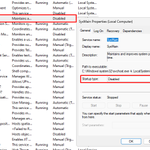
‼️THIS SERVICE IS STEALING YOUR FPS AND YOU PROBABLY DON’T EVEN KNOW IT‼️
SysMain (the old Superfetch) is a Windows service that constantly monitors what apps you open and tries to preload them into your RAM so they start faster. On paper it sounds useful, but on a normal gaming PC with an SSD and enough RAM it mostly just causes unnecessary disk activity and small CPU spikes in the background. That shit can create micro stutters and inconsistent frametimes while you’re playing Fortnite, Valorant or whatever.
A lot of people notice smoother gameplay and less random hitching after disabling it. App launches can get a tiny bit slower, but for pure gaming performance it’s usually a win.
How to disable it fast:
Win + R → type services.msc → Enter
Find SysMain
Right click → Properties
Startup type → Disabled
Click Stop (if it’s running) → Apply → OK
That’s it. It won’t start again on the next boot.
Want your PC fully Optimized go to our website and book a optimization now! link is down below👇


❗BEST ETHERNET SETTINGS❗
in our discord is a list of every setting you should disable, link is down below.

Pure Tweaks is looking for Esports Organizations & Content Creators to partner with!
We are currently looking for new Partners who are interested in promoting Pure Tweaks and our Optimization Services.
What we offer:
🟢 20% Commission on every sale made with your code
🟢 Custom 20% Discount Code for your Community
🟢 Free Full Optimizations for 2 Players / Creators
🟢 30% Discount on Full Optimizations for the rest of your Roster
🟢 Custom OBS Overlay with your Discount Code
What we expect:
🟢 Active Promotion of Pure Tweaks
🟢 At least 1 Post / Shoutout per Month
🟢 Using our Custom OBS Overlay while Streaming
If you are an Esports Organization or Content Creator and are interested in working with us, feel free to send us a DM for more information.
📩 DMs are open!


❗BEST DISCORD SETTINGS❗
Turn Off these settings for the best input dela on discord:
Clipping
Game Overlay
Hardware Accelaretion
These settings improve input delay and overall performence.


This was only one "tweak" that would help your PC with performence, if you want your PC completely optimized then go to our website and book a optimization now! halloween sale right now and you can get 30% off any order 👇
PureTweaks.com/tweaks discord.gg/QKTtY8j4py
