
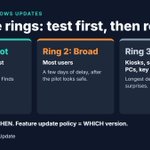


Example: a bad update breaks a printer driver. With rings, only the pilot group sees it. You pause the ring, and the rest of the company never notices. Without rings, everyone gets the problem on the same day.
6
Never push Windows updates to everyone at once.
Intune update rings:
Ring 1: IT/test devices (first)
Ring 2: most users (a few days later)
Ring 3: critical devices (last)
Ring = WHEN. Feature update policy = WHICH version.
#Intune #WindowsUpdate #Microsoft

1
9
Example: an employee wants work email on their personal phone. With MDM, IT would have to enroll and control the whole phone. With MAM (App Protection Policy), only Outlook is protected. When they leave, IT removes the work data and the personal photos and apps stay.
19
MDM vs MAM in Intune:
MDM = manages the device (must be enrolled)
MAM = manages the app data (no enrollment needed)
Personal phone? Use MAM. Require a PIN for Outlook, block copy-paste to personal apps, wipe only company data.
#Intune #MAM #Microsoft

1
26
Example: an employee leaves and keeps their personal phone, so use Retire. A laptop is stolen, so use Wipe. A device was already reset and now shows as a ghost in the portal, so use Delete to clean the record.
30

Example: the app installs in the right folder, but the detection rule checks a different path or version. Intune can’t find it, so it marks the install failed and may retry. Fix the rule, not the installer.
35
Win32 app failing in Intune? Don’t guess, read the log:
C:\ProgramData\Microsoft\IntuneManagementExtension\Logs
Open IntuneManagementExtension.log (and AppWorkload.log).
Common culprit: a wrong detection rule. App installs fine, Intune thinks it failed.
#Intune #Troubleshooting
1
54
Lab lesson: the connector needs permission to create computer objects in the target OU. Delegate that first, or the join fails with no obvious reason.
39
Autopilot Hybrid Join = 3 hand-offs:
Intune connector creates the computer object in on-prem AD (in the OU you delegated)
Laptop needs a path to a domain controller during setup
Entra Connect syncs it, so it shows Hybrid joined
Miss one, setup gets stuck.
#Intune #Autopilot
1
45
Real example: pull every device with "complianceState = noncompliant" with one Graph call, then export it to CSV. Needs the right permission first, like DeviceManagementManagedDevic….All.
65
Intune's admin center is a front end for Microsoft Graph.
Every click = a REST API call returning JSON.
So PowerShell can list all non-compliant devices in seconds instead of 50 clicks.
Learning this now.
#Intune #MicrosoftGraph
1
65
Thanks, that's the safe way to roll it out. Report-only first, check the sign-in logs for who would've been blocked, then switch it on. Also learning that unenrolled devices get blocked by "require compliant" regardless of this setting. Different problem, same outcome.
5
Eg:a laptop with BitLocker off tries to open Outlook.
Compliance policy → Not compliant
CA rule “Require compliant device” → access blocked
User sees: “Your device must be managed /compliant”
The user fixes BitLocker, the device re-checks in, and access comes back automatically
50
Part 2:Compliance policy+Conditional Access
Compliance Policy =the judge.
Conditional Access =the guard.
Policy marks a device Compliant or Not.
CA reads that mark and allows or blocks access.
Trap: no policy assigned=Compliant by default.Change it.
#Intune #ConditionalAccess
2
56
Great point, thanks! That default catches a lot of people. I'm going to test it in my lab, set it to Not compliant and see how it behaves during Autopilot enrollment.
8
Nuance: a new device can show “Not compliant” or “Not evaluated” right after enrollment, before its first check-in. If CA requires compliance, users get blocked for a short time. That’s why many setups use a grace period or exclude the enrollment flow.
57
Learning Intune in my Hyper-V lab, here’s what clicked:
Compliance policy ≠ enforcement.
It only gives a device a “Compliant / Not compliant” tag. Without Conditional Access, nothing acts on that tag.
Judge without a guard = no security.
#intune #Microsoft
2
70