

Privacy-first web tools, agents & homelab automation for builders. Free tutorials. No fluff. Local-first where possible 🔗 https://nitter.gq/t.co/rSYsHSCR10
Guru's Tech Bytes 🎤︎︎ ➜
Joined March 2026
- Tweets2K
- Following114
- Followers136
- Likes6.3K





Pinned Tweet
For those who missed it … I’m not the author of the video but it’s funny!
Welcome back, Jenson Huang!
1
87
Can’t help but think of this iconic Christmas Vacation scene when I see this Hermes agent message, LOL


2
2
70


AnITGuru retweeted

Milestone achieved 🪨
100+ apps listed on my directory.
$199 in total revenue.
Tons of improvements.
...but I have a question for you—see the comments 👇


Thanks, I’ll have to give Claudio another chance! I like customizations!

This update is the start of something much bigger
Personalized, custom, transforming interfaces are the future
You need to be including this in everything you build
People use your software and it proactively changes for them
Your app figures out the user likes the Boston Celtics, all of a sudden the score is always in the interface
Your user doesn’t like a feature in the app, they can prompt your software to get rid of it
In the next 12 months I guarantee nobody’s Claude Code looks remotely like each other. Everyone’s interface will be 100% unique
Guarantee this is the biggest trend in software coming
6
3
100
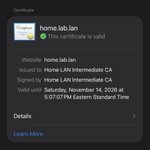
Your homelab has HTTPS. So why doesn't your phone trust it?
This is how to get the SSL lock on your homelab domains, right on your phone.
The trick is adding your own local Certificate Authority (CA) to your phone's trusted certificates.
First, why?
Because nobody wants browser security warnings when accessing their own homelab services. A locally trusted CA lets you get that nice SSL lock on your private domains.
Let's get started.
First, get your CA certificate onto your phone. You can use AirDrop, secure email, or a local file repository (like the one pictured).
I'm using Caddy for this setup. It's fantastic for managing local certificates.
For this tutorial, I'll use my own home domain: lab.lan.
Let's make our homelab a little more trusted. 🔐

2
61
Congrats! You now have a local full chain in your iOS device without exposing an endpoint to the internet.
Interested but you might be wondering what’s Step CA? GitHub link shared below.

1
11
