

PC Optimizer Working with @x1lly https://nitter.gq/t.co/4wQjxDylau
🏴
Joined December 2015
- Tweets4.6K
- Following1.2K
- Followers891
- Likes3.8K
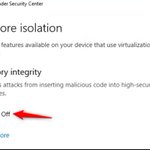




Memory Integrity in CoD and hurt frametimes and lows on some systems.
Windows Security → Device Security → Core isolation → Memory integrity → Off, then restart.
This trades security for CPU performance. Don't disable it if you play Valorant or FACEIT.

12
1,223

astrrix retweeted

Just had my PC optimized by @x1lly and his team and wow… night and day difference.
Everything feels incredibly crisp and responsive. Input lag is basically gone, the game runs smoother than it ever has, and the whole system just feels locked in. Honestly one of the best upgrades I’ve done.
Only downside is I waited way too long to get it done. The game is already starting to die out and the new one is right around the corner. Wish I had pulled the trigger months ago so I could’ve enjoyed it while the player base was still active.
Still, massive props to @x1lly and the team. Highly recommend if you’re still playing.
astrrix retweeted

shoutouts to @itshemu2k and @x1lly for the pc optimization i went from 400 frames in fn to 800. very fast and efficient but thorough with their work. if you’re serious about getting your pc optimized for competitive gaming you have to get it from these guys.

Stock RAM timings are designed for stability, not maximum performance.
On X3D platforms, tighter memory timings can have a noticeable impact on latency, frame consistency, and overall game responsiveness.
Enabling EXPO is just the first step. Optimizing these timings takes things further — and beyond that comes full RAM overclocking.

Hundreds of additional timings can be applied if you want everything done for you. Book a service now and experience an instant improvement in your game-play.
xilly.net

1
296
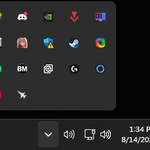
Windows has a lot of apps hiding in your System Tray that run in the background.
Right click your taskbar → Taskbar settings → Other system tray icons.
Turn off apps you don’t need.
These background apps can use:
RAM
CPU
startup time
Fewer tray apps = less stuff running = better performance.

astrrix retweeted

Vouch for @x1lly @itsHemu2K tweaks, best tweaks ever, running 900 fps in game
astrrix retweeted

If you recently Updated your NVIDIA driver to 610.47 and can't find the Control Panel in your right-click menu anymore, it's because the Newest Driver removes it
You can get it back by installing it from the Microsoft Store
Search: "NVIDIA Control Panel" and Install it🚀


Reduce network latency & improve packet responsiveness by setting TxIntDelay to 0
Open regedit → navigate to:
Computer\HKEY_LOCAL_MACHINE\SYSTEM\CurrentControlSet\Control\Class\{4d36e972-e325-11ce-bfc1-08002be10318}\0001
(The last folder may be 0001, 0002, etc — check each until you find your network adapter)
Add String:
TxIntDelay = 0
If string already shown change from 28 to 0
Restart your PC after applying.

Many settings you haven’t changed have been hindering your performance and costing you wins across all games. Don’t let that happen in the future, and book now to see the switch in your gameplay.
xilly.net
1
1,776
Missing out on wins because of a misconfigured system can be frustrating. Here at Xilly, we can fix that and help you enjoy your games even more.
Book now and feel the difference.
xilly.net
1
1
2,037

You’ve got a custom gaming rig, but Windows is still treating your memory like it’s running on a budget office machine.
Memory Compression comes enabled by default. It makes your CPU waste cycles squeezing RAM usage—useful on low-RAM systems, but unnecessary overhead for a gaming setup.
Run PowerShell as administrator and enter:
Disable-MMAgent -mc
Let your CPU focus on performance where it matters—in your games, not on managing memory it doesn’t need to babysit.

Hidden Windows settings could be hurting your performance and costing you fights in your games. Book now and experience a whole new level of play.
xilly.net
1
1,348
astrrix retweeted

Finally got my rig tuned the RIGHT way 🔥
Big thanks to @x1lly & @itshemu2k
393 avg FPS
345+ lows
No stutters, just pure consistency
Different level performance 🧠⚡
