




Pinned Tweet
I opensourced model, dataset and lora
Model: huggingface.co/azyg0s/pixela…
Dataset: huggingface.co/datasets/azyg…
LoRA: huggingface.co/azyg0s/Krea-2…

.@Angaisb_ 's pixel LoRA and the little model Opus trained for them made me want to try the same thing.
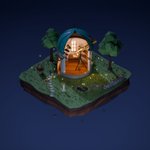
So I had Opus 5.5 train a 32×32 pixel art model, and used @DevinAI along the way. Krea 2 LoRA for the data, then the model on 175k sprites.
I'll open source the model, the dataset, and the LoRA soon.
A few samples:


beko retweeted
I opensourced model, dataset and lora
Model: huggingface.co/azyg0s/pixela…
Dataset: huggingface.co/datasets/azyg…
LoRA: huggingface.co/azyg0s/Krea-2…
.@Angaisb_ 's pixel LoRA and the little model Opus trained for them made me want to try the same thing.
So I had Opus 5.5 train a 32×32 pixel art model, and used @DevinAI along the way. Krea 2 LoRA for the data, then the model on 175k sprites.
I'll open source the model, the dataset, and the LoRA soon.
A few samples:

I created same prompt with Gemini 4 Argon in @DevinAI. It cost 2.87$

$0.21 vs $7.88 for a tiny ice rink
MiniMax M3.1-Flash vs GPT-6 Astra
MiniMax takes this one for me. Look at the nighttime lighting: warm lamps, shadows across the ice, glowing windows, and all those little details. The whole scene feels more alive
And all that for just 21 cents - almost 38 times cheaper than Astra
I’m picking MiniMax for both quality and price. What about you?
1
6
315
PROMPT:
Build "Pixel Ice Rink" — a single-file, real-time three.js (r160, ES module via import map from jsDelivr) page: an isometric diorama of a floating outdoor ice rink, rendered as crisp pixel art in the style of "3D rendered as pixel art". UI text in English.
RENDER PIPELINE
- Orthographic camera at ~31° elevation, azimuth 45° + 90° steps (animated turns, drag sideways or buttons), wheel/pinch zoom. Fit the whole floating slab into the free screen area (clear of the title, a top-centre scoreboard and a right control rail).
- Render the scene into a tiny target (screen / pixel size, ~480×300 on desktop) with no anti-aliasing. Snap the camera so the world origin lands on a whole pixel (static things never shimmer).
- Post pass on a full-screen quad:
- depth-based outlines: darken a pixel that stands >0.55 m in front of a neighbour;
- map every pixel to the nearest colour of a fixed ~49-colour winter palette in OKLab (snow/ice greys, ice blues, reds, lamplight/wood/skin, pines, dusk peach/rose/mauve/lilac, brass/ochre);
- optional light 4×4 Bayer dither;
- upscale with texelFetch so each art pixel is an exact block of device pixels. The background (depth = 1) is the page colour.
- Hard sun shadows (BasicShadowMap, 2048). Lambert flat-shaded low-poly materials.
- Planar ice reflection: render the scene mirrored (scene.scale.y = -1 about the ice plane, ground, ice, particles and lamp posts hidden) into a second target. Sample it in the ice shader at gl_FragCoord. Gloss = small base + extra where the ice is wet, reduced where it is worn.
- A "Raw 3D" mode renders the same scene at full resolution with MSAA, for comparison.
SCENE
- A floating slab of snow over earth over rock, each extruded from a ragged rounded rectangle.
- A 24×12 m rink with 3 m corners: white boards with a yellow kick plate and red cap, built as band segments with gaps for two bench doors and a double resurfacer gate (hinged doors that swing open).
- Ice markings painted texel-by-texel into a 10 px/m canvas: red centre and goal lines, blue lines, circles, face-off dots, creases.
- Red-post goals with alpha-tested grid nets; players' benches; a lit scoreboard drawn with 3×5 pixel digits.
- A log warming hut with lit windows and chimney smoke; a garage for the resurfacer; lamp posts with point lights; string lights at night.
- Snowy stacked-cone pines, snowbanks, a snowman.
PLAYERS — procedural rigs of ~16 boxes
- Placed every frame from heading, lean, crouch and turn roll. Two-bone IK for the legs (skating stride with push-out and toe-out, gliding, sideways hockey stop) and for the arms holding a stick.
- Stick poses: carry/stickhandle, slap-shot wind-up and strike, pass sweep, celebration with stick raised.
- Goalies: pads, blocker and glove, crease positioning, butterfly drop on incoming shots.
GAME
- Two-on-two pick-up hockey plus goalies. Steering with arrival, separation and board/net avoidance; hockey stops when reversing hard.
- Carrier AI weaves to the slot, shoots when the lane is open, passes when pressured. Defenders pressure goal-side and poke-check; the nearest skater chases a loose puck.
- Puck physics with substeps: friction, board bounces, posts, solid nets with goal detection through the mouth, goalie saves (deflect or catch and play out), blocks by skates.
- Face-offs, goal celebrations, score, shots and a game clock on the scoreboard. Clicking the ice drops a puck.
ICE WEAR
- An RG DataTexture over the rink (20 px/m). Blades write scratches as they glide; stops gouge wider marks and throw spray particles that settle as wear; falling snow settles too.
- "Resurface the ice": players skate off through the bench doors; the resurfacer drives out of its garage through the gate and does shrinking rounded-rectangle laps (swinging in front of the nets), wiping its swath and leaving wet, reflective ice that dries over time. Then the players return for a face-off. Show an "ice worn %" bar.
UI
- Pixel display font (Silkscreen) with a clean body font.
- Light and dark themes via tokens; the background is a near-white or near-black page.
- Controls: Day / Dusk / Night (lighting presets blended over ~1.6 s), Snow Off / Light / Heavy, Resurface, Drop a puck, Pause, New game, Turn left / right, Pixel art / Raw 3D, Pixel size slider, Palette / Dither / Outlines toggles.
- A "How it's drawn" panel explaining the pipeline. Stacked mobile layout with no horizontal scroll.
1
53
I recreated this as basketball court with Gemini 4 Argon in @DevinAI. It cost 2.47$ prompt is below
$0.21 vs $7.88 for a tiny ice rink
MiniMax M3.1-Flash vs GPT-6 Astra
MiniMax takes this one for me. Look at the nighttime lighting: warm lamps, shadows across the ice, glowing windows, and all those little details. The whole scene feels more alive
And all that for just 21 cents - almost 38 times cheaper than Astra
I’m picking MiniMax for both quality and price. What about you?
1
6
518
Prompt:
Build "Pixel Basketball Court" — a single-file, real-time three.js (r160, ES module via import map from jsDelivr) page: an isometric diorama of a floating outdoor basketball court, rendered as crisp pixel art in the style of "3D rendered as pixel art". UI text in English.
RENDER PIPELINE
Orthographic camera at ~31° elevation, azimuth 45° + 90° steps (animated turns, drag sideways or buttons), wheel/pinch zoom. Fit the whole floating slab into the free screen area (clear of the title, a top-centre scoreboard and a right control rail).
Render the scene into a tiny target (screen / pixel size, ~480×300 on desktop) with no anti-aliasing. Snap the camera so the world origin lands on a whole pixel (static things never shimmer).
Post pass on a full-screen quad:
depth-based outlines: darken a pixel that stands >0.55 m in front of a neighbour;
map every pixel to the nearest colour of a fixed ~49-colour outdoor court palette in OKLab (asphalt/concrete greys, court tan/ochre, white lines, orange/red accents, wood/skin, pines or trees, dusk peach/rose/mauve/lilac, brass/lamp light);
optional light 4×4 Bayer dither;
upscale with texelFetch so each art pixel is an exact block of device pixels. The background (depth = 1) is the page colour.
Hard sun shadows (BasicShadowMap, 2048). Lambert flat-shaded low-poly materials.
Planar court reflection (subtle): render the scene mirrored (scene.scale.y = -1 about the court plane, ground, court surface, particles and lamp posts hidden) into a second target. Sample it in the court shader at gl_FragCoord. Gloss = small base + extra where the surface is freshly swept/wet-looking, reduced where it is worn/scuffed.
A "Raw 3D" mode renders the same scene at full resolution with MSAA, for comparison.
SCENE
A floating slab of asphalt/concrete over earth over rock, each extruded from a ragged rounded rectangle.
A ~22×14 m outdoor court with 3 m corners and a low perimeter fence or open edges: painted lines for full-court markings (centre circle, free-throw lanes, three-point arcs, restricted areas), built with clear gaps for two bench areas and a double gate for the sweeper (hinged doors that swing open).
Court markings painted texel-by-texel into a 10 px/m canvas: white centre and boundary lines, free-throw lines, three-point lines, circles, key rectangles, restricted arcs.
Orange-rim hoops with white backboards and alpha-tested mesh nets; players' benches; a lit scoreboard drawn with 3×5 pixel digits.
A small log or brick warming/snack hut with lit windows and chimney smoke; a garage for the court sweeper; lamp posts with point lights; string lights at night.
Trees or stacked-cone pines around the edges, snowbanks or grass edges (optional seasonal), a basketball or two lying around.
PLAYERS — procedural rigs of ~16 boxes
Placed every frame from heading, lean, crouch, jump height and turn roll. Two-bone IK for the legs (running stride, jump take-off and land, defensive shuffle, pivot) and for the arms holding or dribbling a ball.
Ball/arm poses: dribble (low and high), crossover, pass chest/overhead, jump-shot wind-up and release, layup, celebration with arms raised.
Defenders: hands up, close-out, contest jump.
GAME
Two-on-two pick-up basketball. Steering with arrival, separation and court/edge avoidance; defensive slides and close-outs.
Ball-handler AI drives to the paint or spots up, shoots when open, passes when pressured. Defenders pressure ball-side and contest; nearest player chases a loose ball and boxes out for rebounds.
Ball physics with substeps: gravity, bounce (court and backboard), rim interaction, net detection for made baskets, blocks, steals, rebounds (offensive/defensive).
Jump balls or inbound starts, basket celebrations, score, shot clock or game clock on the scoreboard. Clicking the court drops a ball.+++
2
1
407
+++COURT WEAR
An RG DataTexture over the court (20 px/m). Shoes write scuff marks as players run and pivot; hard stops and jumps leave wider marks and throw dust/spray particles that settle as wear; light rain or dust settles too.
"Sweep the court": players clear through the bench gates; the sweeper drives out of its garage through the gate and does shrinking rounded-rectangle laps (swinging in front of the hoops), wiping its swath and leaving a cleaner, slightly more reflective surface that accumulates wear again over time. Then the players return for a jump ball. Show a "court worn %" bar.
UI
Pixel display font (Silkscreen) with a clean body font.
Light and dark themes via tokens; the background is a near-white or near-black page.
Controls: Day / Dusk / Night (lighting presets blended over ~1.6 s), Dust Off / Light / Heavy, Sweep court, Drop a ball, Pause, New game, Turn left / right, Pixel art / Raw 3D, Pixel size slider, Palette / Dither / Outlines toggles.
A "How it's drawn" panel explaining the pipeline. Stacked mobile layout with no horizontal scroll.
52