

The bookmark manager that can’t read your bookmarks. Links encrypted on your device before they sync. iPhone, Android, web, and browser. Release notes here.
Joined August 2026
- Tweets37
- Following2
- Followers3
- Likes6



Does paying for Plus identify you? Yes, to the payment provider.
On the web that’s Paddle. It needs your name, your email, and a way to charge you, and its dashboard shows us your name and email too.
None of that touches the encryption. We can tell that an account pays, and we still can’t read one link inside it. The free plan asks for no card at all.
One saved link: what you see, and what we store.
You see its title, its address, and its tags.
We store a path, a size, a timestamp, and bytes we hold no key to open.
1
96
Bracemark is now on the App Store, for iPhone.
Share a link from Safari or another app, and it syncs with the web app, Android, and the browser extension. Each link is encrypted on your iPhone before it syncs.
This is 1.0.0, the build we first sent Apple on October 18. Android has had five updates since, including tablet layouts, creating an account in one step, and keeping a read-mode copy of a page (on Plus). The update that brings them to iPhone and iPad goes to Apple next.
apps.apple.com/app/id6814343…
What would someone get if they ordered us to hand over your bookmarks?
Your encrypted files, with the path, size, and time that ride with each one. Your account record: the username you chose, your public key, your sessions, and a subscription record if you pay. Not a link, a title, a tag, or a note, and no key to open them, because we never had one.
And an order doesn’t have to come to us. Cloudflare stores the files, and AWS serves the site and the app. Our privacy policy lists every provider and what each one holds.
bracemark.com/privacy

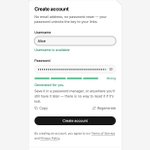
Bracemark asks for a username and a password. No email address, no phone number, no card.
There’s nothing we could honestly do with an email. We can’t send you a password reset, because we hold no key that could unlock your library. Receipts come from our payment provider.
The cost is that reset. If you lose both your password and your recovery code, there is no way back into your account.
17

Delete a link in Bracemark and it goes to Trash. It stays there until you delete it for good, and Restore brings it back to My List.
An edit is different. Change a title, a note, or a set of tags, and the old one is gone. We hold nothing readable from your links, so there’s no earlier version for us to give back.
A backup before a big clean-up costs nothing. Restoring it brings back links you deleted, but it won’t undo an edit to a link you still have.
bracemark.com/docs/restore-a…

12
What happens if you edit the same link on two devices before either one syncs?
The one that syncs last wins, and the other edit is replaced. We hold nothing readable from your links, so there’s no merge we could do for you, and no older version to restore.
Two devices changing different links never collide, because each link, list, and tag is its own encrypted file. And titles and images fetched in the background live in a separate file from what you type, so one never overwrites the other.
bracemark.com/docs/sync-and-…
A new version of Bracemark is out on the web, on Android, and in the browser extension for Chrome and Firefox.
On Plus, you can now keep a copy of a page in read mode: its article, to read after the page changes or disappears. The browser extension can also keep a screenshot. Each copy is encrypted on your device before it syncs, like your links. In the web app, a copy comes from our link-extraction service once you turn on Server read mode, and it gets the link’s address.
The iPhone and iPad app is still waiting for its first App Store review.
bracemark.com/docs/read-mode…

Bracemark is free to use, with end-to-end encrypted sync across your devices. The free plan holds 200 links.
Plus removes the cap and adds nested and hidden lists, the app lock, and read-mode copies of pages.
12


Say you’re moving 2,000 links into Bracemark, and the free plan holds 200. What happens?
Before it writes anything, the import counts the new links in your file and tells you how many there are and how many fit. Then it asks: import the ones that fit, in the file’s order, or cancel and import nothing.
Nothing is cut silently. The rest stays in your file, and importing the same file again after you upgrade brings them in, with the ones already here skipped as duplicates.
The file is read on your device and never uploaded. Folders come in as lists, nested the way they were, on any plan. Export is free on every plan, including when your library is over the limit.
bracemark.com/docs/import

13
Before you trust an app with years of saved links, try its export. Then open the file and see what came out.
In Bracemark, export is free on every plan, even when your library is over the free plan’s limit. The full backup is a zip of plain files. There are also formats for browsers, Raindrop, and spreadsheets.
The file isn’t encrypted, so you can read it in any text editor, with no app of ours needed. Anyone else who gets it can read it too, so keep it somewhere safe.
bracemark.com/docs/export
How does a new phone open your links if we cannot read them?
Your device makes a random key and encrypts your library with it. We store a copy of that key, locked with a key made from your password. The password stays on your device, so we cannot unlock the copy. On the new phone, you type your password. It unlocks the copy, and the key opens your links as they download.
We also store a second copy of the key, locked with your recovery code. Use it if you forget your password. We can’t unlock that copy either.
The cost: if you lose both, nobody can open the library. Not us, not support. That’s why the app asks you to save the recovery code somewhere other than your password.
bracemark.com/docs/how-encry…
Someone borrows your phone to look something up. What can they see in your saved links?
In Bracemark, with app lock on, nothing until the app is unlocked. With a list lock, only that list is closed: its links stay out of browse, search, and export, and the list’s name can be hidden too.
A lock isn’t the encryption. We cannot read your links with or without it. It’s a gate over the app on your device, for whoever is holding it.
Two costs. A lock lives on one device, so you set it on each one. And there’s no recovery code for a lock password: if you forget it, you sign out and back in, which clears that device’s local copy first.
Locks are part of Plus. The encryption isn’t.
Character AI is in bankruptcy and selling what it owns. Its privacy policy says user information can go to a buyer. The court hasn’t decided yet whether people’s chats are part of the sale.
Our privacy policy says much the same. If Bracemark is ever sold, your data goes to the buyer, and the policy goes with it. But a policy is a promise, and the buyer would be the one keeping it.
So here’s what a buyer would get from us. Your account details, like your username and plan, which they could read. And your links, which they couldn’t.
Each link is encrypted on your device before it syncs to our servers. Only your password or recovery code can open it, and we have neither. A buyer would get the same bytes we have, and no key to open them.
bracemark.com/privacy
25
A page about a symptom, saved to read before the appointment. Two flats in a city you haven’t told anyone you’re moving to. A job listing you’re not ready to mention.
We store each one as bytes we hold no key to open.
9
Before you install a browser extension, look for one line in its install dialog.
If it says “Read and change all your data on all websites”, the extension can see every page you open, including the ones you’re signed in to. Some need that, but a bookmark manager that saves the page you’re on doesn’t.
Bracemark’s browser extension doesn’t ask for it. It gets the current tab only when you click its button, and the only site it can always access is our own API.
The code is public, so you can check. Ask an AI to read the permission list and say what each line allows. Ask it to review the whole source and flag anything odd. Or open your browser’s network inspector, with an AI to help, and watch what the extension sends.
None of these checks is a guarantee. But as the old saying goes: trust, but verify.
What you save is a fairly complete picture of what you’re reading, buying, worrying about, and working on.
We store each of your links as bytes we hold no key to open, so we can’t build that picture from them.
12