

Like TweetDeck for Discord. Follow multiple Discord servers in one dashboard. Never miss a post from your favorite channels and members.
Discord Servers Everywhere
Joined January 2026
- Tweets30
- Following126
- Followers101
- Likes1.2K




Pinned Tweet
If you're in multiple Discord servers (or even just one) you know that hopping between channels and servers gets old
Dashcord lets you organize a personal dashboard with all your favorite channels — even specific members — across servers. No more constant context switching
Free to sign up ⤵️
dashcord.gg

NEW FEATURE 🔥
Quick Filter
- Filter the feed on any word
- Instantly see only the matching posts in that Channel or Follow widget
Here's an example filtering on stock "YSS" to see @Braczyy 's entries and updates in #UnchartedTerritory Discord

Since Dashcord runs in a web browser and uses the Official Discord API - we are available for both Windows and Mac 🔥
No download needed, zero install, all operating systems supported 💪

If you're in multiple Discord servers (or even just one) you know that hopping between channels and servers gets old
Dashcord lets you organize a personal dashboard with all your favorite channels — even specific members — across servers. No more constant context switching
Free to sign up ⤵️
dashcord.gg
Added 5 more so plenty of options
Now 10 sounds total for alerts 🎉

NEW FEATURE 🔊🔥
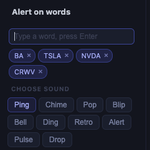
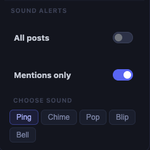
Sound Alerts are live on Dashcord.
Set a different alert sound per widget — so you always know which channel or member just posted without looking at your screen.
- Alert on all posts, or mentions only (replies, user tags, role tags)
- 5 sounds to choose from
- Works on Channel Widgets and Follow Widgets

1
185
NEW FEATURE 🔊🔥
Sound Alerts are live on Dashcord.
Set a different alert sound per widget — so you always know which channel or member just posted without looking at your screen.
- Alert on all posts, or mentions only (replies, user tags, role tags)
- 5 sounds to choose from
- Works on Channel Widgets and Follow Widgets
NEW FEATURES 🔥
- Pro Tier: Create multiple dashboards!
- All Tiers: GIF Filtering
- All Tiers: Opt-in to Email Notifications for when your favorite server(s) adds Dashcord


If you're in multiple Discord servers (or even just one) you know that hopping between channels and servers gets old
Dashcord lets you organize a personal dashboard with all your favorite channels — even specific members — across servers. No more constant context switching
Free to sign up ⤵️
dashcord.gg
New trading Discords adding Dashcord every week! 📈
If your favorite Discord doesn't have it yet — tell the admins!

Now using @dashcordgg in @mattydaytrades_ Discord!
Got mine setup to watch 4 channels with minimal screen space
Way easier to catch all the sick trades he drops throughout the day!


Great example of one way to use Dashcord in a busy trading Discord
Less channel hopping. Fewer missed posts.
Let your admins know about Dashcord and they can add the bot.
One way I use @dashcordgg in Uncharted Territory discord
1st column - a Channel Widget linked to the Main Chat
2nd column - a Follow Widget so I see every post from @Braczyy and @TSDR_Trading
3rd column - a Follow Widget so I see every post from the flow experts, @manrav, @AtTheAsk, @AlexJonesIA
+ can add more columns or split cols horizontally to maximize screen space usage
+ can link columns to any Discord I'm a member of that has the Dashcord bot

1
2
797

For Discord server admins wondering about Dashcord:
• The bot is free to add
• It doesn’t give members any extra permissions
• Users only see channels they already have access to
It simply helps members — and admins — follow activity more easily
1
216
Adding the bot is simple
• Login at dashcord.gg
• Add a Channel Widget or Follow Widget
• Select your server
• Click “Invite Bot” and approve permissions
You control exactly which channels it can access — including private or subscriber-only channels if you choose.
90