
DevOps, MLOps, and Cloud tips & Deep Dives (300 K Community)
Join 20,000+ Readers →
Joined November 2014
- Tweets1.3K
- Following10
- Followers11.9K
- Likes843




Pinned Tweet
47% OFF Linux Foundation Cybersecurity Sale 🚀
Use code OCT26NONCYBERCT at kube.promo/devops to get a flat 35% off on individual certifications.
using code OCT26CYBERCT, get upto 47% off the following security certifications and bundle
- Certified Kubernetes Security Specialist (CKS)
- Kubernetes and Cloud Native Security Associate (KCSA)
- KCSA + CKS Cert Bundle
Use OCT26NONCYBERCT to save up to 40% on the following bundles compared to individual purchases.
- CKA + CKAD : kube.promo/cka-ckad
- CKA + CKS: kube.promo/bundle
- CKA + CKAD + CKS: kube.promo/k8s-bundle
- KCNA + KCSA + CKA + CKAD + CKS: kube.promo/kubestronaut
⏳ Hurry, this offer expires soon.
Don’t miss this chance to certify & level up!
♻️ P.S. Don’t forget to repost and share it with the DevOps community and your friends!
#devops #kubernetes #cka #ckad #cks

DNAT (Destination NAT) - A must-know concept in k8s networking
If you have published a Docker container port on a typical bridge network using the default NAT mode,
You have seen the DNAT concept in action.
When we run a container, it gets a private IP on the container network and the app inside listens on port 80.
By default, clients outside the Docker host cannot directly access that container IP. So we publish the container port using -p 8080:80.
Clients can now connect to the Docker host IP on port 8080.
When that packet arrives, the VM rewrites the destination from the VM IP to the pod IP and forwards it to the container.
In this example, both the destination IP and port change.
That rewrite is DNAT.
When it comes to Kubernetes,
It uses the same concept for Service traffic.
With kube-proxy in iptables mode, DNAT redirects traffic from a Service IP and port to a backend Pod’s IP and target port.
----
If you like practical Kubernetes, DevOps & MLOPS content like this, we share deep dives every week.
→ 𝗝𝗼𝗶𝗻 𝟮𝟬𝗞+ 𝗲𝗻𝗴𝗶𝗻𝗲𝗲𝗿𝘀 (𝟭𝟬𝟬% 𝗳𝗿𝗲𝗲): devopscube.com
♻️ PS: Repost and share it with the DevOps community.
#Kubernetes #DevOps

A complete guide to Kubernetes VPA 🚀
Here is what you will learn from this guide.
- Vertical Pod Autoscaler key components
- Recommender decaying histogram-based algorithm
- End-to-end VPA workflow
- In-Place Pod Resize With VPA
and more..
𝗥𝗲𝗮𝗱 𝗶𝘁 𝗵𝗲𝗿𝗲: newsletter.devopscube.com/p/…
♻️ PS: Repost and share it with the DevOps community.
#devops #kubernetes

If you're aiming for the CKA certification,
Or just diving into Kubernetes projects, here's one thing you can't ignore:
👉 Cluster configurations.
Also, when it comes to the CKA certification,
You will get scenarios to rectify issues in the cluster.
So understanding cluster configurations will make it easier to troubleshoot and find issues the right way.
📘 If you're preparing for CKA certification, we have a detailed study guide
𝗖𝗵𝗲𝗰𝗸 𝗶𝘁 𝗼𝘂𝘁 𝗵𝗲𝗿𝗲: github.com/techiescamp/cka-c…
Have you ever had to troubleshoot a tricky cluster config?
PS: ♻️ Repost if you find this useful. It helps the DevOps community
Have any thoughts to add?
Drop them in the comments below.
#kubernetes #practicaldevops #cka

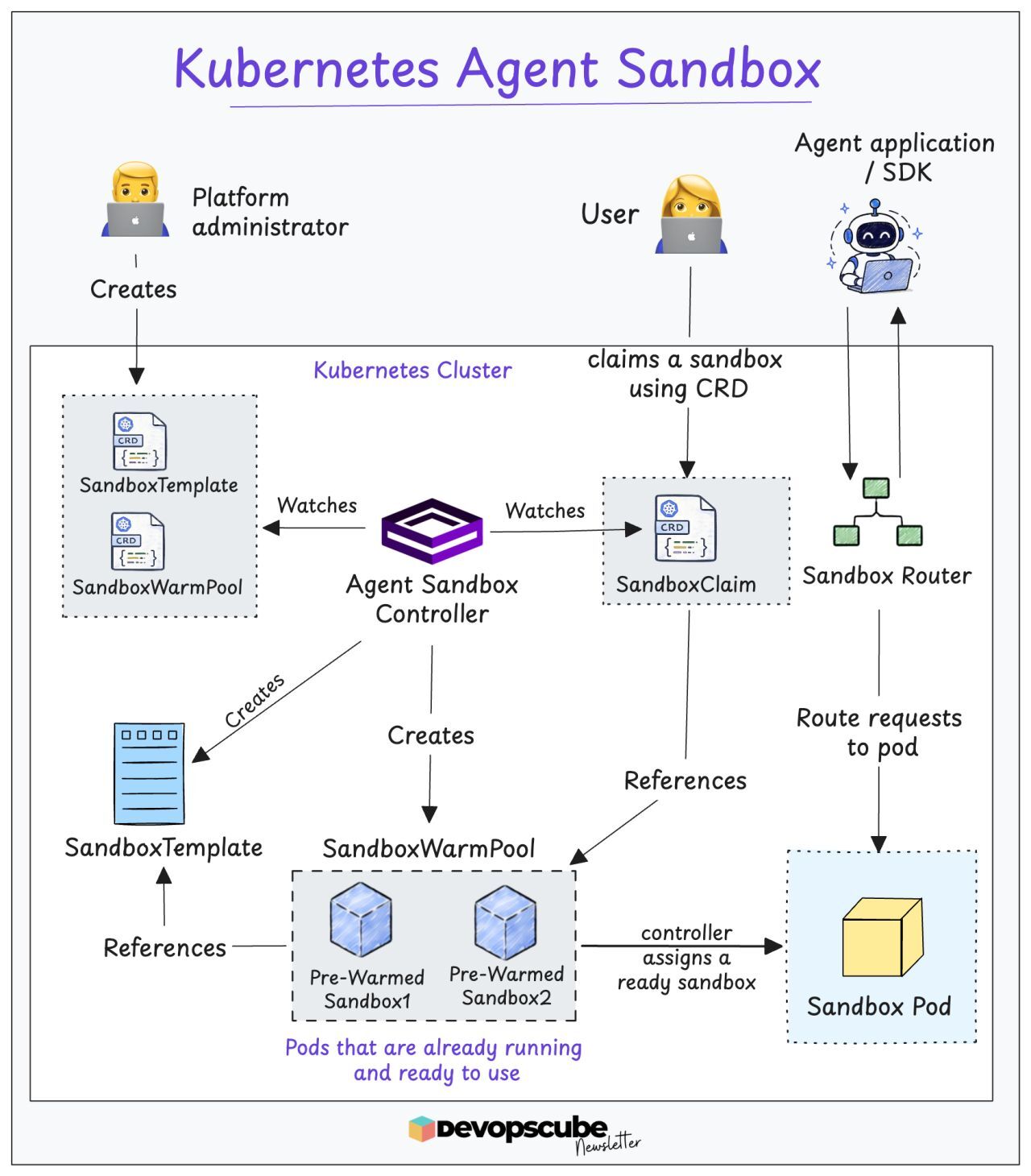
Where should your AI agent run untrusted code?
An AI agent needs a workspace to run commands, install tools, and save files while completing a task.
It may also generate code or download it from external sources.
We should treat it as untrusted code and run it in an isolated workspace with limited access.
This is where Kubernetes Agent Sandbox comes in.
In our recent newsletter, we covered the following
- Why AI agents need an isolated workspace to run untrusted code
- How Kubernetes Agent Sandbox manages these workspaces
- How gVisor and Kata Containers isolate agent workloads
- Hands-on: Deploy a Kubernetes troubleshooting agent and run untrusted code
and more..
𝗥𝗲𝗮𝗱 𝗶𝘁 𝗵𝗲𝗿𝗲: newsletter.devopscube.com/p/…
Note: Kubernetes Agent Sandbox API is currently in Beta
♻️ PS: Repost and share it with the DevOps community.
#devops #mlops #aiops
Becoming a DevOps Engineer 😀
Those who persevere make it big.
----
Every week, we share one practical deep dive with illustrations and hands-on examples in our newsletter.
📚 𝗝𝗼𝗶𝗻 𝗛𝗲𝗿𝗲 (𝗜𝘁'𝘀 𝗙𝗿𝗲𝗲): devopscube.com
#devops
🛠 DevOps Tool of the Week: kube-green
Dev and staging environments often run 24/7, even when nobody is using them.
That means idle Pods keep running at night and on weekends, while the infrastructure keeps costing money.
You could write scripts to scale workloads down and bring them back up every day, but managing this across multiple namespaces can get complicated.
That’s where kube-green helps.
kube-green is an open-source Kubernetes operator that automatically puts workloads to sleep when they are not needed and brings them back when work starts.
Here’s what it can do 👇
- Scales Deployments and StatefulSets to zero during sleep time.
- Suspends CronJobs overnight.
- Restores workloads at the scheduled wake-up time.
- Supports weekdays and time zones.
- Excludes selected resources using names or labels.
- Supports custom resources through patches.
𝗦𝘁𝗮𝗿𝘁 𝗛𝗲𝗿𝗲: github.com/kube-green/kube-g…
Note: Scaling Pods to zero saves money only when the unused nodes also scale down. Pair kube-green with Cluster Autoscaler or Karpenter to get real infrastructure savings.
#devopstool

Practical Guides and resources this week at DevOpsCube ☕
Read these 👇
1. Kubernetes Client-Side vs Server-Side Apply - skills.devopscube.com/kubern…
2. How to Implement Native Admission Policies in Kubernetes - devopscube.com/kubernetes-ad…
3. Kubernetes Native Admission Vs Custom Admission Controllers - linkedin.com/feed/update/urn…
🎓 𝗖𝗲𝗿𝘁𝗶𝗳𝗶𝗰𝗮𝘁𝗶𝗼𝗻𝘀 & 𝗗𝗶𝘀𝗰𝗼𝘂𝗻𝘁𝘀
CKA, CKAD, CKS aspirants! This months deal is live!
Use code 𝗢𝗖𝗧𝟮𝟲𝗡𝗢𝗡𝗖𝗬𝗕𝗘𝗥𝗖𝗧 at kube.promo/devops to save up to 𝟯𝟱% 𝗢𝗙𝗙 on individual certifications, and use code 𝗢𝗖𝗧𝟮𝟲𝗡𝗢𝗡𝗖𝗬𝗕𝗘𝗥𝗖𝗧 on bundles to save upto 𝟰𝟬% 𝗼𝗳𝗳.
👉 Complete Kubernetes & CKA course: courses.devopscube.com/. Use code 𝗗𝗘𝗩𝗢𝗣𝗦𝟯𝟬 to get 𝟯𝟬% 𝗢𝗙𝗙 today
👉 K8s Kustomize Crash Course(Free) - courses.devopscube.com/p/kub…
👉 Container Fundamentals: A Practical Guide to Docker - courses.devopscube.com/p/con…
𝗧𝗵𝗶𝘀 𝗪𝗲𝗲𝗸'𝘀 𝗧𝗼𝗽 𝗘𝘅𝗽𝗲𝗿𝘁 𝗣𝗶𝗰𝗸👇
1. How ML models are monitored in production- newsletter.devopscube.com/p/…
🛠️ 𝗗𝗲𝘃𝗢𝗽𝘀 𝗧𝗼𝗼𝗹 𝗼𝗳 𝘁𝗵𝗲 𝗪𝗲𝗲𝗸: Popeye - github.com/derailed/popeye
Which resource are you diving into this week? Drop a comment!
#DevOps #Learning #techtips

Here are 5 engineering blogs worth reading this week👇
If you work in DevOps, SRE, Platform Engineering, Cloud, or Infrastructure, this is for you.
1/ How Meta Handled 2026 World Cup Traffic at Scale - engineering.fb.com/2026/10/1…
2/ How Datadog Runs One Query Across Multiple Machines - datadoghq.com/blog/engineeri…
3/ How GitHub Cut Star History API Requests from 2,500 to 24 - github.blog/engineering/arch…
4/ How Netflix Keeps Large GPU Jobs Running Through Failures - netflixtechblog.com/reliable…
5/ What Engineers Need to Know About the DNS Root Key Rollover - blog.cloudflare.com/root-ksk…
🎓 𝐏𝐫𝐞𝐩𝐚𝐫𝐢𝐧𝐠 𝐟𝐨𝐫 𝐂𝐊𝐀?
If you are preparing for the Certified Kubernetes Administrator exam, check out our CKA course by industry experts. You can also use 𝗗𝗘𝗩𝗢𝗣𝗦𝟯𝟬 at checkout for a discount:
👉 courses.devopscube.com/p/cer…
#devops #kubernetes

Kubernetes HPA isn't limited to CPU and memory.
You can also scale workloads using custom metrics, such as
- Requests per second
- Queue length
- Active connections
- Application latency
You can do it with a combination of HPA, Prometheus, and Prometheus Adapter.
The Prometheus Adapter exposes the metrics via the Kubernetes Custom Metrics API and is used by the HPA.
But choosing the metric is only one part of autoscaling.
You also need to control HPA scaling when the metric changes.
Should HPA add or remove replicas every time that metric changes slightly?
That is decided using the HPA tolerance configurations.
We covered how HPA tolerance works in our guide.
𝗥𝗲𝗮𝗱 𝗶𝘁 𝗵𝗲𝗿𝗲: newsletter.devopscube.com/p/…
Over to you!
What custom metrics are you using for autoscaling?
#Kubernetes #HPA #DevOps

Basic Kubernetes skills will not get you hired anymore.
Today, companies want engineers who can design, deploy, and secure production-grade clusters.
Not just run kubectl apply.
We have a Kubernetes Learning Roadmap to learn k8s the right way.
It covers,
- What to know before starting (prerequisites)
- How to get free cloud credits for your first cluster
- The key cluster concepts you must master
- Best practices for reliability and security
- Our favorite learning resources and more..
𝗸𝟴𝘀 𝗟𝗲𝗮𝗿𝗻𝗶𝗻𝗴 𝗥𝗼𝗮𝗱𝗺𝗮𝗽: devopscube.com/learn-kuberne…
♻️ If this roadmap helps you, pass it along to your DevOps community.
Over to you.
What is the one Kubernetes concept you wish you had learned earlier?
#devops #kubernetes

DevopsCube retweeted
Kubernetes NodeLocal DNSCache Explained 🚀
When it comes to performance, every DNS lookup in Kubernetes matters.
Without NodeLocal DNSCache, Pods send DNS queries to the kube-dns/CoreDNS Service IP.
These requests go through kube-proxy, DNAT rules, and conntrack before reaching CoreDNS.
In busy clusters, this can add latency and increase pressure on the conntrack table.
NodeLocal DNSCache solves this by running a local DNS cache on every node as a DaemonSet.
So, instead of talking to CoreDNS directly, Pods send DNS queries to the local cache on the same node.
Here are its key benefits,
- It reduces average DNS lookup time, as the DNS queries are resolved locally using the DNS cache
- It reduces load on CoreDNS
- It prevents conntrack table exhaustion, as Connections from Pods to their local cache don't create conntrack table entries
- DNS queries for external URLs can be forwarded directly without involving CoreDNS
We share deep dives on Kubernetes, DevOps, MLOps, Cloud, and GitOps
→ 𝗝𝗼𝗶𝗻 𝗛𝗲𝗿𝗲 (𝟭𝟬𝟬% 𝗳𝗿𝗲𝗲): devopscube.com/
♻️ PS: Repost and share it with the DevOps community.
𝗡𝗼𝘁𝗲: NodeLocal DNSCache is not enabled by default in Kubernetes.
It must be deployed manually as a DaemonSet (except on managed platforms like GKE Autopilot where it's now default).
Got any tips?
⬇️ Share and discuss in the comments below! ⬇️
#devops #kubernetes

Kubernetes Native Admission Vs Custom Admission Controllers
Native admission policies can now handle both validation and mutation, which covers many common policy requirements.
However, they are not a complete replacement for tools like Kyverno.
The following are the current limitations of native admission policies you should know.
- Native policies don't cover every workflow available in dedicated policy engines, such as generating additional Kubernetes resources.
- Tools like Kyverno can automatically create a NetworkPolicy or a RoleBinding whenever a new namespace is created. Native policies cannot do this.
- CEL expressions run in the API server. It cannot call an external API, query a database, or check an OCI registry. If your validation logic needs to reach outside the cluster, you need a webhook.
So, you can use native admission policies for straightforward admission rules.
Use tools such as Kyverno or Gatekeeper when your policy requirements go beyond what native admission policies can handle.
---
Every week, in our newsletter, we share one practical deep dive with illustrations and hands-on examples.
It will help you learn something new.
📚 𝗝𝗼𝗶𝗻 𝗛𝗲𝗿𝗲 (𝗜𝘁'𝘀 𝗙𝗿𝗲𝗲): devopscube.com
♻️ If you find it useful, repost and share it with the community.
#devops #kubernetes

99% of DevOps Engineers may not know this 🚀
The Linux Foundation has 65+ absolutely FREE courses
These courses span a variety of highly sought-after topics, such as:
✅ DevOps
✅ SRE
✅ GitOps
✅ Kubernetes
✅ Microservices
✅ Service Mesh
and many more!
𝗙𝗿𝗲𝗲 𝗰𝗼𝘂𝗿𝘀𝗲 𝗰𝗮𝘁𝗮𝗹𝗼𝗴: kube.promo/free-courses
💬 Keep an eye on the comments section, where I'll be highlighting some of the key courses you may want to start with.
𝗔 𝗹𝗶𝘁𝘁𝗹𝗲 𝗧𝗶𝗽 𝗳𝗼𝗿 𝘆𝗼𝘂 𝗮𝗹𝗹: Don't rush and subscribe to all the courses at once.
Rather, take it one at a time. Choose a course that interests you, commit to a disciplined learning schedule, complete it in its entirety, and then move on to the next one.
#LinuxFoundation #FreeCourses #DevOps

Gateway API vs Ingress Controller.
Here is the Key Difference You Should Know
In Kubernetes, the Ingress object only defines routing rules.
The actual traffic routing happens through the Ingress Controller, which acts as both the controller and the proxy.
With Gateway API, that workflow is almost similar.
You define resources like Gateway and HTTPRoute to control traffic flow.
The Gateway API controller (NGINX Gateway Fabric) then translates these configs into real routing rules and infrastructure.
But here is the big difference with NGINX Gateway Fabric.
It has separate control plane and data plane.
When you create a Gateway resource, the controller sets up a dedicated NGINX proxy pod (data plane) to handle traffic.
However, in Ingress, the controller itself acts as the proxy.
We break down Gateway API, Ingress and other core Kubernetes concepts step by step (with illustrations) in our CKA course.
If you are learning Kubernetes or preparing for CKA,
𝗝𝗼𝗶𝗻 𝗛𝗲𝗿𝗲: courses.devopscube.com/p/cer…
Have you experimented with Gateway API yet?
What are your takeaways so far?
#Kubernetes #CKA #GatewayAPI #DevOps

Terraform Interview Question 🚀
How do you Prevent Concurrent Terraform Applies?
Store the Terraform state in a remote backend such as Amazon S3 and enable native state locking using use_lockfile = true.
Terraform uses an S3 lock file (.tflock) to prevent multiple Terraform operations from modifying the same state at the same time.
𝗗𝗲𝘁𝗮𝗶𝗹𝗲𝗱 𝗔𝗻𝘀𝘄𝗲𝗿: skills.devopscube.com/interv…
If you have any insights to share, please drop them in the comments.
♻️ PS: Repost and share it with the DevOps community.
#Terraform #DevOps

Kubernetes Client-Side vs Server-Side Apply 🚀
When you run kubectl apply,
By default, you are using Client-Side Apply (CSA).
With Client-Side Apply, kubectl looks at your manifest, the previously applied configuration, and the current object in the cluster.
It determines what has changed and sends the required patch to the Kubernetes API server.
Server-Side Apply (SSA) works differently.
When you run kubectl apply --server-side,
Kubernetes API server handles the apply operation.
The biggest difference is field ownership.
The following guide explains it well.
𝗗𝗲𝘁𝗮𝗶𝗹𝗲𝗱 𝗚𝘂𝗶𝗱𝗲: skills.devopscube.com/kubern…
♻️ PS: Repost and share it with the DevOps community.
#Kubernetes #DevOps

Kubernetes can enforce admission rules without a separate webhook server.
When you create or update a resource, k8s can check the request or change the object before saving it.
Usually, this is done using custom webhooks.
However, Kubernetes Admission Policies provide a native way to validate or modify API requests during admission, without running a separate admission webhook server.
There are two Native Admission Policy types:
- 𝗩𝗮𝗹𝗶𝗱𝗮𝘁𝗶𝗻𝗴𝗔𝗱𝗺𝗶𝘀𝘀𝗶𝗼𝗻𝗣𝗼𝗹𝗶𝗰𝘆 - This checks the incoming API request and decides whether it should be allowed.
- 𝗠𝘂𝘁𝗮𝘁𝗶𝗻𝗴𝗔𝗱𝗺𝗶𝘀𝘀𝗶𝗼𝗻𝗣𝗼𝗹𝗶𝗰𝘆 - This changes the incoming resource before it is created.
We have created a detailed guide on admission policies.
📚 𝗥𝗲𝗮𝗱 𝗶𝘁 𝗵𝗲𝗿𝗲: devopscube.com/kubernetes-ad…
𝗡𝗼𝘁𝗲: ValidatingAdmissionPolicy became GA in version 1.30, and MutatingAdmissionPolicy became stable in 1.36.
♻️ If you find it useful, repost and share it with the community.
#devops #kubernetes

🛠 DevOps Tool of the Week: Popeye
Over time, Kubernetes clusters can collect unused resources, such as
ConfigMaps and Secrets that nobody uses anymore or Services that do not match any Pods.
These may not cause problems today. But over time, they can lead to outages, security gaps, and wasted resources.
Finding them manually across namespaces is not practical.
That is where Popeye helps.
Popeye is an open-source tool built by the same creator of k9s.
It checks the resources in your live Kubernetes cluster for misconfigurations and unused resources.
Here is what it does 👇
- Finds unused ConfigMaps, Secrets, ServiceAccounts, PVs, PVCs, and RBAC roles.
- Flags Services with no endpoints or matching Pods.
- Checks Pods for missing probes, resource limits, and latest image tags.
- Reports CPU and memory allocation when metrics-server is available.
- Gives your cluster a score from 0 to 100.
- Exports reports in HTML, JSON, YAML, JUnit, and Prometheus formats.
- Can run as a CronJob and push reports to S3.
𝗦𝘁𝗮𝗿𝘁 𝗛𝗲𝗿𝗲: github.com/derailed/popeye
Note: Popeye is a read-only tool, so it does not change anything in your cluster.
#devopstools
