

Solo Mac Developer Building Orbit Dock Pro ➔ https://nitter.gq/t.co/UcjLs2JY3H Point and go beats scroll and hunt. No accounts. No subscriptions.
Joined April 2026
- Tweets332
- Following80
- Followers172
- Likes223




Orbit Dock Pro 1.0.4 is out.
New animation sets, Clear and Frosted Liquid Glass, choose your displays, and moved files and apps are found automatically. Lighter and faster too.
Free update for everyone who has it. Which will you try first?
orbitdock.app
Coming in the next update: a new animation for Orbit Dock.
Smoother, softer and a little more fun.
What do you think? 👇
orbitdock.app

The middle of Orbit Dock isn't empty space.
Click the center to open Finder, Settings or any app, file or folder you choose. One more spot, right at your cursor.
What would you put in the center? 👇
orbitdock.app

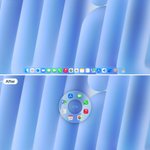
Same Mac. Same app.
Top: all the way down to the Dock, then hunting for the icon.
Bottom: Orbit Dock opens at your cursor and you're already there.
Point and go beats scroll and hunt.
How far does your cursor travel to open an app? 👀
orbitdock.app
Before: 18 apps fighting for room in the Dock.
After: 10 in the Dock, 8 in Orbit Dock, right at your cursor.
Got more? Give them another profile, one shortcut away.
How many apps are in your Dock right now? 👀
orbitdock.app

Choose how Orbit Dock opens.
Pick the animation you like, or turn motion off and it simply appears at your cursor.
Which one would you pick? 👇
orbitdock.app
One Orbit Dock for work, another for the evening.
A dedicated profile for every workflow with its own apps, files, folders, and custom shortcuts.
orbitdock.app

