

An indie app developer. Booklover (PDF/CBZ/CBR reader for iOS) / Haste (Search utility for macOS).
Japan
Joined January 2015
- Tweets497
- Following0
- Followers78
- Likes29







📚Booklover v3.9.3 is out. This version supports iPhone Duo alongside several miscellaneous fixes and improvements. If you have ideas on how to make the most of its form factor or spot any issues while using it, please let us know.

Booklover, an eBook (PDF/ZIP/CBZ) management and reader app for iOS/iPadOS, is available on the App Store. apps.apple.com/us/app/booklo…
📚Booklover v3.9.2 is out. It fixes issues following the iOS 27 adaptation, alongside stability improvements.
Continuous navigation across adjacent books is now disabled by default. It can be enabled in Reader Settings > Moving Between Books.

📚Booklover v3.9 now supports context menus when multiple books are selected in the library.
Long-press any selected book cover to open a menu that applies to all selected books.

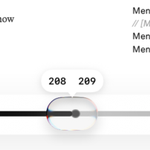
📚Booklover v3.9.1 improves the magnifier (loupe) tool:
- Slider can now be dragged along edges
- Alignment between slider handle and magnifier focus area is now exact
- Magnifier is now supported in the Page Cropping view as well

📚Booklover v3.9: A new "Select" button is in the top left of the context menu when long-pressing a book in the library.
Now you can switch to selection mode without having to reach for the top-right corner of the screen.

📚 Booklover v3.9.1 is out. This version fixes issues following the iOS 27 update and includes several helpful improvements. Please update for a smoother reading experience.

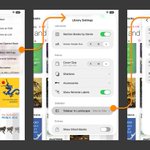
📚Booklover v3.9: Sidebar Settings
In landscape mode, keep the sidebar visible next to the library. Configure this via "..." -> "Library Settings" -> "Sidebar in Landscape". You can also choose whether to shrink book covers or maintain their size when the sidebar is visible.

📚Booklover v3.9: Slider v2
Improved page slider usability. Page numbers now stay visible above the slider during scrolling for clearer feedback. In double-page spread layout, page numbers for both the left and right pages are displayed.

📚Booklover v3.9.0 is out. This version fully supports iOS/iPadOS 27 and Liquid Glass, alongside several usability refinements.

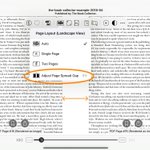
📚Booklover v3.8.4 - Adjust Page Spread Gap
Try "Adjust Page Spread Gap" under "Page Layout" in double-page spread layout. It lets you fine-tune the gap for a more comfortable reading experience (*With image-rendered pages only).


📚Booklover v3.8.4 is out. You can now adjust page spacing when reading in double-page spread layout (image-rendered pages only). This update also includes minor improvements and bug fixes.
📚Booklover v3.8.x - Enhanced Contrast Adjustment (v2)
We've improved the Contrast Filter to correct yellowing, paper textures, and black tones while reading. With the new gamma slider, you can fine-tune contrast while preserving natural gradients.

📚Booklover v3.8.x - Side Menu Improvements
We have improved the side menu. The new "Formats" section lets you view your books categorized by file format. You can also tap the chevron (arrow) on the right edge of a section header to collapse or expand it.

📚Booklover v3.8.3 - Genre/Tag Filtering
Filter items in the list by typing into the text field at the top of the Genre/Tag editor. Use this to easily assign your growing list of genres and tags. You can also add a new one using the "Add" button on the right.

📚Booklover v3.8.3 - "Locate in All Books" for Search Results
While search results are displayed in the library, long-press a book cover to find "Locate in All Books" in the context menu. This navigates the view directly to where that book is located in "All Books".

📚Booklover v3.8.3 - Context Menu Support for Selection
While selecting books in the library, long-press any selected book to open a context menu for your current selection.

📚Booklover v3.8.3 is out. This update includes a few subtle but powerful usability improvements - such as long-press menu support for single/multiple selected books - along with several bug fixes.
Booklover, an eBook (PDF/ZIP/CBZ) management and reader app for iOS/iPadOS, is available on the App Store. apps.apple.com/us/app/booklo…
📚Booklover v3.8 - Enhanced Cover Image Editor (1):
We've given the Cover Image Editor a major upgrade with some handy features to make editing book covers even easier. We'll share more about these new features in replies over the coming days.

📚Booklover v3.8 - Enhanced Cover Image Editor (6):
Select All button. Tap the button at the top right of the editor to select the entire source image. No need to drag the selection handles individually.


