RoByte: Roku Remote (@robyteapp) header
RoByte: Roku Remote (@robyteapp) profile picture

Control your Roku with your phone for free. No setup required. Get it today. 👇

Joined April 2011
Photo by RoByte: Roku Remote (@robyteapp)Photo by RoByte: Roku Remote (@robyteapp)Photo by RoByte: Roku Remote (@robyteapp)Photo by RoByte: Roku Remote (@robyteapp)Photo by RoByte: Roku Remote (@robyteapp)Photo by RoByte: Roku Remote (@robyteapp)Photo by RoByte: Roku Remote (@robyteapp)Photo by RoByte: Roku Remote (@robyteapp)Photo by RoByte: Roku Remote (@robyteapp)Photo by RoByte: Roku Remote (@robyteapp)
🚨 We're aware that RoByte is not working for some users. Roku recently updated their TVs that blocks 3rd party apps from working. To fix this, go into your TV's Settings > System > Advanced System Settings > Control by mobile apps > Change this to "Enabled".
76
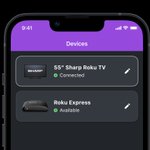
In the latest version of RoByte for iPhone, we've redesigned the Devices page that has smarter Roku names, an icon of the device, and a connection status. We hope you enjoy this update!
1
1
Hi Amanda, what Roku model do you have? Some models don’t support volume adjustments.
1
Replying to @caley_caroline
Hi Caroline, sorry it’s not working with your setup. If you’d like a refund, please contact Apple as they don’t allow developers to issue them.
1
2
Replying to @AudaciousLex
You’ll need to check your emails for a receipt from “Google Play”. It will have your order ID in there
Replying to @AudaciousLex
Sure, what’s your Order ID (shown on your receipt from Google Play)
Replying to @iDeafGeek
Hi Jared, It’s just something we haven’t had time to add to iOS yet
1
1
Replying to @y2r2r05
Ok so ya with those 2 channels, no roku apps are able to use the keyboard.
1
Replying to @y2r2r05
Does the keyboard work in other channels? If so, then that means Amazon has also blocked keyboard entry. Unfortunately when they do that it’s completely out of my control.
2
Replying to @y2r2r05
Are you trying it in the YouTube channel? That channel doesn’t allow keyboard entry.
1
Replying to @destinyraynor
Does the official roku app work?
Replying to @destinyraynor
Can you confirm your Roku has connection to the wifi?
1
Replying to @jd97062161
Hi, so Youtube actually blocks keyboard entry for some reason. It’s completely out of my hands. Keyboard works on all other channels.
Replying to @ashwortr
That’s a good idea. One possible issue is that it would only work if you have a Roku TV. Many of my users don’t so I would get tons of angry reviews about it not working. I get lots of angry comments about having a power button that doesn’t work on non Roku TVs
1
Replying to @robertomalheir3
Is your Roku connected to the same wifi network as your phone?
3
1
Replying to @southboundand
Unfortunately YouTube blocks keyboard entry from all Roku apps
Replying to @Huffproductions
Does the directional pad or play/pause all work? What specifically isn’t working on your Roku?