

A tool that lets you prove any file is authentic and unchanged by anchoring its cryptographic hash onchain | Built on Solana | Now available on the App Store
Joined December 2021
- Tweets437
- Following22
- Followers644
- Likes4.7K





Pinned Tweet
Introducing snaproot, a blockchain-based tool that helps individuals and organizations verify that their digital files haven’t been altered.
Every year, millions of digital files are forged, altered, or fraudulently reproduced, including photos, videos, documents, and certificates, making it harder to know what is real online.
The main problem isn’t the alteration itself, but proving what is original once a file has been altered, and that’s where disputes begin.
People are forced to rely on assumptions instead of evidence, leading to disagreements, loss of trust, and decisions being made without clear proof of what is real.
To solve the problem of proving what is original in a world where digital files can be easily altered, we built @snaprootbyCH.
Here is what it is all about 🧵
🤖 Made with AI


snaproot retweeted

Damn what a great service by @Courtyard_io ! Crazy cards in my #Pokémon collection 🔥

Just snaproot It.
If you captured it, just snaproot it.
If it's important, just snaproot it.
If you don't want questions later, just snaproot it.
Before anyone asks for proof, just snaproot it.
All you need to do is just snaproot it.

4
48
The reason snaproot makes use of SHA-256 instead of uploading your files to the blockchain is because the goal isn't to store your photos, videos, or documents.
The goal is to make it possible to verify them later.
SHA-256, short for Secure Hash Algorithm 256-bit, is a cryptographic hashing algorithm that processes a digital file and produces a fixed-length string of 64 hexadecimal characters called a hash.
A hash is a cryptographic representation of a file's contents.
Every file has its own hash, and because the hash is generated from the file itself, even the smallest change to that file produces a completely different result.
For example, changing a single pixel in a photo, trimming one second from a video, or adding a single character to a document is enough to generate a new hash.
This ability to reliably detect even the smallest changes is exactly why snaproot uses SHA-256.
Using SHA-256 makes it possible to verify whether a photo, video, document, or any other digital file still matches the version that was registered with snaproot, without storing the file on the blockchain.
By relying on SHA-256, snaproot gives users a reliable way to verify that the files they're checking still match the version registered with Snaproot, while allowing them to keep the original files under their own control.
🤖 Made with AI

4
38

One day, “Can you prove this is the original?” will be just as common as “Can you send me the link?”
When that day comes, the difference won’t be who tells the most convincing story. It will be who can provide proof.
While others will be busy trying to explain why their photos, videos, or documents should be trusted, snaproot users will be able to prove that they’re sharing the exact file they originally captured, backed by cryptographic proof.

5
33
Me acting calm because I already snaprooted the photo before the allegations started.
You can never be caught slacking with snaproot.
Get started today by downloading the app on the App Store.
4
48
It’s a new week, and with it comes a fresh chance to do a little better than you did last week.
Whether it’s learning something new, building something cool, or simply taking better care of yourself, the little things you do consistently often have the biggest impact.
Here are 7 things to do this week:
→ Call someone you’ve been meaning to check on.
→ Read at least 20 pages of a book.
→ Build something on @solana or support someone who is.
→ Spend less time scrolling and more time creating.
→ Stay hydrated by drinking enough water
→ Touch grass more often
→ Take a photo of a moment you’ll want to remember years from now, then create a snaproot proof for it.
→ Stay hydrated and take care of your health.
Have a beautiful and productive week.

2
5
68
snaproot retweeted
Question to you: How do you verify and proof photos and videos?
I might have a solution for this problem.
@snaprootbyCH
A few years from now, people will tell their children about the day Lionel Messi, the football legend, created one of the most unforgettable moments of the 2026 FIFA World Cup.
They’ll say, “I was there, I saw it happen, and I captured it,” but only a few will be able to prove that the photos and videos they are showing their children are the very ones they captured that day.
By then, AI will have made “seeing is believing” a thing of the past and a video may no longer be enough for them to believe you were there when Messi created that unforgettable World Cup moment.
You’ll need a way to verify that the photos and videos haven’t been altered since they were first recorded, and that’s exactly what @snaprootbyCH is built to do.
Rather than trying to determine whether a photo or video was created with AI, snaproot verifies whether a file has remained unaltered since it was first recorded or registered.
So when you show your children those photos and videos years later and they ask, “Were you really there?”, you won’t just have memories to rely on.
You’ll have a way to show that the photos and videos you’re sharing are the same ones you captured that day and that they haven’t been altered since.

1
5
121
It’s important to understand that snaproot is not an AI-generated image detector.
It doesn’t tell you whether an image was created with AI or captured by a camera.
It doesn’t analyze visual content, look for AI artifacts, or classify images as “real” or “fake.”
Instead, snaproot focuses on something different, which is making it possible to verify whether a file has remained unaltered.
As AI makes it easier to create and manipulate images, it becomes harder to know whether a file has been altered.
Rather than analyzing an image’s contents to determine whether it’s AI-generated, Snaproot focuses on whether the file still matches its original state.
It does this by generating a cryptographic SHA-256 hash of the file and anchoring that hash onchain.
Later, whenever the file needs to be verified, a new hash is generated and compared with the one anchored onchain.
If the hashes match, the file has remained unaltered.
If they don’t, the file has been modified, even if the difference isn’t visible to the human eye.
The goal isn’t to identify AI-generated images.
The goal is to make it possible to verify whether a file has remained unaltered.
🤖 Made with AI

1
5
96
snaproot retweeted
The last World Cup where Messi, Ronaldo, Neymar and future star Lamine Yamal played Futter together 👀⚽️
Gotta #snaproot this moment @snaprootbyCH
A file doesn’t have to be heavily edited before it’s considered altered.
A single edited pixel is enough to change the entire file and that is because digital files are identified by more than what you can see.
Behind every image are millions of pixels that create the picture, color data that tells each pixel what color it should be, information about the image’s size and dimensions, metadata such as when and where the photo was taken (if available), and the file structure that organizes all of this so the image can be stored and displayed correctly.
Even the smallest change to any of this information creates a different version of the file, and most of the time you’d never notice.
So while the human eyes may see no difference, the file itself is no longer the same.
@snaprootbyCH helps you uncover that difference by verifying whether the file still matches the original version.
It does this by creating a SHA-256 cryptographic hash of the file when it is first captured/uploaded and anchoring it on the Solana blockchain.
Once it’s done, any change made afterward can be detected immediately.
As a user, this means you can confirm whether a file is still exactly as it was when it was created, or if it has been altered in any way even if the change is visually impossible to notice.
Plus, you can also upload your own file and instantly create an onchain proof of its original state, so it can later show whether the file has been altered.
🤖 Made with AI

4
10
141


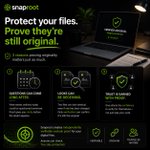
We protect our most important digital files by storing them safely, backing them up, and keeping them secure.
What happens if someone asks you to show that one of them hasn’t been altered and is still the original?
That’s not a situation you want to prepare for at the last minute.
Here are 3 reasons being able to show they haven’t been altered is just as important as backing them up.
→ Files can be questioned long after they’re created.
A photo, contract, report, or certificate might not seem important today but weeks, months, or even years later, someone may ask whether it’s the original or if it has been altered.
Knowing you can show it’s the original before it’s questioned gives you peace of mind.
→ Looking authentic doesn’t prove authenticity.
Two files can look exactly the same, even if one has been modified.
When there are no visible clues, relying on appearance isn’t enough.
You need a way to show that a file still matches the original and that’s what snaproot helps you do
→ Trust is stronger when it’s backed by proof.
Whether you’re sharing a file with a client, colleague, partner, or institution, giving others a way to independently check the file builds confidence instead of asking them to simply take your word for it.
With snaproot, you can create independently verifiable onchain proof for your digital files, so anyone can check whether they still match the original version.
🤖 Made with AI

1
2
71
To get started, download the snaproot app from the Appstore today
apps.apple.com/ng/app/snapro…
It takes less than 5 minutes to create your account, and your first 10 file snaproot are free.
1
45
Can you tell which one is original?
One image is original and the other has been edited.
You probably can’t, and that’s because there are no obvious visual clues to reveal which is which.
The difference may lie within the file itself, such as its metadata, timestamps, or other digital information that can change when a file is modified, which is why relying on what you see isn’t enough.
With snaproot, you don’t have to rely on appearances.
You can create independently verifiable proof that allows anyone to check whether a file has been altered.

2
54
The need to verify digital files like photos, videos, documents, and certificates isn’t limited to one profession.
As more industries rely on digital files, being able to prove a file hasn’t been altered is becoming increasingly important.
Here are five examples of what you can verify with snaproot:
→ Photos & Videos
Whether it’s evidence, documentation, or important memories, snaproot helps verify that photos and videos remain unaltered.
→ Legal Documents
Create independently verifiable proof for contracts, agreements, and other legal documents, making it easy to verify they haven’t been altered.
→ Construction & Site Documentation
Verify construction progress, site inspections, and project documentation with proof that can be checked at any time.
→ Artwork & Creative Files
Protect the integrity of artwork, designs, photographs, videos, and other creative files with independently verifiable proof.
→ Business Records
Verify invoices, reports, certificates, compliance documents, and other business files.
Whether you’re documenting, creating, or sharing digital files, snaproot helps you create independently verifiable proof that they haven’t been altered.
To get started, download the snaproot app from the Appstore today
It takes less than 5 minutes to create your account, and your first 10 file snaproot are free.
🤖 Made with AI
