

MCP App framework and MCP testing framework. Build, test, ship ChatGPT Apps and Claude Connectors. $SUNPEAK 0x5e09F8fb59a1c336959ABC6D74e227806D710FFE
Joined November 2026
- Tweets37
- Following6
- Followers173
- Likes38





Pinned Tweet
sunpeak is an open-source (MIT) MCP App framework and MCP testing framework. MCP Apps are cross-platform, so sunpeak is also a ChatGPT App framework and a Claude Connector framework.
sunpeak.ai
$SUNPEAK × @ponsdotfamily
CA: 0x5e09f8fb59a1c336959abc6d74e227806d710ffe
It ships a local inspector with replicated ChatGPT and Claude runtimes, an MCP dev server, UI components, 20+ typed React hooks and a testing framework for E2E, visual regression and multi-model evals.

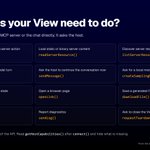
Which API should your MCP App View call?
Fresh server data or an action: callServerTool(). State the model should see next turn: updateModelContext(). Continue the chat now: sendMessage(). Save a file: downloadFile().
The full map is in the picture.

Every inspector state is a URL.
?simulation=show-albums&theme=dark renders mock data right away. ?tool=show-albums waits for Run and calls the real handler. Add &sidebar=false for the app viewer only.
Handy for programmatic testing.
The sunpeak Inspector also ships as a standalone React component.
Drop it into any React app and render any MCP App, without the CLI dev server or the simulation file layout.

MCP App HTML comes from your MCP server and runs inside an AI host. Before you ship one:
✓ The UI resource uses ui:// and text/html;profile=mcp-app.
✓ CSP lists only the external origins the built View loads.
✓ The View works when optional browser permissions are denied.
✓ Every View-callable tool includes "app" visibility.
✓ Every tool validates input and enforces server-side authorization.
✓ Destructive calls are honestly annotated and safe against retries.
✓ Model-safe data goes in content or structuredContent. View-only data goes in _meta.
✓ Result strings render through escaped text APIs.
✓ Partial tool input cannot trigger tool calls, writes, or other side effects.
✓ The app works in a real separate-origin sandbox, not only a same-origin development iframe.
One line to remember: visibility is not authorization. A button click is still an untrusted tools/call request.
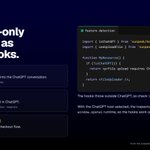
Uploads, modals and instant checkout in ChatGPT, as typed React hooks. Check isChatGPT() first and show a fallback on other hosts.

Tool handlers are plain async functions, so you can unit test them directly.
pnpm test:unit runs them with Vitest and happy-dom. No inspector, no browser.
npx sunpeak new sunpeak-app review,map
Your project starts with working resources in src/resources/. Review handles confirmations for code changes, purchases, posts and bookings. Map shows points of interest.
Both adapt to light and dark themes, and both are yours to edit.
Your MCP server needs login? sunpeak implements the resource-server side of MCP OAuth.
What sunpeak does
+ Publishes OAuth 2.0 Protected Resource Metadata at /.well-known/oauth-protected-resource
+ Returns RFC 6750 bearer challenges to unauthenticated requests
+ Returns a 403 challenge for a scope upgrade when your auth function reports insufficient_scope
+ Passes verified token data to your tool handlers
What your authorization server still owns
+ Login and consent
+ Client registration
+ Token issuance and refresh tokens
You export two things from src/server.ts: oauth (resource, authorization servers, scopes) and auth (your token check).
The inspector follows the same MCP OAuth discovery flow, with PKCE and state validation.
content, structuredContent or _meta?
The model reads the first two. _meta goes only to the Host and your View, which makes it the place for component-only IDs and lookup data.

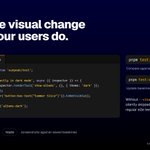
Visual regression tests for MCP Apps: screenshots across themes, display modes and hosts, compared against saved baselines.
pnpm test:visual

useAppState works like React's useState, but every update is pushed to the host, so the AI model can see it on the next message.
Use it for user decisions, selections, or any state the model should be aware of.
pnpm build turns every resource into a self-contained HTML file. pnpm start launches a production MCP server.
Or mount it yourself: createMcpHandler for Express, Fastify or a plain http server, createHandler for Cloudflare Workers, Deno, Bun and Vercel Edge.

The inspector is fast, deterministic and free. But what about the real host?
What do live tests check?
They open your browser, go to ChatGPT, send messages that trigger tool calls against your MCP server, and verify the rendered app with Playwright assertions. That catches what inspector tests cannot: real MCP connection behavior, actual LLM tool invocation, host-specific iframe rendering and production resource loading.
What do I write?
Only assertions. sunpeak handles auth, message sending and iframe access:
const app = await live.invoke('show me the weather in Austin');
await expect(app.locator('h1')).toBeVisible();
How do I run them?
Start a tunnel (ngrok http 8000), then pnpm test:live. Each test gets its own chat window, and tests run fully in parallel.
What do I need?
A ChatGPT account with developer-mode app support, a tunnel tool, and a browser logged into chatgpt.com.
Inline, picture-in-picture or fullscreen. Light or dark. Mobile, tablet or desktop.
The sunpeak inspector renders your MCP App in each display mode the host supports, on localhost, with no host account.
A simulation is a JSON file. It names the tool, the user message, the tool input and the tool result, and the inspector renders your resource in exactly that state.

No sunpeak project needed.
Inspect any running MCP server:
npx sunpeak inspect --server http://localhost:8000/mcp
Or start a server and inspect it in one step:
npx sunpeak inspect --server python my_server.py
Python, TypeScript, Go, anything. The inspector renders your resources exactly as ChatGPT and Claude would: same display modes, themes, safe areas and conversation chrome.
From the sidebar, toggle ChatGPT or Claude, light or dark, mobile, tablet or desktop. Edit tool input and output live. Every setting is reflected in the URL, so ?host=claude opens the Claude runtime directly.
ChatGPT Apps are now published as Plugins.
A plugin can contain an MCP-backed app, skills, or both. That changes where you add and submit a ChatGPT App. It does not change the app itself: you still build it with MCP Apps or the OpenAI Apps SDK and expose its tools and resources through an MCP server.
To add a custom app in development:
Settings → Security and login → Developer mode (once)
Sidebar → Plugins → + → app name, MCP connection, description, icon
For public distribution, submit an app-only plugin through the OpenAI plugin submission portal and choose With MCP. Approved apps appear in the plugin directory in ChatGPT and Codex.
Built with sunpeak, the same app also runs in Claude.

Write your MCP App once. Core APIs like useToolData and useHostContext stay the same on ChatGPT, Claude and any MCP host.
Host-specific features are opt-in imports.