

Entrepreneur | Father | Life long learner, Advertising,Ai, Stock, Crypto, FIRE Content Moderator🇹🇭,Generalist Expert 🔬
Thailand
Joined February 2026
- Tweets1.8K
- Following787
- Followers647
- Likes469
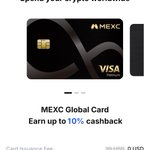


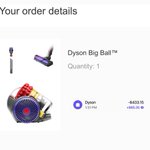





@EthenaPay Hi, could you please look into my pending $749.96 refund and help escalate this with the support team? It has been pending since 8 November, and I would really appreciate a faster response and resolution. Thank you.
68
GenZstyleTh 🌐 ☄ 🚀 🛡️ retweeted

Here Is A Simple List of Security Habits That WIll Put You in the Top 0.1%
Here is a list of simple to follow habits that can make a big difference in protecting your privacy and security online.
These practical habits come from Andrej Karpathy @karpathy - one of the leading voices in AI.
>> 1. Use a password manager.
Create a unique, strong password for every account and let the manager fill them in for you. That way, one leaked password won’t unlock your other accounts.
>> 2. Protect important accounts with a security key.
A physical key adds another step to sign-in and is harder to steal than a texted code, which can be vulnerable to SIM-swap scams. See @Yubico
>> 3. Turn on biometrics where useful.
Use Face ID or similar features to protect access to apps such as your password manager.
>> 4. Treat security questions like passwords.
Use random answers and save them in your password manager instead of sharing real personal details.
>> 5. Encrypt your computer’s disk.
Turn on the built-in encryption feature, such as FileVault on Mac, so stolen computer doesn’t make your files easy to access.
>> 6. Be cautious with smart home devices.
Internet-connected gadgets can collect data and create more ways for attackers to get into your home network.
>> 7. Use an encrypted messaging app.
Consider using privacy-focused messaging app Signal @signalapp and turn on disappearing messages.
>> 8. Choose privacy-focused browser and search tools.
Andrej recommends @brave for browsing and Brave Search, with Google as a fallback when needed.
>> 9. Use separate or limited-use cards for online purchases.
This can reduce the impact of a merchant’s data breach and help limit unexpected charges.
>> 10. Avoid sharing your home address.
A virtual mailing address can give you a more private way to receive mail and packages.
>> 11. Be careful with email
Don’t click links in unexpected messages; go to the service’s website directly. Consider disabling automatic image loading to reduce email tracking.
>> 12. Use a VPN
A VPN can hide your IP address from some services.
>> 13. Block ads and trackers.
A DNS-based blocker can prevent many known ad and tracking domains from loading.
>> 14. Monitor what your apps connect to.
A network monitor can show which apps send data online and help you spot unexpected activity.
Stay Private!

I wrote a quick new post on "Digital Hygiene".
Basically there are some no-brainer decisions you can make in your life to dramatically improve the privacy and security of your computing and this post goes over some of them. Blog post link in the reply, but copy pasting below too.
Every now and then I get reminded about the vast fraud apparatus of the internet, re-invigorating my pursuit of basic digital hygiene around privacy/security of day to day computing. The sketchiness starts with major tech companies who are incentivized to build comprehensive profiles of you, to monetize it directly for advertising, or sell it off to professional data broker companies who further enrich, de-anonymize, cross-reference and resell it further. Inevitable and regular data breaches eventually runoff and collect your information into dark web archives, feeding into a whole underground spammer / scammer industry of hacks, phishing, ransomware, credit card fraud, identity theft, etc. This guide is a collection of the most basic digital hygiene tips, starting with the most basic to a bit more niche.
Password manager. Your passwords are your "first factor", i.e. "something you know". Do not be a noob and mint new, unique, hard passwords for every website or service that you sign up with. Combine this with a browser extension to create and Autofill them super fast. For example, I use and like 1Password. This prevents your passwords from 1) being easy to guess or crack, and 2) leaking one single time, and opening doors to many other services. In return, we now have a central location for all your 1st factors (passwords), so we must make sure to secure it thoroughly, which brings us to...
Hardware security key. The most critical services in your life (e.g. Google, or 1Password) must be additionally secured with a "2nd factor", i.e. "something you have". An attacker would have to be in possession of both factors to gain access to these services. The most common 2nd factor implemented by many services is a phone number, the idea being that you get a text message with a pin code to enter in addition to your password. Clearly, this is much better than having no 2nd factor at all, but the use of a phone number is known to be extremely insecure due to the SIM swap attack. Basically, it turns out to be surprisingly easy for an attacker to call your phone company, pretend they are you, and get them to switch your phone number over to a new phone that they control. I know this sounds totally crazy but it is true, and I have many friends who are victims of this attack. Therefore, purchase and set up hardware security keys - the industrial strength protection standard. In particular, I like and use YubiKey. These devices generate and store a private key on the device secure element itself, so the private key is never materialized on a suspiciously general purpose computing device like your laptop. Once you set these up, an attacker will not only need to know your password, but have physical possession of your security key to log in to a service. Your risk of getting pwned has just decreased by about 1000X. Purchase and set up 2-3 keys and store them in different physical locations to prevent lockout should you physically lose one of the keys. The security keys support a few authentication methods. Look for "U2F" in the 2nd factor settings of your service as the strongest protection. E.g. Google and 1Password support it. Fallback on "TOTP" if you have to, and note that your YubiKeys can store TOTP private keys, so you can use the YubiKey Authenticator app to access them easily through NFC by touching your key to the phone to get your pin when logging in. This is significantly better than storing TOTP private keys on other (software) authenticator apps, because again you should not trust general purpose computing devices. It is beyond the scope of this post to go into full detail, but basically I strongly recommend the use of 2-3 YubiKeys to dramatically strengthen your digital security.
Biometrics. Biometrics are the third common authentication factor ("something you are"). E.g. if you're on iOS I recommend setting up FaceID basically everywhere, e.g. to access the 1Password app and such.
Security questions. Dinosaur businesses are obsessed with the idea of security questions like "what is your mother's maidan name?", and force you to set them up from time to time. Clearly, these are in the category of "something you know" so they are basically passwords, but conveniently for scammers, they are easy to research out on the open internet and you should refuse any prompts to participate in this ridiculous "security" exercise. Instead, treat security questions like passwords, generate random answers to random questions, and store them in your 1Password along with your passwords.
Disk encryption. Always ensure that your computers use disk encryption. For example, on Macs this total no-brainer feature is called "File Vault". This feature ensures that if your computer gets stolen, an attacker won't be able to get the hard disk and go to town on all your data.
Internet of Things. More like @internetofshit. Whenever possible, avoid "smart" devices, which are essentially incredibly insecure, internet-connected computers that gather tons of data, get hacked all the time, and that people willingly place into their homes. These things have microphones, and they routinely send data back to the mothership for analytics and to "improve customer experience" lol ok. As an example, in my younger and naive years I once purchased a CO2 monitor from China that demanded to know everything about me and my precise physical location before it would tell me the amount of CO2 in my room. These devices are a huge and very common attack surface on your privacy and security and should be avoided.
Messaging. I recommend Signal instead of text messages because it end-to-end encrypts all your communications. In addition, it does not store metadata like many other apps do (e.g. iMessage, WhatsApp). Turn on disappearing messages (e.g. 90 days default is good). In my experience they are an information vulnerability with no significant upside.
Browser. I recommend Brave browser, which is a privacy-first browser based on Chromium. That means that basically all Chrome extensions work out of the box and the browser feels like Chrome, but without Google having front row seats to your entire digital life.
Search engine. I recommend Brave search, which you can set up as your default in the browser settings. Brave Search is a privacy-first search engine with its own index, unlike e.g. Duck Duck Go which basically a nice skin for Bing, and is forced into weird partnerships with Microsoft that compromise user privacy. As with all services on this list, I pay $3/mo for Brave Premium because I prefer to be the customer, not the product in my digital life. I find that empirically, about 95% of my search engine queries are super simple website lookups, with the search engine basically acting as a tiny DNS. And if you're not finding what you're looking for, fallback to Google by just prepending "!g" to your search query, which will redirect it to Google.
Credit cards. Mint new, unique credit cards per merchant. There is no need to use one credit card on many services. This allows them to "link up" your purchasing across different services, and additionally it opens you up to credit card fraud because the services might leak your credit card number. I like and use privacy dot com to mint new credit cards for every single transaction or merchant. You get a nice interface for all your spending and notifications for each swipe. You can also set limits on each credit card (e.g. $50/month etc.), which dramatically decreases the risk of being charged more than you expect. Additionally, with a privacy dot com card you get to enter totally random information for your name and address when filling out billing information. This is huge, because there is simply no need and totally crazy that random internet merchants should be given your physical address. Which brings me to...
Address. There is no need to give out your physical address to the majority of random services and merchants on the internet. Use a virtual mail service. I currently use Earth Class Mail but tbh I'm a bit embarrassed by that and I'm looking to switch to Virtual Post Mail due to its much strong commitments to privacy, security, and its ownership structure and reputation. In any case, you get an address you can give out, they receive your mail, they scan it and digitize it, they have an app for you to quickly see it, and you can decide what to do with it (e.g. shred, forward, etc.). Not only do you gain security and privacy but also quite a bit of convenience.
Email. I still use gmail just due to sheer convenience, but I've started to partially use Proton Mail as well. And while we're on email, a few more thoughts. Never click on any link inside any email you receive. Email addresses are extremely easy to spoof and you can never be guaranteed that the email you got is a phishing email from a scammer. Instead, I manually navigate to any service of interest and log in from there. In addition, disable image loading by default in your email's settings. If you get an email that requires you to see images, you can click on "show images" to see them and it's not a big deal at all. This is important because many services use embedded images to track you - they hide information inside the image URL you get, so when your email client loads the image, they can see that you opened the email. There's just no need for that. Additionally, confusing images are one way scammers hide information to avoid being filtered by email servers as scam / spam.
VPN. If you wish to hide your IP/location to services, you can do so via VPN indirection. I recommend Mullvad VPN. I keep VPN off by default, but enable it selectively when I'm dealing with services I trust less and want more protection from.
DNS-based blocker. You can block ads by blocking entire domains at the DNS level. I like and use NextDNS, which blocks all kinds of ads and trackers. For more advanced users who like to tinker, pi-hole is the physical alternative.
Network monitor. I like and use The Little Snitch, which I have installed and running on my MacBook. This lets you see which apps are communicating, how much data and when, so you can keep track of what apps on your computer "call home" and how often. Any app that communicates too much is sus, and should potentially be uninstalled if you don't expect the traffic.
I just want to live a secure digital life and establish harmonious relationships with products and services that leak only the necessary information. And I wish to pay for the software I use so that incentives are aligned and so that I am the customer. This is not trivial, but it is possible to approach with some determination and discipline.
Finally, what's not on the list. I mostly still use Gmail + Gsuite because it's just too convenient and pervasive. I also use 𝕏 instead of something exotic (e.g. Mastodon), trading off sovereignty for convenience. I don't use a VoIP burner phone service (e.g. MySudo) but I am interested in it. I don't really mint new/unique email addresses but I want to. The journey continues. Let me know if there are other digital hygiene tips and tricks that should be on this list.
Link to blog post version in the reply, on my brand new Bear ʕ•ᴥ•ʔ blog cute 👇

The last time I saw a 12% yield was with Anchor Protocol on the Terra chain. Many people ended up losing all their money. I hope history doesn’t repeat itself.

Introducing Earn+: 12% rewards on your dollars in a single tap.
Available now for Pro and VIP users and rolling out to all Ethena Pay users in the coming days.
29
The last time I saw a 12% yield was with Anchor Protocol on the Terra chain. Many people ended up losing all their money. I hope history doesn’t repeat itself.
1
12
GenZstyleTh 🌐 ☄ 🚀 🛡️ retweeted

4 data leaks reported today:
1. Coinbase's vendor Amplitude exposed some users’ contact data (funds unaffected).
2. Bithumb (Korea) had user data leaks.
In TradFi, two securities firms in Korea leaked data:
3. Mirae Asset
4. Daishin Securities
You can't prevent a leak, but you can protect yourself.
Leaked exchange data (names, emails, phone numbers, addresses, ID documents, transaction history) is mostly used for phishing, SIM swapping, and social engineering.
Reduce info you share
- Use a unique email alias for each exchange (SimpleLogin, Apple Hide My Email, etc). A leak then can't be linked to your other accounts, and you can spot which service leaked.
- Share only what's required. Don't add optional profile details.
- Use a dedicated phone number (a VoIP or secondary SIM) for exchange accounts if you can, since leaked numbers are the main route to SIM swaps.
Lock down the account
- Use a unique, long password from a password manager.
- Turn on hardware security keys (YubiKey) or passkeys, or at least an authenticator app.
- Avoid SMS 2FA.
- Enable withdrawal address whitelisting and a withdrawal time lock if the exchange offers them.
- Set up an anti-phishing code, which puts a code you choose in every legitimate email from the exchange.
- Review active sessions and API keys regularly. Delete any API keys you don't use.
- Restrict API keys to withdraw-disabled and IP-whitelisted.
Defend against
- SIM swapping: Ask your carrier to add a port-out PIN or number lock.
- Phishing and impersonation: Assume anyone who contacts you about your account, "security issues," or "refund recovery" is a scammer, even if they know your name, balance, or recent trades.
- Exchange support staff don't ask for your password, 2FA codes, or seed phrase.
- Never click links in emails or texts. Go to the site yourself.
- "Wrench attacks": Leaked addresses plus holdings data have led to real-world extortion and robberies. Don't publicize your holdings, and keep large balances out of anything tied to your home address if you can.
If a breach is announced
1. Change the exchange password and any other account that reused it.
2. Check haveibeenpwned.com for your email address.
3. Revoke API keys and active sessions.
4. Review recent withdrawals and security settings.
5. Watch for phishing emails and texts that reference the breach, because scammers move fast after one.
Stay SAFU! 🙏


CZ, what about Binance offering a 2/3 multisig recovery service for BTC & ETH? 🔐
Users hold 2 keys via independent wallet providers; Binance holds the 3rd as recovery. Lose one key? Recover your funds. Binance alone can't move them.
Self-custody with a safety net. Would you build this? @cz_binance
1
93