Hello! Welcome to the official twitter page for the Hathershaw College Library. Visit to stay up-to-date on the latest library news, events, study tips & more!
- Tweets437
- Following166
- Followers133
- Likes146








ALT A NEW CHAPTER SCHOOL FUNDING We are offering some limited funding to schools to apply for. The funding is to be used on diverse and inclusive books for libraries or classrooms. We are offering seven schools £300 and one school £1000. Please see below for how to apply and please do let colleagues and other schools know. To be considered, there is a short application process. You should send the email to [email protected] In the email please outline the following: Why you believe your school will benefit from these books. What you are already doing in school to promote diversity and inclusion. If this is ‘lacking’, perhaps talk about future plans. Feel free to include photos etc. Please also include any other information that you think may mean this funding would be particularly beneficial for your setting. Any educational setting is free to apply. We would politely ask that the schools who benefitted from the last round of funding did not apply again.

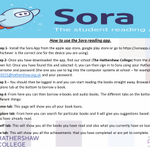
ALT Step 1- Install the Sora App from the apple app store, google play store or go to https://soraapp.com (whichever is the correct one for the device you are using). Step 2- Once you have downloaded the app, find our school (The Hathershaw College) from the drop-down list. Once you have found this and selected it, you can then sign in to Sora using your Hathershaw username and password (the one you use to log into the computer systems at school – for example – [email protected] and your password. Step 3 – You should then be logged in and you can start reading the books straight away. Browse the explore tab at the bottom to borrow a book. Step 4 -From here you can then borrow e-books and audio books. The different tabs on the bottom do different things: