

Do no harm but take no shit
White
Joined May 2024
- Tweets2.2K
- Following684
- Followers2K
- Likes3.8K






Name Cannot be Blank💀 retweeted

5 weeks of learning.
EXCEL101 was practical, interactive, and most of all fun.
We covered a lot together: from basic data entry to Functions, Descriptive Statistics, Tables, Pivot Tables, Slicers/Timeline, Pivot Chart, Power Query, Power Pivot, DAX, Wireframing..
#Excelboss

This is the account I’ll be using from now on for all my data analysis content.
I’m leaving this one inactive for some reasons,
so follow me here to stay connected.


Name Cannot be Blank💀 retweeted

THINK LIKE AN EXCEL BOSS WEEK 1 done ✅.
Unto week 2,you can still be part of this cohort.
Send me a DM
Come let's build Excel analysts @msexcel
#Excel #exceltutorial #excelmodeling #exceltips #ThinkLikeAnExcelBoss

What's your favorite data analytics task to tackle on a Saturday morning!
A) Data cleaning
B) Building dashboards
C) Querying data
D) Other (comment with your preference)

Don't feel guilty for using AI when you get stuck. asking ChatGPT to fix a broken SQL query will not make you less of an analyst. It just saves your sanity.
Nobody is giving awards for suffering through errors you could solve in minutes. Your work is judged by accuracy and speed, not by how long you stare at a red syntax message.
Leverage AI, use the tools, and learn from the answers. Keep your energy for the real battles, like understanding your data and delivering insights that matter.
Work smart.
Name Cannot be Blank💀 retweeted

Heyyyy!
I just launched my new YouTube channel Explore Data with Annie!!
If you’ve ever wanted to understand data, switch into tech, or just learn practical skills the easy way, this channel is for you.
My first video is out already, and I’d really love your support.
Please check it out, subscribe, and share with someone who might need it.
YouTube: youtu.be/ez0a3n6J87U?si=mLqK…
Name Cannot be Blank💀 retweeted
Let's be honest about something most people won't admit
you've probably spent hours watching coding tutorials, nodding along, typing exactly what the instructor types, and at the end you felt... nothing. Maybe a bit accomplished for finishing, but also kind of empty.
Here's why:you didn't learn anything. You just proved you can copy.
I know that sounds harsh, but think about it. When you follow along step-by-step, your brain is on autopilot. You're not making decisions. You're not problem-solving. You're basically a human Ctrl+C, Ctrl+V machine. And the second you close that tutorial, everything is gone. All of it.
Real learning happens in the uncomfortable middle ground where you're trying to remember what to do next, and you can't. That moment when you think, wait, why did they use a LEFT JOIN here instead of an INNER JOIN?" — that's when your brain actually wakes up.
Here's how I learn, and it should work for you, too.
After you finish a tutorial, close it. Don't rewatch it. Don't peek at the code. Instead, grab a different dataset — it could be from Kaggle, could be your own data, doesn't matter — and try to solve a similar problem from memory.
You're going to fail. You're going to forget the steps. You're going to write code that doesn't work. Perfect. That's exactly where learning lives.
When you get stuck, then go back and check. But only after you've tried. Because that struggle — that annoying, frustrating feeling is your brain actually building the skill.
You'll be slow. You'll make mistakes. You'll wonder if you learned anything at all from that tutorial. But here's what's happening: you're forcing your brain to retrieve information instead of just recognizing it. Retrieval is what builds real memory.
If this changes how you think about learning, follow me for more honest takes.

Name Cannot be Blank💀 retweeted

November Data Analysis Challenge🎉
Open to everyone😇
1st prize 100,000
2nd 70,000
3rd 30,000
Here is the dataset: github.com/getnervs/Soft-Dri…
Check here for submission guidelines: github.com/getnervs/Soft-Dri…
Deadline: 30th November
Make sure you follow the guidelines


Name Cannot be Blank💀 retweeted

Listen…
If you’re in tech right now and the money hasn’t started coming in yet, I want you to hear me clearly:
You are not failing.
You are building.
Tech is not the kind of journey where you plant a seed today and harvest tomorrow.
Tech is the kind of journey where you plant a seed, water it every single day, and one day, out of nowhere, it becomes a forest.
Right now you’re learning.
Right now you’re debugging.
Right now you’re copying code from StackOverflow.
Right now you’re watching YouTube tutorials at 1am because the bug is embarrassing your destiny.
Right now you’re applying for jobs and nobody is replying.
Right now you’re wondering if you chose the wrong path.
But hear me:
Every skill you are building is compounding.
Every frustration is part of your foundation.
Every late night is shaping your future income.
Tech doesn’t reward the fastest.
Tech rewards the most consistent.
There are people earning millions today because they refused to quit during the season you’re currently in.
So don’t look at your bank account and assume that’s your value.
Don’t look at your current situation and assume that’s your future.
Your time is coming.
Every line of code you write…
Every dashboard you build…
Every SQL query you break and fix again…
Every project you complete…
…is pushing you closer to the version of you that gets paid effortlessly.
You’re not behind.
You’re in progress.
Stay hungry.
Stay consistent.
Stay learning.
Stay applying.
Stay improving.
Because one day, the same skill that is stressing you today…
Will be the skill that changes your life completely.
Keep going.
Your breakthrough in tech is loading.
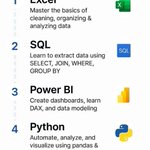
SQL isn’t scary at all.
Most of the time you’re just doing a few simple things:
-Get data with SELECT
-Filter what you need with WHERE
-Combine tables with JOIN
-Summarize everything with GROUP BY
Repeat and rinse.


Name Cannot be Blank💀 retweeted
Femi: This IF Function in Excel… how does it really work?
Me: Excel’s IF Funtion is basically like a judge sitting in your cell. You give it a question, it looks at the situation, and it decides what answer to return.
You’re not doing magic. You’re just saying, “Excel, check this thing. If it’s true, say this. If it’s not, say that.”
That’s the whole idea.
Say you want to check if the number in A1 is greater than 5.
If it is, Excel should say “YES.”
If it’s not, it should say “NO.”
Here’s the formula:
`=IF(A1>5,"YES","NO")`
Nothing complicated. It’s built on three simple parts:
1. What do you want Excel to check
2. What to show if the condition is true
3. What to show if it’s false
Think of it like asking a friend, is the weather hot?
If they say yes, you wear a T-shirt.
If they say no, you grab a hoodie.
You set those up, Excel does the rest. Across hundreds of rows if you want.
And here's where it gets good—once you get the basic idea, you can build bigger logic. String multiple IFs together. Nest them. Layer them until your spreadsheet starts doing the thinking for you.
Want more beginner-friendly breakdowns? Stick around.
Femi: This IF Function in Excel… how does it really work?
Me: Excel’s IF Funtion is basically like a judge sitting in your cell. You give it a question, it looks at the situation, and it decides what answer to return.
You’re not doing magic. You’re just saying, “Excel, check this thing. If it’s true, say this. If it’s not, say that.”
That’s the whole idea.
Say you want to check if the number in A1 is greater than 5.
If it is, Excel should say “YES.”
If it’s not, it should say “NO.”
Here’s the formula:
`=IF(A1>5,"YES","NO")`
Nothing complicated. It’s built on three simple parts:
1. What do you want Excel to check
2. What to show if the condition is true
3. What to show if it’s false
Think of it like asking a friend, is the weather hot?
If they say yes, you wear a T-shirt.
If they say no, you grab a hoodie.
You set those up, Excel does the rest. Across hundreds of rows if you want.
And here's where it gets good—once you get the basic idea, you can build bigger logic. String multiple IFs together. Nest them. Layer them until your spreadsheet starts doing the thinking for you.
Want more beginner-friendly breakdowns? Stick around.