

The only Mac display utility you need. Stop getting blinded by bright screens at night, unlock an on-screen creator studio, and get 8 free daily tools.
In your Menu Bar
Joined September 2026
- Tweets536
- Following79
- Followers117
- Likes772





Pinned Tweet
Phosphor v2 is out.
Dark app. Cmd+Tab to a white page. Your Mac screen jumps to full brightness all at once.
Flashbang Protection softens that jump, then eases back to normal.
After v1, people told me what they wanted next. This is that. I built it solo, and it’s a native Mac menu bar app.
What’s in it:
Pro ($19.99, one time, not a subscription)
• Flashbang Protection
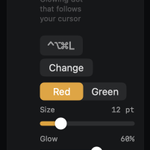
• Studio Features for calls and presentations: Laser Pointer, Drawing, Flashlight, Keystroke Display and Invisible Notes, Ring Light (coming soon!)
Free
• Soft Screen, Focus Spotlight, Screenshots, Display Presets, Display Schedule, Color Picker, Color Grading and Display Health
No tracking, no analytics, no telemetry. Requires macOS 13 or later.
Download link in the first reply.
I’m building this in public. Tell me what you want next. I read every reply.

Hey everyone! 👋 What are you building?
Drop your project below and tell us what it does.
Follow @WareVote for software discovery, maker conversations and details on listing your product when it opens.
There’s no analytics in Phosphor, so I only learn what’s working when you tell me. Tell me what’s missing.
Flashbang watches app and desktop switches. For a flash from tabs inside a browser, a dark mode extension like Dark Reader is the right tool. Different problem, different fix.

People of X, let’s connect!
If you’re working on your SaaS, app, website, or just into tech and AI, I’d be happy to have me on your feed and me on yours!
Who do you think is the primary audience for your product? Do you think you have been able to reach them?
