

#EdTech resources that are out of this 🌎 Level 2️⃣ GoogleCE 📱 Glide Ambassador
🌌 Milky Way
Joined September 2019
- Tweets1.2K
- Following1.3K
- Followers880
- Likes1.7K





Pinned Tweet
FREE #Christmas @canva Template! Grab this to use for morning announcements, or anything else you can think of.
🎅🏼 canva.com/design/DAFTQSamZso…
#edtech #edchat #edutwitter #template #announcement #CanvaDesignChallenge #CanvaTemplate #GoogleEDU #snow #SantaClaus #MerryChristmas #Free

.@DiffitApp is one of the best uses of AI that I've seen yet. You type in what topic your students are studying, and it creates:
- a reading comp
- a list of vocab words
- questions
- and it even creates Google Slides that the students can use to demonstrate their learning!
Spencer Barfuss ˗ˏˋ 🚀 retweeted

Want to create a Google Form, Kahoot or @Gimkit from an existing file in SECONDS? 🤯
Check out digitaliser.getmarked.ai/
Now, THIS is a company that understands teachers. 💚
#edtech #ai #edchat

Spencer Barfuss ˗ˏˋ 🚀 retweeted

Important news from @MicrosoftFlip today - download your Shorts videos by July 15 if you wish to keep them. Info on how to do this here: help.flip.com/hc/en-us/artic… #Flipsider

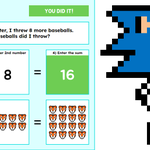
I took @ericcurts's Emoji Math activity idea in #GoogleSheets and added some pixel art. Click below to make a copy for your own #GoogleDrive to share w/ your students.
🚀 Emoji Math Pixel Art
docs.google.com/spreadsheets…
#edtech #edutwitter #GoogleEI #GoogleWorkspace #GoogleEDU

To change the answers for each tab, open up the Key tab by clicking on View, then Hidden sheets. Change the answers next to each question number. Be sure to also change the word problem in each tab to match your new answers. Repeat steps to change emojis in the Emojis tab.
How many of you plan to continue your annual @screencastify subscription since they are almost doubling the cost? Would love to hear your thoughts. Is this new platform really worth the cost?
#edtech #edutwitter #screencasting
✨FREE @Canva TEMPLATE
Fully editable circular door sign. Replace logo with your own, or staff photo. Double-click on text to change it. Change background colors.
canva.com/design/DAFiVx0TNRk…
#edtech #edutwitter #design #template #canva

Spencer Barfuss ˗ˏˋ 🚀 retweeted

Drumroll please 🥁
Magic Eraser just announced at #CanvaCreate. Make your subject stand out and clean up unwanted details in your images, just like this 👇
Spencer Barfuss ˗ˏˋ 🚀 retweeted

Catch us 🔴LIVE🔴 on @CyFairEdTech ! There are some awesome new features on @edpuzzle and we can’t wait to share them with you! FREE PD IN YOUR PJS! Love presenting with this friend of mine 💕💕 @MissRust17 #BeAHooverHero #CFISDSPIRIT #Bringingoutthebest @HooverCFISD @CyFairISD

.@canva makes it so easy to create little animations like this.
#edtech #design #edutwitter #canva #animation #chocolate #fundraiser
Spencer Barfuss ˗ˏˋ 🚀 retweeted

Google announces Bard, their ChatGPT competitor.
👏👏👏
blog.google/technology/ai/ba…
Needing to insert the time (sticky) when an adjacent checkbox is checked? Here you go.
=𝗶𝗳(𝗔𝟮,𝗹𝗮𝗺𝗯𝗱𝗮(𝘅,𝘅)(𝗻𝗼𝘄()),)
If checkbox is in A2 + u want time in B2, place formula in B2. Drag it down for as many as u need.
#GoogleSheets #GoogleEDU #edtech #edutwitter
You’re unable to view this Post because this account owner limits who can view their Posts. Learn more
Shoutout 📣 to @UnrealEngine, @mr_isaacs and @alicekeeler for the awesome ☕️ at @CommonWealthCof this morning #TCEA23 #TCEA2023


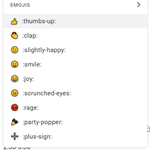
Did you know that you can select an emoji in #GoogleDocs by typing in a colon? Super easy. Thanks, @Google.
#edtech #edutwitter #tcea23 #tcea2023 #GoogleWorkspace #GoogleET #GoogleEDU #GoogleEI
