

Cofounder @heyula_ai Engineer & founder building with AI agents and sharing what actually works (and what breaks) along the way.
Planet Earth
Joined June 2020
- Tweets8.7K
- Following541
- Followers17.6K
- Likes38.5K




Pinned Tweet
Turning 29 today 🥳
- Built two SaaS products.
- Became a first-time mom.
- Bootstrapped every line of code.
- Balanced baby milestones with user feedback.
My biggest lesson?
You can build slow, messy, beautiful things and still be on the right path.
Here’s to a year of softness, strength, and showing up, as me.
What’s one life lesson you learned this year?

Ramya Chinnadurai 🚀 retweeted
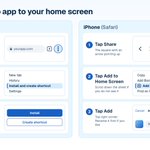
Want your web app on your phone?
You may not need a separate mobile app.
When a non-tech friend asks me for a mobile app for personal use,
- I often suggest this instead of building a separate mobile app.
- It opens like an app from the home screen.
- It won't match a native app for every feature, but for a simple personal app it's often enough.
Android (Chrome):
1. More > Install
2. Create shortcut,
3. then Install (or Create shortcut)
iPhone (Safari):
Share > Add to Home Screen > Add.
To make your web app ready for both,
copy-paste this prompt:
"Make this web app installable on phones (PWA). Manifest with name, start_url, display standalone and the icon sizes Android needs, plus an apple-touch-icon for iPhone. Service worker that caches the main screens so they load offline. Optional: an Install button using before install prompt, only where the browser supports it iPhone has no install prompt, so show a small hint: tap Share, then Add to Home Screen, If you add push, on iPhone only ask after it's opened from the home screen and the user taps a button. Check the Manifest in Chrome DevTools (Application tab) and fix what it flags. Use Lighthouse for performance and best practices only."

Want your web app on your phone?
You may not need a separate mobile app.
When a non-tech friend asks me for a mobile app for personal use,
- I often suggest this instead of building a separate mobile app.
- It opens like an app from the home screen.
- It won't match a native app for every feature, but for a simple personal app it's often enough.
Android (Chrome):
1. More > Install
2. Create shortcut,
3. then Install (or Create shortcut)
iPhone (Safari):
Share > Add to Home Screen > Add.
To make your web app ready for both,
copy-paste this prompt:
"Make this web app installable on phones (PWA). Manifest with name, start_url, display standalone and the icon sizes Android needs, plus an apple-touch-icon for iPhone. Service worker that caches the main screens so they load offline. Optional: an Install button using before install prompt, only where the browser supports it iPhone has no install prompt, so show a small hint: tap Share, then Add to Home Screen, If you add push, on iPhone only ask after it's opened from the home screen and the user taps a button. Check the Manifest in Chrome DevTools (Application tab) and fix what it flags. Use Lighthouse for performance and best practices only."
Small milestone, big motivation!
Our first flight booking went through @heyula_ai..
2 flights, Germany to Asia, $1000+ and it worked on the first try.
We also crossed 100+ public sign-ups, on top of 500+ friends and family who already tried Ula.
From a temple ticket to real flights in few days 🥳
Still early and still waitlist only, but we're just getting started!


Wooh 1st success for @heyula_ai
Ula successfully booked its first temple ticket for Tirupathi.
- It triggered OTP, logged in and showed the open slots
- Filled the form from my saved details ( vaults )
- Showed the exact price before doing anything.
I tapped approve,
paid inside Whatsapp using UPI,
and ticket landed in my trip documents.
Just converted the screenshots into video using claude for demo.
Join our waitlist and will open spots quickly.
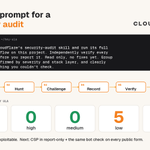
Try this prompt for a security audit:
"Install Cloudflare's security-audit skill and run its full audit workflow on this project. Independently verify every finding before you report it. Read only, no fixes yet. Group what's confirmed by severity and stack layer, and clearly label anything you couldn't check."
It walks the agent through 6 phases:
- map the codebase,
- hunt,
- challenge each candidate,
- record,
- verify,
- then report.
So you get what's confirmed, rejected or still unverified, instead of a scary list of maybes.
I ran it on @heyula_ai last night and as a result:
✓ 𝟬 critical
✓ 𝟬 high
✓ 𝟬 medium
✓ 𝟱 low + 𝟴 info, none confirmed exploitable
Next: CSP in report-only, and the same bot check on every public form.


With the recent wave of vulnerability disclosures, it’s a good time to take a closer look at your own code.
Turn your coding agent into a team of security auditors with the open-source skill that seeded Cloudflare’s vulnerability discovery harness.
The 6 phase approach:
1. Map the codebase
2. Hunt for vulnerabilities
3. Challenge each candidate
4. Record the findings
5. Verify the findings
6. Report what’s confirmed, rejected, or still needs validation
Start your hunt here:
github.com/cloudflare/securi…

I handed my TV to my bot on Sunday, and it did exactly what this says 😅
I wanted my Mac to use the TV as a second screen. Casting only mirrors, and I wanted real extra space to drag windows onto.
So the agent went to GitHub and looked through open-source AirPlay receivers that run on Android TV. It picked one, installed it on the TV and gave it a proper name. Now my Mac uses the TV as an extended display over Wi-Fi, and I didn't pay anything for it!
Then it built me a small Mac app called TV Remote. Arrow keys with OK in the middle, volume, buttons that open my apps, and a box where I type the search on my keyboard. No more pressing letter by letter with the TV remote..
Before it touched anything, it took a backup and wrote a restore script so I could undo all of it.
My part was really small. I switched on USB debugging on the TV myself, and I said yes before it turned off the apps I never open.
I didn't know that repo existed before Sunday, big thanks to jqssun for building it.
Full story and the prompt I'd paste: nitter.gq/code_rams/status/21170…

LifeVal from OpenAI went from 49% to 81% at real life chores in 1 year 🤯
Not coding or maths.. stuff like finding a kindergarten after a move, planning meals for a parent with diabetes, booking a toddler class.
I read the whole LifeVal page, so here it is in simple words, plus what I took from it as someone building an AI that books family trips.
What is LifeVal
A benchmark is a test for AI, like a report card.
Older AI tests mostly check what a model knows.. LifeVal checks how well it gets everyday life stuff done for you.
How they built it
- Started with 2 big studies that track how people spend their day, in the US and other countries
- Asked 3,995 people where they'd want help from a personal assistant
- Turned that into 169 tasks
- Areas: caregiving, health, education, household admin, personal finance, shopping and government services
Real tasks and scores
- Find a kindergarten after moving: 93.1%
- Meal plan for a parent with a new diabetes diagnosis: 90.4%
- Watch a game with grandma from far away: 96.3%
- Organise flood prep volunteers for 4 neighbours: 98.0%
- Book a sensory class that fits a toddler and the family schedule: 100% (best recorded, GPT-6 Astra)
What OpenAI did with it
They used LifeVal for a whole year to track and push their models.
In that year they trained them to click through websites and computers on their own, and to work inside apps you connect to ChatGPT.
The average score went from 49.3% (GPT-5.2, Dec 2025) to 80.6% (GPT-6 Astra, Sep 2026).
To be fair, this is OpenAI's own test of its own models. A high score is a good sign, but I wouldn't take it as proof it will get your real booking right every time.
My takeaways
1. So many of the examples are family tasks. OpenAI is testing for the same daily mess every family deals with.
2. My favourite part is small. Before acting, the assistant stops and asks "Want to review the shortlist?" or "Want to review it together before you share it with your parent?"
This is exactly how we think about @heyula_ai!
Ula plans and books the trip, but the parent sees the exact booking and price and approves before anything is paid.
I'd love to see a full family trip in LifeVal next. Trains that don't clash with nap time, a hotel that actually has a cot, all in one go.
If an AI could take one family task off your plate, but had to show you everything before paying, which one would you hand over first?
Mine is that trip puzzle 😂

For AGI to benefit all of humanity, it should help people with the everyday tasks that matter most to them. So we built LifeVal, a new benchmark shaped by feedback from thousands of ChatGPT users on where they most want help from a personal assistant—from finding childcare to accessing government services to managing personal finances.
Over the past year, we’ve used LifeVal to measure and improve how well our models handle these everyday tasks.
openai.com/index/lifeval/

I tried to let @heyula_ai pay for an experience on its own. It got all the way to the payment page and died there 😅
Ula is our AI travel companion, it plans and books family trips. The planning part works. The booking part works, up to the moment money has to move. Then it needs a human.
We tried a lot of routes over the last few weeks:
1. Plain cards. A card checkout expects a person. The OTP goes to your phone, not to the agent, and the bank's fraud checks are trained on human sessions.
2. Visa agent tokens. Live in the US and Europe, rolling out to Asia Pacific through partner banks. No bank in the market where we're launching first yet.
3. Mastercard agent tokens. There was one authenticated demo with local banks earlier this year, in a controlled setup. Nothing a small team can integrate today.
4. Some other payment APIs we looked at don't support agents at all yet.
So the rails are too early for where we launch first. Agent payments on the local payment rails are being worked on, but still waiting on approval as far as I know.
Here is how Ula works now:
1. Ula plans the trip and fills every form, [hotel, train, the kids' details], all of it.
2. It stops right before payment and shows the exact price.
3. You tap approve on your phone and pay with your usual method.
4. Ula confirms the booking and adds it to the itinerary.
Every single payment gets one tap from a human. Honestly this started as plan B. Now I think it's the right default for family trips anyway, you want to see the final price before anyone pays for a hotel..
I'm watching the card networks and the local agent payment work closely. The day a bank here supports agent wallets with a limit per merchant, Ula will use them.

We applied to YC (@ycombinator) yesterday.. and a16z (@speedrun).. and PearX for @heyula_ai 😅
Honest confession.. I didn't write a single answer. My cofounders did all of it while I was busy building.
Hey Ula is the AI travel companion we're building for families. It plans the trip, books it, and waits for your yes before it pays.
A few weeks ago Ula booked its first real ticket, a temple visit for my own family. It logged in, found the open slots, filled the form from the details it had saved, showed me the exact price and waited. Then the ticket just showed up in our trip documents.
That's the thing they had to explain in a few hundred words. I've rewritten "what does Ula do" so many times myself, so I know how hard that is!
Now we wait. Speedrun says 4 to 6 weeks.
Whatever the answer, we keep building. Families still plan trips with multiple tabs open and that's what we want to fix.
Fingers crossed 🤞


How secure is @heyula_ai vault?
We keep on getting this question. So thought to share a few things on how we built the vault..
An agent that books trips needs passports and IDs. That scared me too, because it's my own family's documents first.
So the rule we started with: the agent can use your IDs, but it can never read them.
1. Lock before save. IDs get locked on your own phone before they're stored anywhere.
2. Only the user holds the key. It unlocks with your Face ID, fingerprint or phone PIN. Not even Ula can open it.
3. Nothing unlocks without a yes. The vault stays shut until you approve that booking.
4. Release only what's needed. Booking your dad's ticket? Only his ID comes out, the rest stay locked.
5. Copies expire. That one ID goes into the form for 15 minutes, then the copy is deleted.
6. Money needs its own tap. Ula shows the exact price and waits for you to approve.
Still adding more as families start using it, like checks before anything gets shared with a new site.. will share those too!
If you're building an agent that touches personal documents, bookmark this for later.6. Money needs its own tap. Ula shows the exact price and waits for you to approve.
We tried all of this first on our own family's booking this week.. Ula filled the form, showed the price and just waited for my tap before paying.
If you're building an agent that touches personal documents, bookmark this for later.

I created FREE directory for startup grants and investments.
I kept looking for them while building @heyula_ai, and every time one had already expired or I found it too late.
So I put them all in one place, and it keeps updating as new ones get posted.
November deadlines still open:
• a16z speedrun - nov 1, up to $1m + $10m+ in credits
• yc w2027 - nov 2 at 8pm pt, $500k
• era nyc - nov 2, $150k, 4 months in nyc
• nsf america's seed fund - nov 4, full proposal (phase i up to $305k)
• techstars spring 2027 - nov 18, $220k
• thiel fellowship - rolling, $250k So I put them all in one place, and it keeps updating as new ones get posted.
over 2 years, 22 and under
• z fellows - rolling, $10k for one week
Here is the link - tweetsmash.com/directory/sta…
Also building Hey Ula, your AI travel companion for family trips. Waitlist is open: heyula.ai
Ramya Chinnadurai 🚀 retweeted
Wooh 1st success for @heyula_ai
Ula successfully booked its first temple ticket for Tirupathi.
- It triggered OTP, logged in and showed the open slots
- Filled the form from my saved details ( vaults )
- Showed the exact price before doing anything.
I tapped approve,
paid inside Whatsapp using UPI,
and ticket landed in my trip documents.
Just converted the screenshots into video using claude for demo.
Join our waitlist and will open spots quickly.
Wooh 1st success for @heyula_ai
Ula successfully booked its first temple ticket for Tirupathi.
- It triggered OTP, logged in and showed the open slots
- Filled the form from my saved details ( vaults )
- Showed the exact price before doing anything.
I tapped approve,
paid inside Whatsapp using UPI,
and ticket landed in my trip documents.
Just converted the screenshots into video using claude for demo.
Join our waitlist and will open spots quickly.
Just applied to @HF0 W27 with @heyula_ai 🤞
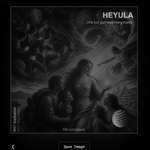
Got this card at the end of the application and I can't stop looking at it 😅
"One bot journeys many roads" is pretty much what we want Ula to be for families planning trips together

Launching my new product, @heyula_ai 🥳
- Ula is an AI travel companion right inside your messaging app.
- Ula understands your travel preferences.
- Helps plan personalised trips.
- Remembers what you save.
So that you don't have to start from scratch every time.
Travelling with a toddler is messy enough. Planning it shouldn't be.
50+ signups on the @heyula_ai waitlist 🥳
Almost half of them came in the 2 days since our launch post.
Honestly didn't expect this much love for a travel planner we started building for our own messy family trips.
Thank you to everyone who commented ULA, reposted and shared it. It means a lot to us.
Now back to building..

ALT Hey Ula waitlist growth chart showing 57 people on the waitlist, with 23 joining since the Oct 22 launch.
Launching my new product, @heyula_ai 🥳
- Ula is an AI travel companion right inside your messaging app.
- Ula understands your travel preferences.
- Helps plan personalised trips.
- Remembers what you save.
So that you don't have to start from scratch every time.
Travelling with a toddler is messy enough. Planning it shouldn't be.
Launching my new product, @heyula_ai 🥳
- Ula is an AI travel companion right inside your messaging app.
- Ula understands your travel preferences.
- Helps plan personalised trips.
- Remembers what you save.
So that you don't have to start from scratch every time.
Travelling with a toddler is messy enough. Planning it shouldn't be.
I planned our last family trip with 12 tabs open. Never again.
If you travel with a toddler, you know.
Trains that don't clash with nap time. Hotels that actually have a cot. "Is this place okay with a 2 year old?" Reviews, maps, prices, again and again.
And at the end, one spreadsheet nobody else opens 😅
This year I was already deep into AI agents. Building them, breaking them, spending days just fixing memory.
That's when it clicked.
If an agent can remember how I work, why can't it remember how my family travels?
So we're building Hey Ula.
You message it like a friend on WhatsApp.
Tell it where, when and who's coming.
It comes back with a few options that actually fit, not 50 links.
It remembers what you like for next time.
Built with my co-founders, tested on our own messy family trips.
Waitlist opens today.
Comment "ULA" and I'll DM you the link 👇 (follow so I can DM you)


I planned our last family trip with 12 tabs open. Never again.
If you travel with a toddler, you know.
Trains that don't clash with nap time. Hotels that actually have a cot. "Is this place okay with a 2 year old?" Reviews, maps, prices, again and again.
And at the end, one spreadsheet nobody else opens 😅
This year I was already deep into AI agents. Building them, breaking them, spending days just fixing memory.
That's when it clicked.
If an agent can remember how I work, why can't it remember how my family travels?
So we're building Hey Ula.
You message it like a friend on WhatsApp.
Tell it where, when and who's coming.
It comes back with a few options that actually fit, not 50 links.
It remembers what you like for next time.
Built with my co-founders, tested on our own messy family trips.
Waitlist opens today.
Comment "ULA" and I'll DM you the link 👇 (follow so I can DM you)