

Cofounder @heyula_ai Engineer & founder building with AI agents and sharing what actually works (and what breaks) along the way.
Planet Earth
Joined June 2020
- Tweets8.7K
- Following541
- Followers17.6K
- Likes38.5K




Turning 29 today 🥳
- Built two SaaS products.
- Became a first-time mom.
- Bootstrapped every line of code.
- Balanced baby milestones with user feedback.
My biggest lesson?
You can build slow, messy, beautiful things and still be on the right path.
Here’s to a year of softness, strength, and showing up, as me.
What’s one life lesson you learned this year?

Ramya Chinnadurai 🚀 retweeted
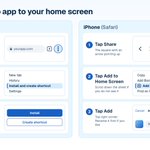
Want your web app on your phone?
You may not need a separate mobile app.
When a non-tech friend asks me for a mobile app for personal use,
- I often suggest this instead of building a separate mobile app.
- It opens like an app from the home screen.
- It won't match a native app for every feature, but for a simple personal app it's often enough.
Android (Chrome):
1. More > Install
2. Create shortcut,
3. then Install (or Create shortcut)
iPhone (Safari):
Share > Add to Home Screen > Add.
To make your web app ready for both,
copy-paste this prompt:
"Make this web app installable on phones (PWA). Manifest with name, start_url, display standalone and the icon sizes Android needs, plus an apple-touch-icon for iPhone. Service worker that caches the main screens so they load offline. Optional: an Install button using before install prompt, only where the browser supports it iPhone has no install prompt, so show a small hint: tap Share, then Add to Home Screen, If you add push, on iPhone only ask after it's opened from the home screen and the user taps a button. Check the Manifest in Chrome DevTools (Application tab) and fix what it flags. Use Lighthouse for performance and best practices only."

Want your web app on your phone?
You may not need a separate mobile app.
When a non-tech friend asks me for a mobile app for personal use,
- I often suggest this instead of building a separate mobile app.
- It opens like an app from the home screen.
- It won't match a native app for every feature, but for a simple personal app it's often enough.
Android (Chrome):
1. More > Install
2. Create shortcut,
3. then Install (or Create shortcut)
iPhone (Safari):
Share > Add to Home Screen > Add.
To make your web app ready for both,
copy-paste this prompt:
"Make this web app installable on phones (PWA). Manifest with name, start_url, display standalone and the icon sizes Android needs, plus an apple-touch-icon for iPhone. Service worker that caches the main screens so they load offline. Optional: an Install button using before install prompt, only where the browser supports it iPhone has no install prompt, so show a small hint: tap Share, then Add to Home Screen, If you add push, on iPhone only ask after it's opened from the home screen and the user taps a button. Check the Manifest in Chrome DevTools (Application tab) and fix what it flags. Use Lighthouse for performance and best practices only."
Small milestone, big motivation!
Our first flight booking went through @heyula_ai..
2 flights, Germany to Asia, $1000+ and it worked on the first try.
We also crossed 100+ public sign-ups, on top of 500+ friends and family who already tried Ula.
From a temple ticket to real flights in few days 🥳
Still early and still waitlist only, but we're just getting started!


Wooh 1st success for @heyula_ai
Ula successfully booked its first temple ticket for Tirupathi.
- It triggered OTP, logged in and showed the open slots
- Filled the form from my saved details ( vaults )
- Showed the exact price before doing anything.
I tapped approve,
paid inside Whatsapp using UPI,
and ticket landed in my trip documents.
Just converted the screenshots into video using claude for demo.
Join our waitlist and will open spots quickly.
Yes, round one is where you win or lose the trust. If the first report had been a wall of maybes I would have closed it and never run it again
Honestly it was mostly confirming. The real win was having nothing exploitable to worry about, so I could fix the low ones calmly instead of panicking.
Yes.. The verify step is what made it usable for me. Without it you just get a long list of maybes. With it I got 5 low and 8 info, none confirmed exploitable, and I could actually decide what to fix.
Exactly this.. I wanted to see everything before anything got touched. Only after that I picked what to do next, CSP in report-only first so nothing breaks on the live site .
Thank you Eleftheria. Run it read only first, the verify step is what keeps the list short. Would love to hear what it finds on your side
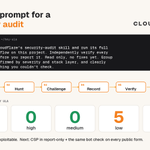
Try this prompt for a security audit:
"Install Cloudflare's security-audit skill and run its full audit workflow on this project. Independently verify every finding before you report it. Read only, no fixes yet. Group what's confirmed by severity and stack layer, and clearly label anything you couldn't check."
It walks the agent through 6 phases:
- map the codebase,
- hunt,
- challenge each candidate,
- record,
- verify,
- then report.
So you get what's confirmed, rejected or still unverified, instead of a scary list of maybes.
I ran it on @heyula_ai last night and as a result:
✓ 𝟬 critical
✓ 𝟬 high
✓ 𝟬 medium
✓ 𝟱 low + 𝟴 info, none confirmed exploitable
Next: CSP in report-only, and the same bot check on every public form.


With the recent wave of vulnerability disclosures, it’s a good time to take a closer look at your own code.
Turn your coding agent into a team of security auditors with the open-source skill that seeded Cloudflare’s vulnerability discovery harness.
The 6 phase approach:
1. Map the codebase
2. Hunt for vulnerabilities
3. Challenge each candidate
4. Record the findings
5. Verify the findings
6. Report what’s confirmed, rejected, or still needs validation
Start your hunt here:
github.com/cloudflare/securi…

Haha yes, typing letter by letter was the part I hated most. MacRemoteBuddy sounds fun, phone to Mac is the other half of the couch problem!
It picked jqssun's android-airplay-server! Open source, runs right on the Android TV, and my Mac sees it as a normal AirPlay display so extended mode just works.
github.com/jqssun/android-ai…

Yes, if your TV takes AirPlay that's the easy way! Mine is an Android TV and it didn't show up as a display on my Mac at all, so the bot installed an AirPlay receiver on it first. After that it's exactly the setting you mean.
Yeah, this was really cool, I felt like a hacker 😅
My only job was switching on USB debugging on the TV, the bot did the rest.