
@windfallapples' #ASEprite-specific alt. / / / / / ASEprite is a fantastic piece of software. But its UI holds many secrets. Together, we will discover them!
Joined May 2020
- Tweets106
- Following3
- Followers1.9K
- Likes67
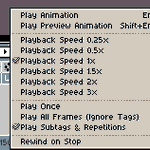




⏺Not satisfied with your Timeline playback options? Feels too basic?⏸
👁There is more to it than meets the eye! 👁
Adjust playback speed⏩, looping🔁, and Tag effects🔖 independently of Frame timing!
🖱Just Right-Click on the ▶Play button above the Timeline and check it out~

⏱Protip recent as of ASEprite v1.3.7-x64!
📷Want more "hidden" Timeline options? Here are a few more for you!
nitter.gq/ASE_ProTips/status/125… 🔻


If you are following this account you probably already have a copy of ASEprite, but just in case you want to tell a friend, now is your chance to get it for less!~ 💰🌠


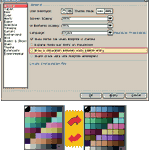
😕Are you sick of being TOTALLY COMFORTABLE with how you pick colours in #ASEprite?😴
Try adding or removing the lines between your colour swatches to see palettes in a REMARKABLY DIFFERENT WAY!🤯
Add the lines for a pure view of each colour!
Remove them for a contrastier feel!

ALT Example palette is "Multimono Rainbow" by Disasterix, found on Page 8 of the Rejected Palettes List!


Indeed, although it only works if [Auto Select Layer] is toggled ON at the top of the Workspace~
(If it breaks, that is how to fix it!)
You can do it by CTRL-LMB clicking the same way too, which brings you to the layer of the upper-most visible pixel!
💡Thank you for the tip!😀


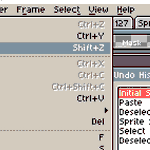
@ASE_ProTips just found your account. Knowing this would've saved so much time. The move tool (bound to the v key by default) will move you to the layer of any pixel you click and shift+x toggles layer visibility
O wow! Thank you, you guys!
I will have to figure out some way to celebrate sometime soon~ <3
I am glad so many of you have found these little tips so useful, and hopefully I will get back to updating again soon! :D
Keep on pixellin'~


ASEprite ProTips retweeted
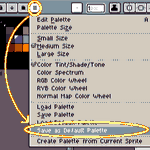
Bored with the default colour palette #ASEprite came with on every new image?
🎨A new selection can change how you think!💡
Pick out a new palette, then click [Save As Default Palette] in the Colour Picker's rightmost [≡] Options menu to set them as your new default!
#Protips

ALT Select "Save As Default Palette" in the Colour Picker's [≡] Options pull-down menu to set the current palette as your new default.
ASEprite ProTips retweeted
🔄Looking to Undo to a point in the distant past but do not want to lean on Ctrl-Z forever?⌚️
#ASEprite has an Undo History Pane that lets you scroll through everything you have done and jump directly to any specific point you like!
Find it in [Edit > Undo History]!
#UI #ProTip

ASEprite ProTips retweeted

You do #pixelart ?
You use #Aseprite ?
Do you find it frustrating to have only 3 options for creating your gradients with dithering ?
If so, you can download these additional dithering options.
bitbucket.org/jjhaggar/asepr…
How to install ?
Very simple, see below 👇

❔ But what does that mean exactly?
💻⚡It means you can enter RAW CALCULATIONS and ASE will WORK THEM OUT MATHEMAGICALLY!💡🧙♂️
Want to make the Canvas eleven pixels narrower?
Type "-𝟷𝟷" AFTER the width value!
Want it exactly 2⁶ pixels tall?
Type "𝟸^𝟼" AS the current height!
Tip current to ASEprite v. 1.3-beta16-x64.
Example art by me, @windfallapples!
(Normally my stuff is way better though I swear ;0; <3)
ASEprite ProTips retweeted
ASEprite ProTips retweeted
ASEprite ProTips retweeted
ASEprite ProTips retweeted
Press and hold SHIFT while drawing lines with the Line Tool to constrict your angle to vertical or horizontal axes, 45-degree angles, or 1:2 or 2:1 angle ratios!
Great for setting up #isometric #pixelart scenes!
Hold CTRL to draw diametic (double-ended) lines~
#aseprite #protip
ASEprite ProTips retweeted

=PSA for #ASEprite users with v1.3-b6=
You may have noticed that if you hold Undo or Redo, only the first step is updated and subsequent ones are undone/redone invisibly.
🔧There is a fix for it! 🪲
Go to "Experimental" in Edit/Preferences and disable "UI with multiple windows"
