
@windfallapples' #ASEprite-specific alt. / / / / / ASEprite is a fantastic piece of software. But its UI holds many secrets. Together, we will discover them!
Joined May 2020
- Tweets106
- Following3
- Followers1.9K
- Likes67




⏱Protip recent as of ASEprite v1.3.7-x64!
📷Want more "hidden" Timeline options? Here are a few more for you!
nitter.gq/ASE_ProTips/status/125… 🔻


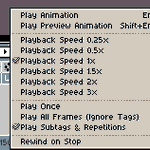
⏺Not satisfied with your Timeline playback options? Feels too basic?⏸
👁There is more to it than meets the eye! 👁
Adjust playback speed⏩, looping🔁, and Tag effects🔖 independently of Frame timing!
🖱Just Right-Click on the ▶Play button above the Timeline and check it out~

If you are following this account you probably already have a copy of ASEprite, but just in case you want to tell a friend, now is your chance to get it for less!~ 💰🌠


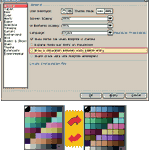
🛠The option to remove or restore the dividing lines is near the bottom in the GENERAL tab of the PREFERENCES PANE under EDIT!🎨
It can seem weird at first, but give it a try for a little while and see how it feels once you are used to it!~
Tip current to ASEprite v1.3-rc6-x64.
😕Are you sick of being TOTALLY COMFORTABLE with how you pick colours in #ASEprite?😴
Try adding or removing the lines between your colour swatches to see palettes in a REMARKABLY DIFFERENT WAY!🤯
Add the lines for a pure view of each colour!
Remove them for a contrastier feel!

ALT Example palette is "Multimono Rainbow" by Disasterix, found on Page 8 of the Rejected Palettes List!


Indeed, although it only works if [Auto Select Layer] is toggled ON at the top of the Workspace~
(If it breaks, that is how to fix it!)
You can do it by CTRL-LMB clicking the same way too, which brings you to the layer of the upper-most visible pixel!
💡Thank you for the tip!😀


@ASE_ProTips just found your account. Knowing this would've saved so much time. The move tool (bound to the v key by default) will move you to the layer of any pixel you click and shift+x toggles layer visibility
O wow! Thank you, you guys!
I will have to figure out some way to celebrate sometime soon~ <3
I am glad so many of you have found these little tips so useful, and hopefully I will get back to updating again soon! :D
Keep on pixellin'~


ASEprite ProTips retweeted
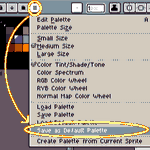
Bored with the default colour palette #ASEprite came with on every new image?
🎨A new selection can change how you think!💡
Pick out a new palette, then click [Save As Default Palette] in the Colour Picker's rightmost [≡] Options menu to set them as your new default!
#Protips

ALT Select "Save As Default Palette" in the Colour Picker's [≡] Options pull-down menu to set the current palette as your new default.
ASEprite ProTips retweeted
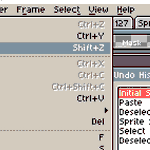
🔄Looking to Undo to a point in the distant past but do not want to lean on Ctrl-Z forever?⌚️
#ASEprite has an Undo History Pane that lets you scroll through everything you have done and jump directly to any specific point you like!
Find it in [Edit > Undo History]!
#UI #ProTip

What an incredible service this is! Thank you!
Even without using the automatic gradient fill, it is such a boon to be able just to *see* different dithering patterns!
Thank you for sharing this, and also for the quick explanation on how to install it! 💖✨
ASEprite ProTips retweeted

You do #pixelart ?
You use #Aseprite ?
Do you find it frustrating to have only 3 options for creating your gradients with dithering ?
If so, you can download these additional dithering options.
bitbucket.org/jjhaggar/asepr…
How to install ?
Very simple, see below 👇

The interpreter also supports fairly complex equations!
Besides addition (+), subtraction (-), multiplication (*), and division ( / ), you can also use parenthetical ( ( ) ) and exponential (𝚎 + #-of-zeroes) notation!
Try it out~
Calculate the height and width OF YOUR DREAMS✨
Tip current to ASEprite v. 1.3-beta16-x64.
Example art by me, @windfallapples!
(Normally my stuff is way better though I swear ;0; <3)
❔ But what does that mean exactly?
💻⚡It means you can enter RAW CALCULATIONS and ASE will WORK THEM OUT MATHEMAGICALLY!💡🧙♂️
Want to make the Canvas eleven pixels narrower?
Type "-𝟷𝟷" AFTER the width value!
Want it exactly 2⁶ pixels tall?
Type "𝟸^𝟼" AS the current height!
ASEprite ProTips retweeted
ASEprite ProTips retweeted
ASEprite ProTips retweeted