
@windfallapples' #ASEprite-specific alt. / / / / / ASEprite is a fantastic piece of software. But its UI holds many secrets. Together, we will discover them!
Joined May 2020
- Tweets106
- Following3
- Followers1.9K
- Likes67





ASEprite ProTips retweeted
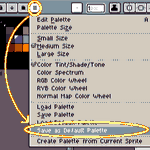
Bored with the default colour palette #ASEprite came with on every new image?
🎨A new selection can change how you think!💡
Pick out a new palette, then click [Save As Default Palette] in the Colour Picker's rightmost [≡] Options menu to set them as your new default!
#Protips

ALT Select "Save As Default Palette" in the Colour Picker's [≡] Options pull-down menu to set the current palette as your new default.
ASEprite ProTips retweeted
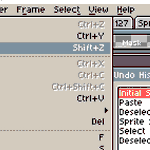
🔄Looking to Undo to a point in the distant past but do not want to lean on Ctrl-Z forever?⌚️
#ASEprite has an Undo History Pane that lets you scroll through everything you have done and jump directly to any specific point you like!
Find it in [Edit > Undo History]!
#UI #ProTip

ASEprite ProTips retweeted

You do #pixelart ?
You use #Aseprite ?
Do you find it frustrating to have only 3 options for creating your gradients with dithering ?
If so, you can download these additional dithering options.
bitbucket.org/jjhaggar/asepr…
How to install ?
Very simple, see below 👇

ASEprite ProTips retweeted
ASEprite ProTips retweeted
ASEprite ProTips retweeted
ASEprite ProTips retweeted
Press and hold SHIFT while drawing lines with the Line Tool to constrict your angle to vertical or horizontal axes, 45-degree angles, or 1:2 or 2:1 angle ratios!
Great for setting up #isometric #pixelart scenes!
Hold CTRL to draw diametic (double-ended) lines~
#aseprite #protip
ASEprite ProTips retweeted

=PSA for #ASEprite users with v1.3-b6=
You may have noticed that if you hold Undo or Redo, only the first step is updated and subsequent ones are undone/redone invisibly.
🔧There is a fix for it! 🪲
Go to "Experimental" in Edit/Preferences and disable "UI with multiple windows"

ASEprite ProTips retweeted
ASEprite ProTips retweeted
ASEprite ProTips retweeted
Have a lengthy list of Layers but only a few Frames?
Stack that Timeline tall-wise by realigning it to left or right side of your Workspace instead of the bottom!
Click the Settings button above the Layers list and choose new position to switch things up~
#aseprite #UI #ProTip


ASEprite ProTips retweeted
Oh right, also: You can rearrange colours in the Palette Selector by selecting a colour and dragging its yellow border around!
You can select multiple colours at once by clicking (NOT on the border) and dragging across the ones you want, or by holding CONTROL then clicking them!
ASEprite ProTips retweeted
Everybody experiences that moment of profound, private humiliation when they discover something that seems basic about a familiar piece of software.
The purpose of this account is to help folks get there sooner rather than later, that they may benefit for as long as possible. <3
ASEprite ProTips retweeted
Going try and keep this @ASE_ProTips alt going as well as I can!
I will post all of the #ASEprite tools and commands and secrets I discover that may actually be super-unknown, since we may never actually find them except by accident or being told.
Send me *your* tips as well! :D